What Is Load Balancing? Types, Benefits, and How It Works
Load balancing distributes network traffic across multiple servers, ensuring high availability and performance. Check out how it prevents overload, optimizes resources, and keeps applications responsive during traffic spikes or server failures.
As of the last quarter of 2024, Netflix has over 300 million subscribers globally. The ability to support tens of millions of concurrent streams without buffering is a huge indicator of the robustness of its robust infrastructure. One key component behind such performance is load balancingthat intelligently routes traffic ,so no single server becomes a bottleneck.
TL;DR – Load Balancing in 60 Seconds
Load balancing is the process of distributing network traffic evenly across multiple servers to prevent overload, improve speed, and ensure high availability. It works by routing each incoming request to the healthiest, least-busy server using algorithms like round-robin, least connections, or resource-based distribution. Modern load balancers can operate at Layer 4 (transport) or Layer 7 (application), with Layer 7 enabling content-aware routing, SSL termination, and advanced traffic control.
Key benefits:
- High availability – keeps apps online during server failures.
- Scalability – adds capacity seamlessly during traffic spikes.
- Performance optimization – reduces latency and improves user experience.
| Type | Best For | Pros | Cons | Examples |
|---|---|---|---|---|
| Hardware Load Balancer | Enterprise data centers, high-performance apps | Dedicated appliances, high throughput, built-in security features | Expensive, less flexible, CapEx heavy | F5 BIG-IP, Kemp, Citrix ADC |
| Software Load Balancer | Flexible on-prem or cloud setups | Cost-effective, highly configurable, supports modern algorithms | Requires system resources & manual scaling | HAProxy, NGINX, Envoy |
| Cloud Load Balancer | Dynamic workloads, hybrid or global apps | Fully managed, scalable, integrated with cloud services | Ongoing OpEx costs, vendor lock-in | AWS ELB, Azure LB, GCP LB |
In this article, we will discuss what load balancing is, its types, and how it works.
What is Load Balancing?
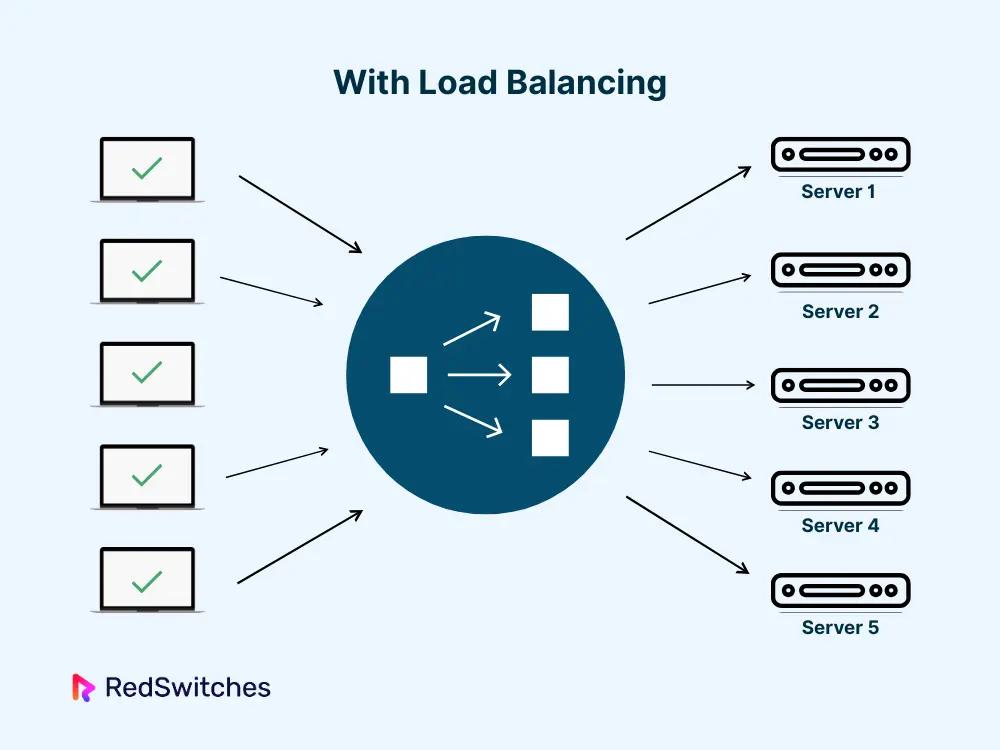
Load balancing distributes incoming traffic across multiple servers to ensure availability, reliability, and optimal performance.
Load balancing is a critical technique in computing systems and networks that involves distributing network traffic across multiple servers or resources to ensure no single resource is overwhelmed.
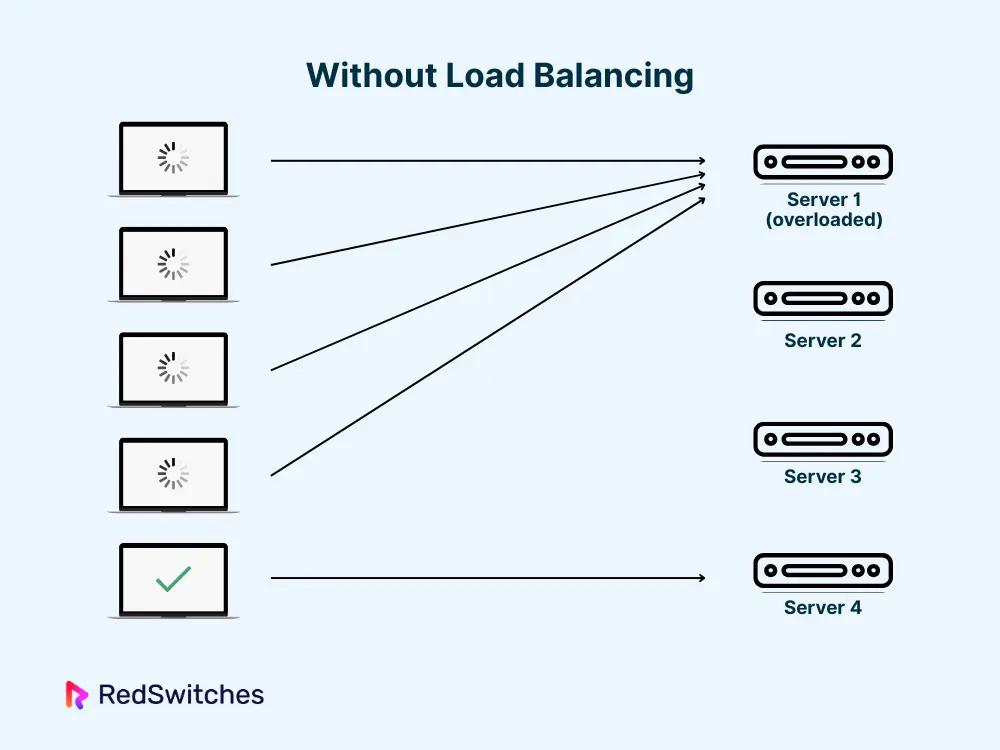
The primary goal is to ensure that no single server is overloaded, which can lead to degraded performance or even system failure. It distributes incoming traffic across a pool of backend servers to reduce latency, improve performance, and optimize resource utilization.
I’ve seen too many systems fail because all traffic hits a single point of failure. When a server crashes or goes down, every request routed to it is lost, causing the entire application to halt. This affects user experience, revenue, and trust.
So when you set up load balancing, you are creating redundancy that keeps applications running even when individual servers crash.
Load balancers can be implemented in different ways:
- As hardware devices
- As software applications
- A combination of both
It also works at different layers of the OSI (Open Systems Interconnection) model, but most commonly at:
- Layer 4 (Transport Layer): Faster and simpler, focusing on IPs and ports.
- Layer 7 (Application Layer): More flexible and intelligent, focusing on application data and content
How Does Load Balancing Work?
Load balancers analyze incoming requests and use algorithms to distribute them across healthy backend servers.
Here is what happens when a client makes a request.
- Client Request Initiation: The process starts when a client (such as a web browser or mobile app) sends a request to access a service.
- Load Balancer’s Role: The load balancer receives the request and determines which backend server should handle it. This decision is based on the chosen load balancing algorithm (e.g., Round Robin, Least Connections, IP Hashing) and the health status of the servers.
- Traffic Distribution: Once the load balancer selects the backend server, it forwards the request. The client remains unaware of which server is handling the request, as all communication is routed through the load balancer. Health checks are performed to ensure the selected server is operational.
- Backend Server Processing: The backend server processes the request, which may involve database queries, computations, or other business logic. The server then generates a response (e.g., a web page or API result).
- Response Transmission: The backend server then sends the response back to the load balancer, which then forwards it to the client. The load balancer may also manage session persistence, ensuring that subsequent requests from the same client are routed to the same server if required.
- Completion: The client receives the response, completing the request-response cycle. The efficiency of this cycle depends on network latency, server processing time, and the effectiveness of the load balance
Core Functions of Load Balancers
Now that you know how load balancing works, you would probably know its functions too.
The following are some of the core functions noted by our senior server engineers based on their real-world experience in managing production systems.
- Client Query Management
As we know, load balancers are the first point of contact for client requests. They efficiently manage incoming queries by determining the best backend server to handle each request based on server availability and predefined algorithms.
So when you set up the balancer, it monitors and routes each query to one of the backend servers, ensuring no single server is overloaded with requests. This makes the client experience seamless.
- Health Checks
Load balancers continuously monitor the health of backend servers by sending test requests. If a server fails a health check, it is temporarily removed from the pool, ensuring that only healthy servers receive traffic.
This is important to ensure client requests are not being sent to unresponsive or malfunctioning servers.
- Traffic Distribution
The primary function of a load balancer is to distribute incoming requests across multiple servers. This is done using various algorithms, such as round-robin and weight least connections. This prevents any single server from becoming a bottleneck and maintains system reliability.
- Server Failover Handling
If a server fails, the load balancer automatically redirects traffic to other operational servers. This failover mechanism is crucial for maintaining high availability and minimizing downtime during server outages.
With regular health checkups, the load balancer can detect when a server is down and reroute traffic to healthy servers.
- Performance Optimization
Load balancers allocate workloads, or in other words, distribute traffic, preventing server overload and thereby reducing latency and improving throughput. Many load balancers also support dynamic resource scaling, that is, adding or removing servers as needed. This allows infrastructure to handle higher traffic volumes without compromising performance.
Key Characteristics of Load Balancers
After numerous conversations with senior server engineers, I’ve come to understand that these six characteristics define the true value of a load balancer.
Traffic Distribution Efficiency
This is one of the primary roles load balancers are set up for. Load balancing is not just about distributing requests evenly; it’s about intelligent distribution that maximizes overall system performance.
Modern load balancers use advanced algorithms to distribute traffic, ensuring optimal resource utilization and preventing server overload. This keeps all servers working optimally and minimizes response times for users.
High Availability and Failover Handling
HA ensures that even if one load balancer fails, traffic is still routed through a backup using VRRP or similar methods.
By default, load balancers are designed to ensure high availability by distributing traffic across multiple servers and performing health checks.
By implementing multiple layers of failover detection, server failures can be detected, and traffic can be automatically redirected to healthy servers, thereby minimizing downtime and maintaining service continuity.
Scalability Through Horizontal Scaling
Horizontal scaling has revolutionized how traffic growth is handled. Due to the load balancer’s horizontal scaling capability, new servers can be added or removed from the pool as needed. This can handle traffic spikes and maintain performance without manual intervention and without re-architecting the core system.
SSL Termination (Layer 7-Specific)
SSL termination at the load balancer level has been one of the most valuable Layer 7 implementations I have seen. Instead of burdening each backend server with the CPU-intensive task of encrypting and decrypting HTTPS traffic, the load balancer handles this process centrally.
It decrypts incoming HTTPS requests and forwards them as standard HTTP to backend servers, saving their CPU cycles. This improves server performance and simplifies SSL certificate management
Health Monitoring and Query Routing
A load balancer performs continuous health checks to ensure that only healthy servers receive traffic.
These health checks may include:
- Network connectivity tests
- HTTP response code validation
- Application-specific health endpoints that verify database connectivity, cache availability, and external service dependencies
- Performance-based health checks that mark servers as unhealthy if response times exceed thresholds
This ensures unhealthy servers are instantly removed from the available pool. Load balancers can also route queries based on server health, response times, or other metrics, further optimizing performance and reliability.
Optimization Through Caching and Compression
Modern load balancers often provide caching and compression tools. This stores frequently requested content and compresses responses before sending them to clients. These features reduce latency, decrease bandwidth usage, and improve user experience.
So next time when a client requests the same resource, it can be served instantly from the cache
What are the Types of Load Balancing?
Load balancers operate at Layer 4 (transport) or Layer 7 (application) depending on whether they’re managing packets or content.
Here are the major classifications of load balancing:
Hardware Load Balancing
Hardware load balancers are physical devices specifically designed for distributing network and application traffic across multiple servers. These devices are commonly deployed in enterprise data centers where performance, reliability, and security are paramount.
- Installed in data centers
- Offers high performance and reliability
- Typically more expensive, but provides dedicated resources
- Suitable for environments requiring high throughput
- Utilize specialized processors for fast throughput
- Include built-in virtualization capabilities
- Offer enhanced security through internal management
- Leading providers include F5 Networks (BIG-IP series), Kemp Technologies, A10 Networks, Fortinet, Barracuda Networks, and Radware.
Software Load Balancing
Software load balancers are applications that run on general-purpose hardware or virtual machines, offering flexibility and cost-effectiveness.
- They operate as part of the Application Delivery Controller (ADC) functions, meaning they can intelligently distribute network traffic across multiple servers
- Provides flexibility and scalability
- More cost-effective than hardware solutions
- Easily integrates with existing infrastructure
- Supports various load balancing algorithms
- Particularly suitable for cloud environments
- Some of the popular software load balancers include HAProxy, NGINX, and Envoy
Global Server Load Balancing (GSLB)
GSLB manages traffic distribution across geographically dispersed servers:
- Directs users to the nearest or most responsive server
- Enhances disaster recovery capabilities
- Reduces latency by optimizing geographical routing
- Can be implemented using DNS or application delivery controllers
DNS-based Load Balancing
DNS-based load balancing utilizes the Domain Name System to distribute traffic across multiple servers.
- Configures DNS records to point to multiple IP addresses
- Enables geographical traffic distribution
- Provides a simple implementation for basic load-balancing needs
- Less dynamic due to DNS propagation times
- Suitable for global traffic management
Cloud-Based Load Balancing
Cloud-based load balancers are managed services provided by cloud platforms, offering seamless integration, scalability, and pay-as-you-go pricing.
- They integrate seamlessly with cloud services
- Support both inbound and outbound traffic
- Global reach using Anycast IP addressing
- Software-defined and fully managed services
- Have Layer 4 and Layer 7 load balancing capabilities
- Automatic scaling and elasticity r
- Require minimal management
- Built-in security features
- Some of the popular cloud-based load balancing options include AWS, Azure, and GCP.
Static vs Dynamic Load Balancing Algorithms
Algorithms like round-robin, least connections, and weighted load help optimize how traffic is distributed across servers.
When a load balancer receives the request from a user, it assigns the request to a server. A load balancer assigns this request based on a number of algorithms. These algorithms can be broadly classified as:
- Static load balancing algorithms
- Dynamic load balancing algorithms
Static Load Balancing Algorithms
Static load balancing algorithms are algorithms that distribute traffic based on predetermined rules without considering the current system state. This means it does not take into consideration which servers are under- or over-performing.
Some of the static load balancing algorithms are:
Round Robin
- Distributes client requests sequentially across servers
- Simple implementation
- Suitable for environments with similar server capacities
- It doesn’t consider the actual load or health of servers. If one server is slower or overloaded, it will still receive its turn.
Weighted Round Robin
- Assigns weights to servers based on capacity
- Servers with higher weights receive more requests
- Better suited for heterogeneous environments
- It doesn’t dynamically adjust to real-time load changes
IP Hash
- A hash function is applied to the client’s source IP address to determine the target server
- Maintains session persistence
- Ensures that requests from the same client are consistently routed to the same server.
- Can lead to uneven distribution if a large number of requests originate from a single IP address
Dynamic Load Balancing Algorithms
Dynamic load balancing algorithms are those that adjust traffic distribution based on real-time system conditions. They can distribute traffic from overutilized servers to underutilized ones. However, they are a bit more complex to configure.
Some of the dynamic load balancing algorithms are:
Least Connections
- Directs requests to servers with the least active connections
- Effective for unpredictable session durations
- Prevents server overload
- It doesn’t consider the processing power required for each connection, and hence, a server might have few connections, but those connections could be very resource-intensive and could lead to overload.
Weighted Least Connections
- It directs requests to the server with the lowest ratio of active connections to its assigned weight.
- Directs traffic based on relative server capacity
- Optimizes resource utilization
- Best for heterogeneous server environments where both server capacity and real-time load need to be considered
Least Response Time
- Route traffic based on server response times or the least active connections
- Considers both response time and active connections
- Optimizes user experience
- Ideal for applications where low latency and quick response times are important
Resource-Based
- This is the most advanced dynamic algorithm.
- Monitors real-time server resources (CPU, memory, bandwidth)
- Assigns requests based on server capability
- Requires continuous resource monitoring
- Ideal for highly dynamic and complex environments
The following table summarizes the types, use cases, and layers it utilizes:
| Type/Algorithm | Layer | Key Features/Use Cases | Pros | Cons |
|---|---|---|---|---|
| Hardware Load Balancer | 4/7 | Enterprise data centers, high performance, advanced security | High throughput, reliability | Costly, less flexible |
| Software Load Balancer | 4/7 | HAProxy, NGINX, Envoy; flexible, cost-effective, cloud/on-prem | Flexible, scalable, cost-effective | May require more management |
| Cloud Load Balancer | 4/7 | AWS ELB, Azure, GCP; managed, scalable, pay-as-you-go | Scalable, integrated, low management | Vendor lock-in, ongoing costs |
| Round Robin | 4/7 | Static, simple, even workloads | Simple, predictable | Not adaptive to server load |
| Weighted Round Robin | 4/7 | Static, heterogeneous servers | Utilizes server capacity | Needs manual weight tuning |
| Source IP Hash | 4/7 | Static, session persistence | Consistent user experience | Can cause uneven load |
| URL Hashing | 7 | Static, content delivery, caching | Improves cache efficiency | Not adaptive to server load |
| Least Response Time | 4/7 | Dynamic, variable server load | Adaptive, balances load | Ignores request complexity |
| Consistent Hashing | 4/7 | Dynamic, session persistence, microservices | Session stickiness, resilient | Can be complex to configure |
| Layer 4 | 4 | TCP/UDP, IP/port-based, high performance apps | Fast, low latency | No content-based routing |
| Layer 7 | 7 | HTTP headers, cookies, URIs, intelligent/content-based routing | Flexible, advanced features | Higher latency, more resource usage |
Layer 4 vs Layer 7 Load Balancing
Layer 4 and Layer 7 are two different approaches to distributing network traffic across servers, based on different layers of the OSI model.
The fundamental difference I’ve learned is that Layer 4 operates at the network transport level, making fast routing decisions based on basic network information, while Layer 7 operates at the application level.
Layer 4 (Transport Layer)
When you implement Layer 4 load balancing, you are essentially creating a high-speed packet forwarder that makes routing decisions based purely on network layer information.
The load balancer examines the source/destination IP address, TCP or UDP ports, and the protocol in use, then forwards packets to backend servers without inspecting the actual application content.
Layer 7 (Application Layer)
Layer 7 load balancing has opened up sophisticated routing possibilities that were impossible with Layer 4.
When I implement Layer 7 solutions, the load balancer terminates HTTP connections, parses the complete request, including headers, cookies, and request body, and then makes intelligent routing decisions based on this application-layer information.
In other words, Layer 7 load balancers operate at the Application Layer. Meaning they can see and understand the actual content of requests (most commonly HTTP/HTTPS).
| Feature | Layer 4 (Transport) | Layer 7 (Application) |
|---|---|---|
| Routing Criteria | IP addresses, TCP/UDP ports | HTTP headers, cookies, URLs, payload |
| Speed | Very fast, minimal packet inspection | Slower due to deep inspection |
| Flexibility | Limited (no content-based routing) | Highly flexible, content-aware |
| Advanced Features | No SSL termination, no WAF | Supports SSL termination, WAF, session persistence |
| Best Use Cases | High-throughput apps (DNS, streaming, gaming) | Modern web apps, microservices, eCommerce |
| Limitations | No content inspection or granular control | Slightly higher latency, more resources needed |
To summarize, use Layer 4 when raw performance is critical and routing decisions are simple. Choose Layer 7for intelligent, content-based routing and advanced traffic management.
Advantages of Load Balancers
After our network engineers deployed load balancers across dozens of production environments, they can confidently say that it has transformed how they build and maintain resilient systems.
- Improved Performance and Uptime: By distributing incoming traffic across multiple servers, load balancers prevent any single server from becoming a bottleneck. This ensures that applications remain responsive and available, even during traffic spikes or hardware failures.
- Horizontal Scalability: Load balancers enable horizontal scaling, allowing organizations to add or remove servers as demand fluctuates. This elasticity is crucial for handling growth, seasonal spikes, or sudden surges in user activity without service disruption.
- Better Fault Tolerance and Redundancy: If a server goes down, the load balancer automatically reroutes traffic to healthy servers, ensuring continuous service and reducing the risk of outages.
- Application Security: Load balancers are often the first line of security. They can absorb and distribute traffic spikes (protecting apps from simple DDoS attacks), terminate SSL/TLS at the edge (offloading expensive cryptography from backends), and integrate easily with Web Application Firewalls (WAFs) for application-layer security inspection.
- Easier Maintenance and Zero-Downtime Updates: Load balancers allow rolling updates and maintenance by allowing servers to be taken offline for updates or repairs without impacting end users. At this point in time, traffic is simply rerouted to other available servers.
- Bare Metal Integration Support: Load balancers can be deployed in bare metal environments, integrating with physical servers for high-performance, low-latency applications. This is especially valuable in data centers and industries with strict performance requirements.
- Enhanced Application Availability: By continuously monitoring server health and distributing traffic intelligently, load balancers ensure that applications remain available to users, even in the face of hardware or software failures
- Enhanced Security via IP Filtering, Geo-blocking, and Traffic Shaping: You can configure rules to allow/deny IP addresses, block or allow traffic from specific geographic regions, or shape traffic for quality-of-service. This protects applications from unwanted sources and optimizes user experiences.
Challenges in Using Load Balancers
Key challenges include session persistence, SSL offloading, and performance trade-offs with complex algorithms.
Let us see some of the challenges faced by our network engineers:
- Single Point of Failure Without HA Setup: If a load balancer itself fails and there is no redundancy in place, it becomes a single point of failure, potentially causing widespread service disruption.
- Increased Infrastructure Complexity and Cost: Implementing and managing load balancers adds complexity to the infrastructure. This includes configuring algorithms, health checks, and failover mechanisms, as well as ongoing monitoring and maintenance
- SSL Inspection and Re-Encryption Overhead: SSL termination and inspection at the load balancer can introduce computational overhead, potentially impacting performance and requiring robust hardware or optimized software solutions.
- Requires Ongoing Configuration and Monitoring: Load balancer setups aren’t set and forget. They need constant tweaking as application architectures evolve, backend pools change, or new routing/security rules are needed. Proactive monitoring is essential to spot bottlenecks or failures quickly.
- Misconfigured Health Checks or Routing Rules: Incorrectly configured health checks or routing rules can result in traffic being sent to unhealthy servers or unevenly distributed, undermining the benefits of load balancing
Preventing Single Points of Failure
As we mentioned in the challenges of load balancing, load balancers themselves can become single points of failure if not properly designed for high availability.
The following are some of the strategies to implement to eliminate these failure points.
Active-Active vs. Active-Passive Failover Designs
The choice between active-active and active-passive configurations has been one of the most critical architectural decisions the network engineers need to make when designing resilient load balancer infrastructures.
- Active-Active: All load balancers are operational and share traffic. If one fails, others continue to handle requests, maximizing resource utilization but requiring more complex configuration. It provides superior resource utilization, offers high fault tolerance, and provides seamless scalability
- Active-Passive: One load balancer is active while the other is on standby. If the active one fails, the passive takes over. This is simpler but may underutilize resources. It is simpler because, for troubleshooting, you know which load balancer is handling traffic, and lower complexity in configuration management since only one unit needs active tuning and optimization.
| Aspect | Active-Active | Active-Passive |
|---|---|---|
| Workload Distribution | All nodes handle traffic | Only primary active; passive dormant |
| Resource Utilization | Maximized (all in use) | Passive system underutilized |
| Failover | Seamless; no single point of failure | Automatic, but may incur a brief disruption |
| Complexity | Higher (sync/config needed across all nodes) | Simpler to set up and manage |
On-Premises HA with VRRP and Keepalived
For traditional data centers or private clouds, our network engineers frequently deploy HAProxy using VRRP (Virtual Router Redundancy Protocol) with KeepAlived.
- VRRP (Virtual Router Redundancy Protocol): VRRP is the standard approach for creating highly available load balancer pairs in traditional data center environments. It allows multiple load balancers to share a virtual IP address, with automatic failover if the primary fails. If the primary load balancer goes down, VRRP automatically switches traffic to the backup, ensuring seamless failover without user disruption.
- keepalived: Keepalived is a Linux-based tool that works with VRRP. It provides:
- Health checks for backend servers
- Failover management
- A reliable way to maintain load balancer redundancy in on-premise environments
Cost Considerations for Load Balancers
Load balancer pricing varies by traffic volume, redundancy requirements, and whether you’re using cloud or on-prem solutions.
When planning a load balancing solution, it’s important to evaluate the total cost of ownership (TCO). Costs can vary widely depending on your infrastructure, on-premises, cloud-based, or hybrid, as well as the tools you choose.
Hardware vs. Cloud vs. Open-Source Cost Breakdown
Hardware appliances are capital expenditures (CapEx). In terms of licensing, most of them require annual licensing. In addition to it, vendor support cost, and data centers with strong security or compliance needs also adds to the expense.
For cloud-based load balancers, there is no up-front purchase; you pay a metered hourly or monthly fee, and often a usage-based charge per new connection, active connection, and GB transferred. For instance, for the AWS application load balancer, the baseline is about $18–24/month. Similarly, for Google Cloud and Azure, it would be around $15–25/month minimum.
Open-source options like HAProxy, Nginx, and Envoy are free to use. You only pay for the hardware/VMs/cloud instances running them. In terms of licensing, it is completely free (open source license) unless you need enterprise support, which is optional. However, when using these tools in production, you’re fully responsible for upgrades, patching, scaling, failover, and monitoring.
Tradeoffs Between CapEx (Hardware) and OpEx (Cloud)
- CapEx: Hardware solutions require significant upfront investment but may be cost-effective for large, stable workloads.
- OpEx: Cloud and software solutions shift costs to operational expenses, offering flexibility and scalability for dynamic or unpredictable workloads. Pay only for what you use, but costs can grow rapidly with scale or sudden traffic spikes. Easier to budget for startups or rapidly scaling teams.
Real-World Use Cases of Load Balancing
Industries like eCommerce, streaming, and fintech rely on load balancing to deliver consistent, uninterrupted user experiences.
- Web hosting at scale: eCommerce and media receive millions of user requests daily. Therefore, they need load balancers to handle millions of simultaneous users, protecting uptime during traffic surges, and enabling A/B testing or blue/green deployments.
- Microservices and container orchestration: In containerized environments like Kubernetes, services are broken into smaller microservices that scale independently. Load balancers are essential for routing traffic between pods and services, supporting service discovery, and enabling blue-green or canary deployments.
- Global application delivery with geo-DNS (GSLB): Global Server Load Balancing (GSLB) uses geo-DNS and intelligent traffic steering to direct users to the nearest or best-performing data center. This enhances latency, availability, and disaster recovery for globally distributed applications.
- Multi-region failover architectures: In high-availability environments, load balancers enable automatic failover across multiple geographic regions. If one region or data center goes down, traffic is seamlessly rerouted to a healthy backup location, minimizing downtime and user impact.
Load Balancing vs. Failover: What’s the Difference?
Through my interactions with network engineers, I have learned that they often encounter load-balancing and failover questions, two critical yet distinct approaches for building resilient infrastructure.
The following table summarizes the differences between load balancing and failover.
| Feature | Load Balancing | Failover |
|---|---|---|
| Purpose | Distributes traffic across multiple healthy nodes | Redirects traffic upon node/region failure |
| Operation | Proactive, continuous workload distribution | Reactive, triggered by failure |
| Configuration | Typically active-active (all nodes in use) | Often active-passive (standby node) |
| Resource Utilization | Maximizes all available resources | Standby resources may be idle |
| Example | Round-robin, least connections, resource-based | DNS failover, VRRP, cloud multi-AZ failover |
| Use Case | Web apps, microservices, CDNs | Disaster recovery, mission-critical systems |
| Single Point of Failure | Can be mitigated with HA/failover for LB | Failover itself must be redundant |
In total, when load balancing focuses on optimizing performance and resource utilization by distributing traffic across multiple healthy nodes, failover ensures continuity by redirecting traffic to a backup node or region when a failure is detected.
Conclusion
Load balancing is essential to delivering scalable, fault-tolerant applications with high uptime and user satisfaction
It is essential for building scalable, high-performance, and highly available applications by enabling horizontal scaling, improving uptime, enhancing security, and simplifying maintenance.
However, it introduces challenges such as potential single points of failure, increased complexity, and cost considerations.
By implementing redundancy strategies (active-active/active-passive, VRRP, cloud-native patterns), organizations can mitigate these risks.
FAQs
What is load balancing?
Load balancing is the process of distributing incoming network traffic across multiple servers to ensure no single server gets overwhelmed. It improves the speed, reliability, and availability of websites and applications.
What is a load balancer?
A load balancer is a device or software that acts as a traffic controller, routing incoming requests to the best-performing or least-loaded server in a pool. It can operate at different layers (Layer 4 or Layer 7) based on how deep it inspects the traffic.
What is the difference between static and dynamic load balancing algorithms?
Static load balancing uses a fixed strategy (like round-robin) without considering the real-time load on servers.
Dynamic load balancing adjusts in real-time, routing traffic based on current server health, performance, or usage.
What is server monitoring in load balancing?
Server monitoring refers to the load balancer’s ability to check the health and availability of backend servers. If a server goes down or becomes slow, the load balancer stops sending traffic to it until it recovers.
What is failover in load balancing?
Failover ensures uninterrupted service. If one server or data center fails, the load balancer automatically redirects traffic to a backup server or region, keeping the application available.
How does load balancing improve performance?
Load balancing boosts performance by:
Preventing server overload
Reducing response times
Enabling parallel processing
Optimizing resource usage
It ensures users always connect to the fastest, healthiest server.
What are common load balancing methods?
Popular load balancing algorithms include:
Round Robin
Least Connections
IP Hash
Weighted Round Robin
Resource-based (CPU, memory)
Each method suits different use cases depending on traffic patterns and server capacity.
Where is load balancing commonly used?
Load balancing is widely used in:
Web hosting (eCommerce, media sites)
APIs and microservices
Cloud platforms and CDNs
Enterprise applications
Kubernetes clusters
Multi-region or hybrid cloud setups
What is Global Server Load Balancing (GSLB)?
GSLB is a technique that routes user traffic to the nearest or best-performing data center across multiple geographic locations. It uses DNS-based redirection and health checks to enhance global performance, redundancy, and disaster recovery.
Is a load balancer the same as a reverse proxy?
No. A reverse proxy sits in front of servers to handle requests, caching, and SSL, but it doesn’t always distribute traffic. A load balancer’s primary role is to spread traffic across multiple servers for scalability and uptime. Many modern load balancers include reverse proxy features, but they are not identical.
Can load balancing replace DNS failover? Not exactly. Load balancing distributes live traffic across healthy servers, while DNS failover reroutes traffic only after a failure is detected. The two work best together: DNS failover handles regional or data center outages, and load balancers ensure local servers share traffic efficiently.
Do small websites need a load balancer? Not always. For low-traffic sites running on a single reliable server, a load balancer may not be necessary. But if uptime, scalability, or redundancy are critical, even smaller sites benefit from adding one.
Is load balancing the same as high availability? No. Load balancing is one component of high availability. It prevents single servers from being overloaded, but high availability also requires redundancy, failover mechanisms, and monitoring across the whole system.
Which is better: hardware or software load balancers? Hardware load balancers provide high throughput and security features for enterprise data centers but are expensive and less flexible. Software load balancers (like NGINX or HAProxy) are cheaper, more flexible, and widely used in cloud environments.
Manasa M
Technical Content Editor
Manasa is a Technical Content Editor at RedSwitches, known for turning complex technical concepts into clear, engaging content. With a background in copy editing, sub-editing, and technical writing, she shapes the blog's guides for accuracy, readability, and search performance.
Ubuntu vs Linux: Key Differences Explained
Linux is the kernel, while Ubuntu is a complete operating system built on it. This guide breaks down their key differences, use cases, and when to choose each.

Reduce Docker Image Size: Best Practices to Slim Your Images
Docker image size can become a serious issue as you add more code to the image. Learn how to reduce Docker image size and optimize Dockerfiles for production to speed up CI/CD pipelines and improve container efficiency.

Best Linux Distros 2026, Full Guide for Beginners, Developers, Gamers & Servers
Match your hardware, workflow, and skill to the right Linux distro in 2026. Compare 23 top picks, Mint, Ubuntu, Fedora, Arch, Bazzite, covering beginners, developers, gamers, and servers.
Power Your Next Project With Bare Metal
10 min delivery, zero setup fees, and 24/7/365 human engineers across 20+ global locations.