Ubuntu vs Linux: Key Differences Explained
Linux is the kernel, while Ubuntu is a complete operating system built on it. This guide breaks down their key differences, use cases, and when to choose each.
Linux is the kernel, the low-level engine that manages hardware, memory, and processes. By itself, it isn’t a complete operating system. Ubuntu is a Linux distribution. It takes that kernel and adds the rest: a desktop environment, package managers, security frameworks, and updates to create a full OS.
Think of Linux as the engine and Ubuntu as the car built around it. Ubuntu includes the GNOME desktop, the APT package manager, Snap support, and security frameworks like AppArmor. It also offers long-term support (LTS) releases, with up to ten years of maintenance through Ubuntu Pro.
In this article, we’ll explain what Ubuntu and Linux are, outline the key differences, compare Ubuntu with Debian and Linux Mint, and show when to choose each for desktops, servers, and bare metal hosting.
Key Takeaways
- Linux is just the kernel that manages hardware and processes, not a complete operating system.
- Ubuntu is a complete Linux distribution that packages the kernel with a desktop environment, tools, and applications.
- Ubuntu uses the GNOME desktop by default along with the APT package manager, Snap support, and AppArmor security framework.
- Ubuntu LTS releases offer 5-10 years of support, providing predictable maintenance cycles for enterprise use.
- Ubuntu enables AppArmor security by default, while raw Linux requires manual security configuration.
- Ubuntu releases every 6 months with LTS versions every 2 years, compared to Linux kernel’s continuous release cycle.
- Ubuntu is cloud-ready with pre-built images available on AWS, Azure, and Google Cloud with cloud-init automation.
- Raw Linux requires DIY assembly, as building from the kernel alone means adding every component yourself.
- Ubuntu balances stability with convenience, offering faster hardware support than Debian while maintaining enterprise reliability.
- Ubuntu is ideal for beginners and enterprise, providing out-of-the-box functionality, while raw Linux suits custom builds and IoT projects.
What Is Linux?
Linux is the core of the system that makes everything else work. It is not a full operating system on its own. Instead, it acts like the engine of a car, while distributions such as Ubuntu add the rest: desktop, tools, and applications.
How Linux Works
The kernel runs in kernel space, a protected area that controls low-level operations. It manages CPU scheduling, memory, storage, and device drivers. Applications and desktops run in user space, above the kernel, and rely on it to access hardware. This separation ensures stability and security.
Why Linux Matters
Created in 1991 by Linus Torvalds and licensed under the GPL, Linux is open source and community-driven. Today, it powers servers, supercomputers, Android devices, and embedded systems. Thanks to its broad hardware compatibility, from GPUs to cloud platforms, Linux has become the foundation of modern computing.
What Is Ubuntu?
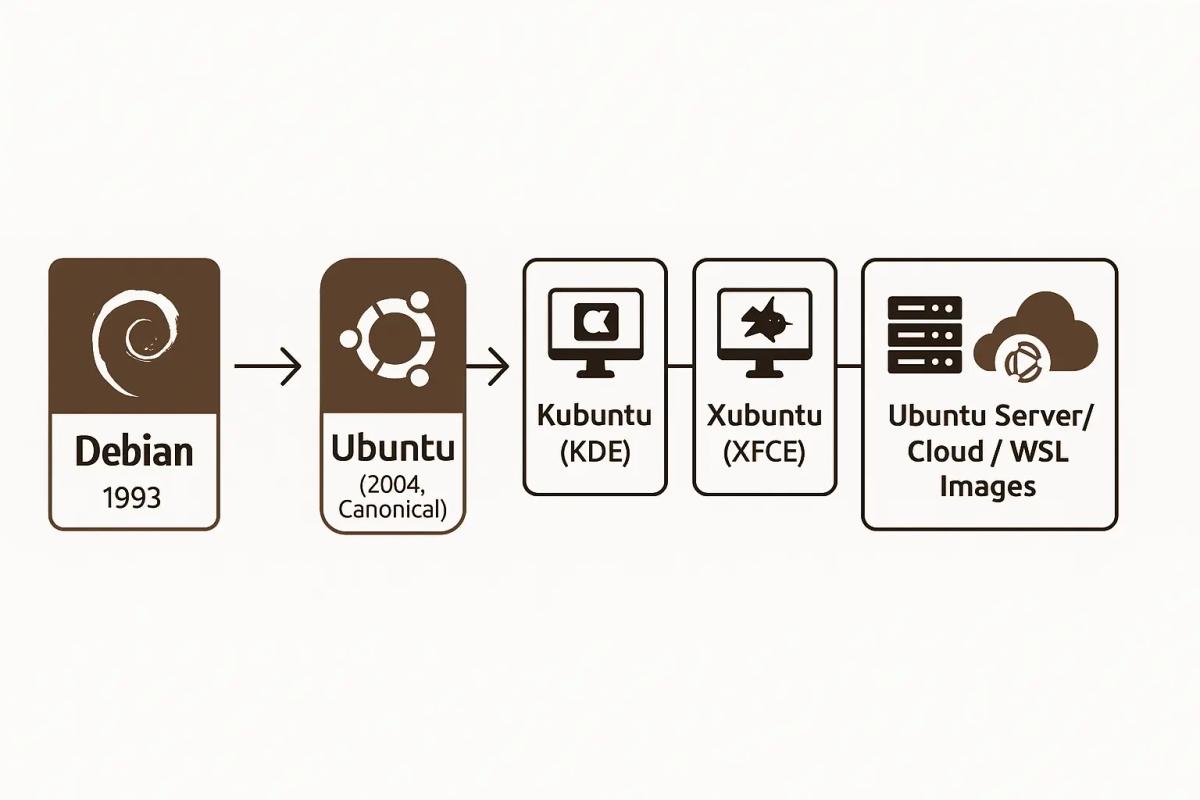
So, what is Ubuntu? Ubuntuis a Debian-based Linux distribution launched in 2004 by Canonical. Its mission was simple: make Linux accessible for everyone while keeping the strength of open source.
It builds on Debian’s stability but delivers faster releases and user-friendly defaults, which is why many discussions around “is Ubuntu same as Linux” appear. The answer is clear: Ubuntu is built on Linux but adds everything needed to create a complete operating system.
Key Features and Defaults
Ubuntu ships with the GNOME desktop by default, though multiple flavors exist. It uses APT and Snap for package management, AppArmor for security, and offers tight cloud and WSL integration. These features make it a top choice for both desktops and servers.
This is also where Ubuntu vs Debian stands out, Debian favors maximum stability and minimal changes, while Ubuntu balances stability with convenience and wider hardware support.
Release Cycle
Every six months, Canonical releases a new Ubuntu version. Every two years, it issues a Long-Term Support (LTS) release. LTS editions get five years of free updates, extendable to ten years with Ubuntu Pro’s Expanded Security Maintenance (ESM). For enterprises that require even longer timelines, Canonical offers custom extended support agreements on a case-by-case basis.
With Legacy Support, enterprises can extend coverage to twelve years. And to address another common query, “ubuntu is linux or unix”: Ubuntu runs on the Linux kernel, while Unix is a different, older family of operating systems.
Ubuntu vs Linux: Key Differences
Let’s discuss the Ubuntu vs linux differences.
Quick Comparison
| Feature | Ubuntu (Distribution) | Linux (Kernel) |
|---|---|---|
| Scope | Complete OS: GUI, repos, installer | Kernel only: not usable alone |
| Security defaults | AppArmor enabled | SELinux/AppArmor available, not enforced |
| Package management | APT + Snap | None |
| Release cadence | 6-month cycle; LTS every 2 years | Continuous kernel releases |
| Support | 5 yrs (LTS), up to 10–12 yrs with Ubuntu Pro/ESM | Longterm kernels vary |
Scope
Ubuntu
Ubuntu is a complete Linux distribution. It includes the Linux kernel, graphical desktop (GNOME), repos, package tools, and an installer. It’s ready to run out of the box on desktops, servers, or cloud platforms.
Linux
Linux is only the kernel, the engine that handles memory, CPU scheduling, and device drivers. By itself, it is not a usable operating system. Distributions like Ubuntu build on Linux to make it usable.
Security Defaults (AppArmor vs Kernel SELinux Option)
Ubuntu
Ubuntu enables AppArmorby default. Applications run inside profiles that limit what they can do, improving system security without extra setup.
Linux
Linux provides the LSM (Linux Security Modules) framework and supports SELinux and AppArmor, but it doesn’t enable anything by default. Security enforcement depends on the distribution.
Package Management and Updates
Ubuntu
Ubuntu includes APT for .deb packages and Snap for sandboxed apps. Updates are centralized, consistent, and easy to manage across desktop, server, and cloud.
Linux
The Linux kernel has no package manager. It only manages hardware and system calls. Distros like Ubuntu add package systems and decide how updates are delivered.
Support Windows and Lifecycle
Ubuntu
Ubuntu follows a predictable release cadence. New versions arrive every six months, with Long-Term Support (LTS) editions every two years. Each LTS release includes five years of free updates, which can be extended to ten years through Ubuntu Pro’s Expanded Security Maintenance (ESM) program.
For enterprises that need even longer coverage, Canonical offers custom extended support agreements on a case-by-case basis. This predictable lifecycle makes Ubuntu a reliable choice for production workloads, hosting environments, and compliance-driven industries.
Linux
Linux kernel releases happen frequently, often every few months. Some kernel versions are designated as Long-Term Support (LTS) by the maintainers at kernel.org. These LTS kernels are typically supported for 2–6 years, depending on community and industry funding. In rare cases, support is extended further, but it is not guaranteed and varies widely.
This makes Linux kernel support cycles less predictable than Ubuntu’s fixed release schedule, leaving more responsibility on the user or vendor to manage updates and maintenance.
Core Decision Framework: When to Use Ubuntu vs Other Linux
Let’s explore when Ubuntu is the right choice, and when other Linux options, or even the raw Linux kernel, make more sense.
Personas
DevOps Engineers
Ubuntu LTS is the default in most clouds. Canonical offers pre-built cloud images with cloud-init, making automation simple. For CI/CD, containers, and bare metal servers, Ubuntu is the fastest on-ramp.
IT Leads & Compliance Teams
If compliance is strict, Ubuntu Pro provides FIPS-certified modules and up to 10 years of support. For even tighter control, the RHEL family is still dominant in regulated industries.
Gamers
Ubuntu and Linux Mint are the best picks. Ubuntu brings quick driver updates, while Mint adds a polished desktop for everyday gaming.
Beginners & Everyday Users
Ubuntu is the safe choice. It installs easily, works with most hardware, and has long-term support. Beginners rarely need to touch the kernel.
Trade-offs
Ubuntu
- Predictable support window
- Polished defaults (AppArmor, Snap, GNOME)
- Works out of the box for servers, desktops, and cloud
Other Linux Distros
- Arch Linux: bleeding edge, fast for developers, but unstable for business workloads
- Debian: ultra-stable, but slower releases
- RHEL family: best for compliance-heavy use, but paid support is costly
Ubuntu reduces setup time. Raw Linux or niche distros give more control but at a higher total cost of ownership (TCO).
KPI Benchmarks
- Support Window: Ubuntu LTS = 5 years (10 with Pro). Linux kernel long-term = 2–6 years, less predictable.
- Stability: Ubuntu LTS remains consistent, even under unmetered bandwidth loads. Arch updates can break configs, while Debian trades features for rock-solid stability.
- Latency & Performance: Ubuntu on bare metal servers delivers low latency with tuned HWE kernels. Arch can squeeze performance gains, but demands constant patching.
Why It Matters
If you’re asking, “is Ubuntu good?” the answer is yes, especially if you want to run desktops, scale servers, or deploy across data centers without deep kernel work.
For those comparing Ubuntu vs Debian or Ubuntu vs Linux Mint, the decision is about speed and polish. Debian is for those who prize stability above all. Mint is for users who want Ubuntu’s base with a friendlier desktop.
Step-by-Step: Choosing the Right Path
Here are the steps to decide between Ubuntu and Linux distros.
Prerequisites (skills, workloads, compliance needs)
List your skills, the apps you need, and any compliance rules. Note where you will run it: desktop, dedicated servers, or cloud. If audits matter, plan for a vendor with a clear support window and security hardening.
How to Decide (beginner checklist)
- **Define the target:**Desktop, servers, or cloud? For fast deployment on dedicated or cloud machines, Ubuntu LTS images are ready to use.
- Pick the base: For Ubuntu vs Linux for beginners, choose Ubuntu LTS. If you want a rolling, DIY stack, consider Arch. If you need ultra-conservative updates, compare Ubuntu or Linux alternatives like Debianor RHEL.
- **Security and Compliance:**Ubuntu enables AppArmor by default and offers Ubuntu Pro for FIPS and extended coverage. Regulated teams can lean on Ubuntu Pro or the RHEL family.
- Check support windows: Ubuntu LTS ships every two years with 5 years of updates, extendable to 10 years via ESM. Plan lifecycle, not just install day.
- **Test before rollout:**Spin up a VM, a cloud instance, or try Ubuntu on WSL if you are on Windows. Validate drivers, updates, and policy.
Common Pitfalls
- Thinking Linux equals a full OS; it is the kernel. Distros (like Ubuntu) add the rest.
- Ignoring support cycles, upgrades cost time.
- Mixing package systems without a plan.
- Skipping a pilot on a VM/WSL/cloud image.
- Not deciding early on linux or Ubuntu workflows for teams.
If you need a stable, supported platform now, pick Ubuntu LTS. If you are building from scratch and want total control, choose another Linux distro, or start at the kernel level.
Related Distro Comparisons You’ll Want to Know
Let’s take a closer look at how Ubuntu compares to Debian, Linux Mint, and even the Unix family.
Ubuntu vs Debian
Positioning. Ubuntu is a Debian-based distribution with opinionated defaults and a fixed cadence (every 6 months; LTS every 2 years). Debian is the upstream project with a “release when ready” ethos and community governance.
Ubuntu LTS receives 5 years of standard support, extendable to 10 years via ESM/Ubuntu Pro; Debian Stable is maintained by the security team and extended to ~5 years via the Debian LTS project.
| Criterion | Ubuntu | Debian |
|---|---|---|
| Base | Debian-based | Upstream project |
| Cadence | 6-month releases; LTS every 2 years | “When ready” + point releases |
| Support | 5 years LTS (+ 10 with ESM/Pro) | Stable + Debian LTS ≈ 5 years |
| Best fit | Fast rollout, cloud/desktop defaults | Maximum conservatism, minimal changes |
Ubuntu vs Linux Mint
Linux Mint builds on Ubuntu LTS (Cinnamon, MATE, Xfce editions) with a familiar desktop and fewer changes per cycle. Mint 22.x is based on Ubuntu 24.04 LTS and is supported to April 2029; LMDE is Mint’s Debian-based variant.
In short, Ubuntu targets broad hardware and cloud images; Mint optimizes the desktop experience and ease.
The following table highlights the differences between Ubuntu vs Linux Mint.
| Criterion | Ubuntu | Linux Mint |
|---|---|---|
| Base | Debian → Ubuntu | Ubuntu LTS (LMDE = Debian) |
| Desktop | GNOME by default | Cinnamon by default (plus MATE/Xfce) |
| Packages | APT + Snap supported | APT; Snap store disabled by default |
| Best fit | Servers, cloud, WSL, general desktop | Polished desktop with minimal fuss |
Ubuntu vs Unix
Ubuntu runs on the Linux kernel, which is Unix-like but not UNIX. “UNIX” is a trademark of The Open Group for systems certified to the Single UNIX Specification (e.g., AIX, HP-UX, some BSD-derived systems when certified).
Ubuntu/Linux is POSIX-inspired and source-compatible in many areas but is not UNIX-certified. That’s the core of linux vs Unix and the broader Ubuntu vs linux vs Unix distinction.
Use it this way.
- If you need predictable Ubuntu LTS images in multiple regions (desktops, servers, cloud/WSL), start with Ubuntu.
- If you want a calmer desktop and Ubuntu’s package base without Snap, pick Linux Mint.
- If you require ultra-conservative changes or want to track upstream policy closely, choose Debian Stable with Debian LTS.
Want to explore beyond Ubuntu? Check out our guide to the Best Linux Distrosfor desktops, servers, and specialized use cases.
Deep Dive: Advanced Configurations and Security
Let’s dive into how Ubuntu handles advanced configurations, from servers and cloud to WSL, and how its security defaults stack up against raw Linux.
Architecture Patterns (Server, Cloud, WSL)
Ubuntu excels across environments. On bare-metal servers, you can install Ubuntu LTS with hardened defaults and root-level control.
In the cloud, Ubuntu publishes official images for AWS, Azure, andGoogle Cloud with cloud-init built in for automated provisioning. In Windows environments, Ubuntu via WSL provides a full Linux userland for scripts, dev tools, and CI workflows.
Whether you’re running on local hardware, hosting, or integrating with CI pipelines, Ubuntu spans them all with consistent behavior.
Security & Compliance (AppArmor vs SELinux, FIPS, GDPR)
Ubuntu defaults to AppArmor, which is intuitive for domestic admins and strong in everyday use. If needed, SELinux can be enabled manually, though it’s not supported out of the box.
For regulated workloads in finance or government, Ubuntu Pro includes FIPS-certified cryptographic modules and CIS hardening options. These features help organizations align with compliance frameworks such as FedRAMP or GDPR, though full compliance depends on organizational processes and policies.
Ubuntu delivers enterprise-grade security without sacrificing ease.
Performance Tuning (HWE kernels, Snaps vs Flatpak, Lightweight Flavors)
Ubuntu LTS ships with a stable kernel. For newer hardware, you can enable the HWE (Hardware Enablement) stack, delivering up-to-date kernels for better performance.
Ubuntu supports Snaps out of the box, providing system-level isolation for applications. Flatpak can also be installed manually if preferred, and it shines for desktop workflows. On legacy or low-resource systems, Ubuntu flavors like Xubuntu(XFCE) or Lubuntu(LXQt) run smoothly with a minimal footprint.
Ubuntu scales, whether you need bleeding-edge performance or ultra-light setups.
Real-World Scenarios
Let’s explore practical scenarios where Ubuntu shines, and where Linux at the kernel level still has the edge.
Cloud VM Deployment (Ubuntu LTS default)
In the cloud, Ubuntu LTS is the default image on AWS, Azure, and Google Cloud. Enterprises rely on its predictable support window, five years of free updates, extendable to ten with Ubuntu Pro. Cloud-init automates configuration, so teams can launch VMs or bare metal servers quickly without manual setup.
By contrast, starting from the Linux kernel alone requires building every layer, which slows deployment and increases cost. For uptime-sensitive workloads, Ubuntu’s stability wins.
High-Security Enterprise (SELinux vs AppArmor)
Compliance-heavy industries demand consistency. Ubuntu enables AppArmor by default, confining applications with clear profiles. With Ubuntu Pro, enterprises gain FIPS-certified cryptographic modules and long-term security updates, helping organizations align with compliance frameworks such as GDPR and FedRAMP. Support can be extended for up to ten years with Ubuntu Pro
On dedicated servers, this long support cycle reduces audit overhead and simplifies patching. The Linux kernel offers SELinux and AppArmor hooks, but without a default policy. Building a compliant stack from scratch on raw Linux is slower and riskier for regulated businesses.
Lightweight Desktop (Ubuntu MATE vs Linux Kernel DIY)
On desktops, many new users ask about Ubuntu vs linux for beginners. Ubuntu MATE provides a lightweight, ready-to-run environment with drivers and a clean interface.
By contrast, compiling the Linux kernel and assembling a DIY OS is complex and prone to breakage. Developers often compare Linux Mint vs Ubuntu for programming.
Linux Mint focuses on polish and a Cinnamon desktop, while Ubuntu offers broader hardware support and long-term stability, making it a stronger choice for coding projects and sustained development.
Why It Matters
These examples prove the difference between Linux and Ubuntu in practice. Ubuntu delivers measurable support, Windows, uptime, and compliance gains, while the Linux kernel alone leaves those tasks to you.
Beginners, developers, and enterprises all benefit when Ubuntu handles the heavy lifting, leaving raw Linux for custom builds and IoT experimentation.
Looking for a powerful home for Ubuntu or other distros? Our Linux Dedicated Servers deliver speed, security, and full control.
FAQs
Q. Are Ubuntu and Linux commands the same?
Most commands are the same because Ubuntu is built on the Linux kernel. Core commands like ls, cd, and mkdir work across both. The difference is that Ubuntu adds package tools like apt, while the plain Linux kernel has no user commands at all.
Q. Which is faster, Linux or Ubuntu?
Linux is only a kernel, so speed depends on the distribution that uses it. Ubuntu is optimized for stability and long-term support. Lightweight Linux distros like Alpine or Arch may feel faster, but Ubuntu balances speed with usability and enterprise reliability.
Hafsa Qadeer
Technical Writer
Hafsa Qadeer is a Technical Content Writer at RedSwitches and a journalist with a background in molecular biology and oncology. She brings research precision to technical writing and SEO strategy, turning complex topics in infrastructure, biotech, and AI into content that informs and engages.
Reduce Docker Image Size: Best Practices to Slim Your Images
Docker image size can become a serious issue as you add more code to the image. Learn how to reduce Docker image size and optimize Dockerfiles for production to speed up CI/CD pipelines and improve container efficiency.
Best Linux Distros 2026, Full Guide for Beginners, Developers, Gamers & Servers
Match your hardware, workflow, and skill to the right Linux distro in 2026. Compare 23 top picks, Mint, Ubuntu, Fedora, Arch, Bazzite, covering beginners, developers, gamers, and servers.

How to Create and Manage Superusers in PostgreSQL
A PostgreSQL superuser is a user with unrestricted access to all database operations, including altering roles, creating databases, and bypassing permission checks.
Power Your Next Project With Bare Metal
10 min delivery, zero setup fees, and 24/7/365 human engineers across 20+ global locations.