Rack Server vs Blade Server: Which Is Right for Your Data Center in 2026?
Explore the differences between rack server vs blade server in architecture, cost, and scalability to help you choose the right setup for your data center in 2026.
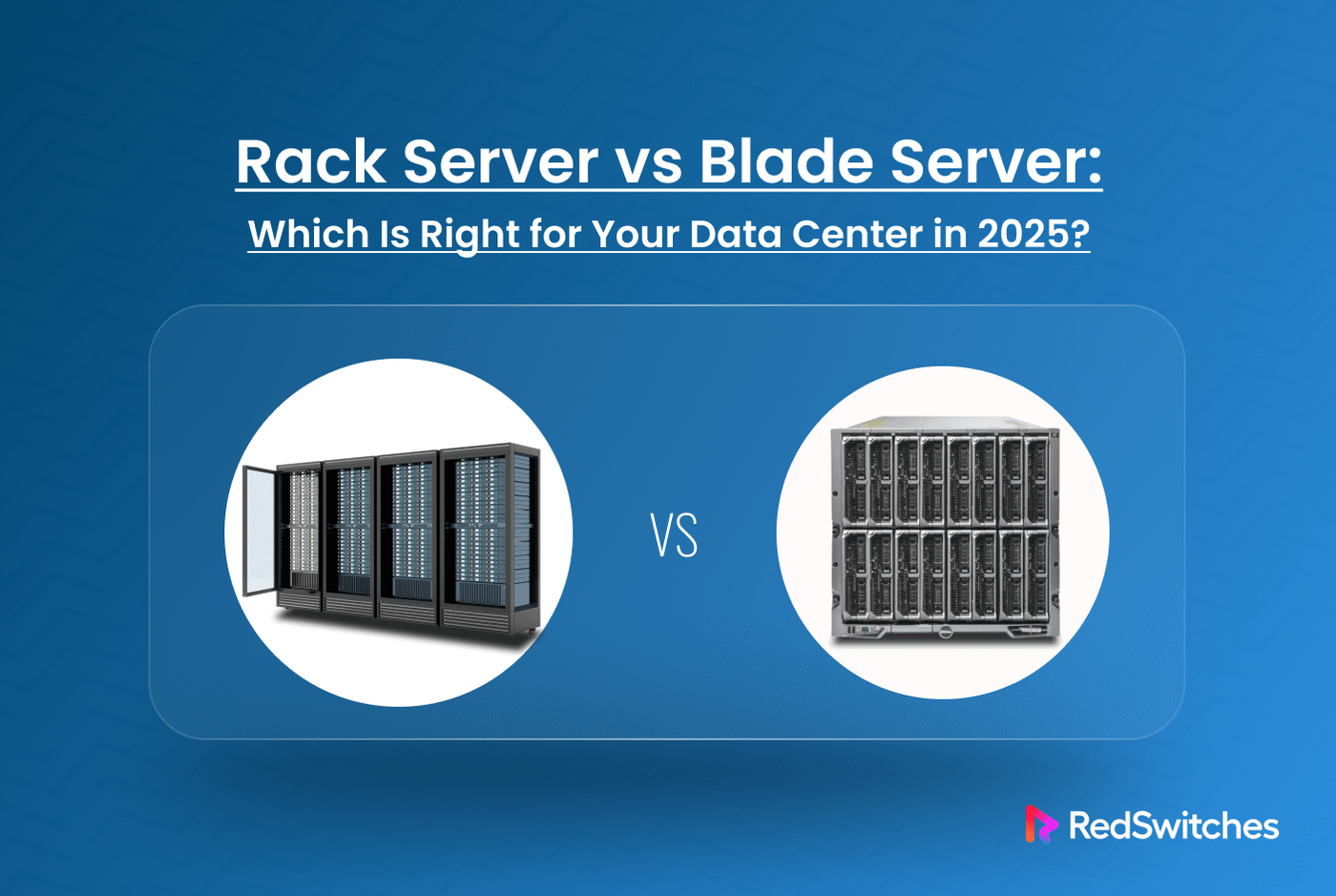
A rack server is a standalone server that fits into standard 19-inch racks. Each unit contains its power supply, cooling components, and networking equipment.
A blade server is a modular server card that slides into a shared chassis. The chassis provides power, cooling, and networking for multiple blade servers.
Poor infrastructure decisions significantly impact companies through downtime and lost productivity, making your server choice crucial for your bottom line. This debate is particularly relevant in 2026 because AI workloads require higher-density computing, while energy costs continue to rise.
Remote management has become increasingly critical, and cloud migration strategies require a solid foundation. This guide helps IT managers, system administrators, and CTOs make informed decisions about servers tailored to their specific needs.
What Is a Rack Server?
A rack server is a computer designed to fit into Electronic Industries Alliance (EIA) 19-inch standard racks. These servers mount horizontally in rack units (U), where 1U equals 1.75 inches of height.
Types of rack servers:
- 1U servers – Ultra-compact, limited expansion slots
- 2U servers – Balance of density and expandability
- 4U servers – Maximum expansion capability for specialized workloads
How Rack Servers Work
Each rack server operates as a self-contained unit. You plug it into power, connect network cables, and it runs independently.
Key characteristics:
- Individual power supplies per server
- Separate cooling fans and airflow paths
- Direct network connections to each unit
- Independent storage and memory configurations
This design makes rack servers ideal for modular scaling. You add servers as needed without changing your existing infrastructure.
Power and cabling:
Each server requires its own power cord and network connections. A full 42U rack typically accommodates 40-42 servers, which requires 40-42 power cords and network cables.
Airflow:
Front-to-back airflow design pulls cool air from the front and exhausts hot air from the rear. Each server manages its thermal requirements.
Pros and Cons of Rack Servers
Advantages:
- Easy to replace individual components
- Mix different server types in same rack
- Lower initial cost per server
- Simple troubleshooting and maintenance
- No vendor lock-in for chassis
- Flexible configuration options
Disadvantages:
- Higher cable management complexity
- More power distribution units required
- Individual cooling systems less efficient
- Takes more rack space for same compute power
- Manual management of each server
Upgrades, cooling, and flexibility:
Rack servers excel at customization. You can upgrade RAM, storage, or CPUs without affecting other servers. Each server’s independent cooling system means you can run different workloads with varying thermal requirements in the same rack.
What Is a Blade Server?
A blade server consists of two main components:
- Blade: A thin server card containing CPU, RAM, and basic I/O.
- Chassis: An enclosure that houses multiple blades and provides shared resources.
The chassis supplies power, cooling, networking, and management services to all blades inside it.
Blade Chassis Explained
Think of the chassis as a shared service platform:
- Power: Redundant power supplies feed all blades through a backplane
- Cooling: Chassis fans create airflow across all blades simultaneously
- Networking: Built-in switches connect all blades to external networks
- Management: Single interface controls all blades in the chassis
A typical blade chassis holds 8-16 blade servers in a 6U-10U form factor. This delivers the computing power of 8-16 rack servers in roughly one-quarter the space.
Resource sharing example:
Instead of 16 individual power supplies (rack servers), you use 4-6 shared power supplies (blade system). The chassis distributes power based on each blade’s current needs.
Pros and Cons of Blade Servers
Advantages:
- Highest compute density per rack unit
- Hot-swap blades without powering down chassis
- Centralized management interface
- Shared cooling is more efficient than individual fans
- Reduced cabling complexity
- Lower power consumption per compute unit
Disadvantages:
- Higher upfront chassis investment
- Vendor lock-in for blade compatibility
- Thermal density requires robust data center cooling
- Single chassis failure affects multiple servers
- Limited customization per blade
- Complex initial setup and configuration
Vendor lock-in considerations:
Your blade choice locks you into that vendor’s ecosystem. HP blades only work in HP chassis. Dell blades only work in Dell chassis. This affects your future upgrade and expansion options.
Thermal density challenges:
Blade servers pack more heat into smaller spaces. Your data center must handle the concentrated thermal load. Poor cooling design can throttle performance or cause failures.
Rack Server vs Blade Server: Feature Comparison
The choice between blade and rack servers depends on your specific requirements. This comparison breaks down the key differences across critical decision factors.
| Feature | Rack Servers | Blade Servers |
|---|---|---|
| Density | 42 servers per 42U rack | 128+ servers per 42U rack |
| Initial Cost | $3,000-15,000 per server | $15,000-50,000 chassis + $2,000-8,000 per blade |
| Power Efficiency | Individual PSUs, 85-90% efficient | Shared PSUs, 92-95% efficient |
| Cabling | 1-4 cables per server | Minimal external cabling |
| Management | Individual interfaces | Single centralized console |
| Flexibility | Mix any compatible hardware | Vendor-specific blades only |
Form Factor & Density
Physical space footprint:
Rack servers consume one rack unit (1U = 1.75 inches) to four rack units (4U = 7 inches) per server. A standard 42U rack can hold 10-42 rack servers, depending on the server height.
Blade servers pack 8-16 servers into a single 6U-10U chassis. You can fit 4-6 blade chassis in a 42U rack, yielding 32-96 servers per rack.
Real-world density comparison:
- Rack servers: 42 x 1U servers = 42 servers per rack
- Blade servers: 6 x 14-blade chassis = 84 servers per rack
Scalability at data center level:
Your data center footprint directly impacts your scaling capacity. Blade servers deliver 2-3x more compute per square foot. This matters when:
- Floor space costs over $ 1,000 per square foot annually.
- Power and cooling infrastructure has fixed capacity limits.
- You need rapid deployment of hundreds of servers.
Power and Cooling Efficiency
Rack server approach:
Each server contains its power supply and cooling fans. A typical 1U server uses a 550- 750W power supply running at 85-90% efficiency. Cooling fans operate independently, creating multiple airflow patterns.
Blade server approach:
Shared power supplies in the chassis operate at an efficiency of 92-95%. Centralized cooling uses larger, more efficient fans that move air across all blades simultaneously.
Efficiency comparison:
- Rack servers: 40 servers x 650W = 26,000W total draw.
- Blade servers: Equivalent compute draws 20,000-22,000W (15-20% savings).
The shared infrastructure eliminates redundant power conversion losses and cooling overlap.
Performance and High-Availability
AI workloads:
AI training requires high-speed interconnects between servers. Blade servers provide faster backplane connections (25-100 Gbps) compared to standard network switches. This reduces training time for distributed AI models.
HPC clusters:
High-performance computing benefits from the shared high-speed fabrics of blade servers. InfiniBandor proprietary interconnects deliver sub-microsecond latency between blades.
Enterprise applications:
Traditional business applications often run better on rack servers. Different applications have different resource requirements. Rack servers let you optimize each server for its specific workload.
Bare metal vs blade server distinction:
Bare metal servers are physical servers dedicated to a single tenant (as opposed to virtualized cloud instances). Both rack and blade servers can be bare metal. The distinction is about hardware dedication, not form factor.
Modularity and Hot Swappability
Blade advantage:
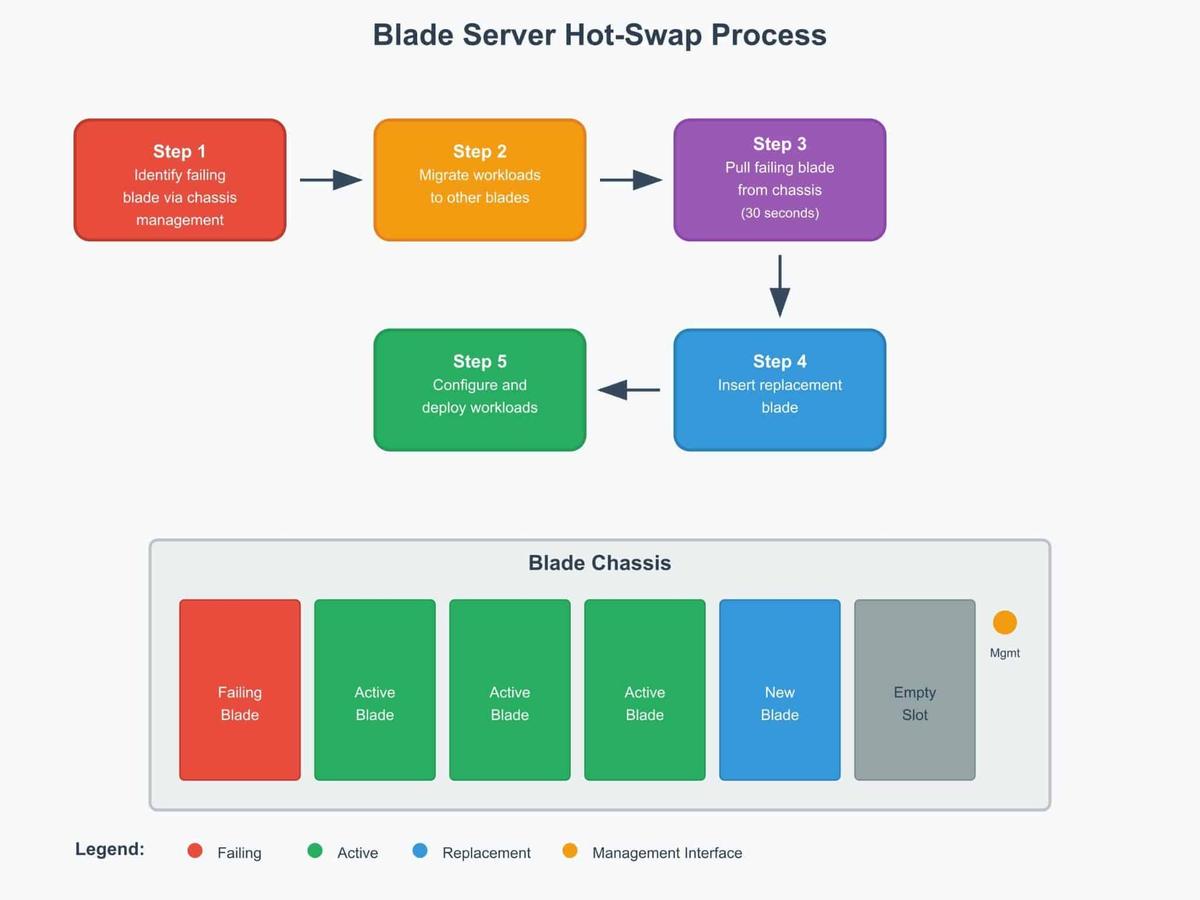
You can remove and replace blade servers without powering down the chassis. The chassis maintains power and cooling for the remaining blades during maintenance.
Blade Server Hot-swap process:
Rack server limitations:
Replacing a rack server requires:
- Powering down the specific server.
- Disconnecting power and network cables.
- Physical removal from the rack.
- Reverse process for replacement.
This process takes 15-30 minutes, compared to 2-5 minutes for blade replacement.
Cabling and Infrastructure Complexity
Rack server cabling:
Each server needs:
- 1-2 power cables to PDUs.
- 2-4 network cables for redundancy.
- Optional management cables (KVM, serial).
A 42-server rack requires 126 to 252 cables. Cable management becomes complex and error-prone.
Blade server cabling:
The chassis requires:
- 4-8 power cables total.
- 8-16 network uplinks total.
- 1 management connection.
The same compute capacity needs 13-25 cables vs 126-252 cables. This reduces installation time by 60-80%.
Cable failure impact:
- Rack servers: Single cable failure affects one server.
- Blade servers: Chassis cable failure can affect multiple blades (but redundancy typically prevents outages).
Cost and Budget Considerations
CAPEX (Capital Expenditure):
Rack servers:
- Lower entry cost: $3,000-15,000 per server.
- Linear scaling: Add servers as needed.
- No large upfront chassis investment.
Blade servers:
- Higher entry cost: $15,000-$ 50,000 for the chassis.
- Lower per-server cost: $2,000-8,000 per blade.
- Cost advantage starts at 8-12 servers.
OPEX (Operating Expenditure):
5-year operational costs:
- Power savings: Blade servers reduce electricity consumption by 15-20%.
- Cooling costs: Shared cooling reduces HVAC load by 10-15%.
- Maintenance: Centralized management reduces admin time by 30%.
- Space costs: Higher density reduces facility costs per server.
Break-even analysis:
Blade servers typically break even at 20-30 servers when including operational savings.
Management and Monitoring
Rack server management:
Each server requires individual attention:
- Separate IPMI, iDRAC, and iLO interfaces per server.
- Individual firmware updates.
- Server-by-server configuration management.
- Multiple monitoring dashboards.
Blade server management:
Chassis provides unified management:
- Single interface for all blades.
- Bulk firmware updates across blades.
- Template-based configuration deployment.
- Integrated monitoring and alerting.
Management efficiency:
Tasks that take 8 hours across 16 rack servers take 1-2 hours with equivalent blade servers.
Redundancy and Failover
Rack server redundancy:
Redundancy exists at the server level:
- Dual power supplies per server.
- RAID storage configurations.
- Network interface bonding.
- Application-level clustering.
Blade server redundancy:
Redundancy exists at multiple levels:
- Chassis-level: Redundant power supplies, cooling, switches.
- Blade-level: Standard server redundancy features.
- Workload-level: Easy migration between blades.
Failover scenarios:
Power supply failure:
- Rack server: Affects one server (if no redundant PSU).
- Blade server: Chassis continues operation, no server impact.
Cooling failure:
- Rack server: Individual server may overheat.
- Blade server: Shared cooling redundancy protects all blades.
Vendor Lock-In vs Hardware Freedom
Rack server flexibility:
You can mix components from different vendors:
- HP servers with Dell switches.
- Various storage vendors.
- Different CPU generations in same rack.
- Upgrade individual components independently.
Blade server constraints:
Your chassis choice locks you in:
- HP BladeSystem only accepts HP blades.
- Dell PowerEdge only accepts Dell blades.
- Cisco UCS only accepts Cisco blades.
- Network modules tied to specific vendors.
Long-term implications:
Rack servers give you negotiating power with vendors. You can switch suppliers for future purchases. Blade servers tie you to one vendor’s roadmap and pricing.
Deployment Speed & Maintenance
Initial deployment:
Rack servers:
- Install each server individually: 30-45 minutes per server.
- Connect all cables: 15-20 minutes per server.
- Configure management interfaces: 10-15 minutes per server.
- Total: 55-80 minutes per server.
Blade servers:
- Install chassis: 2-3 hours one-time setup.
- Insert blades: 5 minutes per blade.
- Configure from central interface: 15 minutes for all blades.
- Total: 20 minutes per blade after initial setup.
Ongoing maintenance:
Hardware replacement:
- Rack server: 30-45 minutes, including cable management.
- Blade server: 5-10 minutes with hot-swap capability.
Firmware updates:
- Rack servers: Individual updates, 15-30 minutes per server.
- Blade servers: Bulk updates, 30-60 minutes for the entire chassis.
Configuration changes:
- Rack servers: Manual changes per server.
- Blade servers: Template-based deployment across multiple blades.
Your technician labor costs drop significantly with blade servers for large deployments.
Real-World Use Cases: Rack vs Blade in Action
Use Cases for Rack Servers
SMB Data Centers
Small and medium businesses need flexible, cost-effective solutions. Rack servers work well because:
- Lower upfront investment per server.
- Easy to start small and scale gradually.
- Mix different applications on different hardware.
- Simple troubleshooting when problems occur.
A 50-employee company might start with 3-5 rack servers and add more as they grow.
Edge Deployments
Remote locations require reliable and maintainable servers. Rack servers excel at edge computing because:
- Minimal infrastructure requirements.
- Easy replacement without a specialized chassis.
- Individual server failures don’t affect others.
- Local technicians can service standard hardware.
Retail chains utilize rack servers in their stores for local inventory management and payment processing.
VMware Clusters
Virtualization environments often prefer rack servers for:
- Different virtual machine (VM) workloads require different hardware specifications.
- Easy to upgrade individual ESXi hosts.
- Mix older and newer server generations.
- Simplified vSphere management per host.
Dev/test Environments
Development teams benefit from rack servers because:
- Different projects need different configurations
- Easy to repurpose servers for new projects
- Individual server rebuilds don’t affect others
- Budget-friendly for experimental workloads
Use Cases for Blade Servers
Large-scale Enterprise Workloads
The data center blade server market is projected to reach$37.35 billion by 2032, driven by increasing demand for modular and scalable data infrastructure. Enterprise deployments benefit from:
- Standardized hardware platforms across departments.
- Centralized management of hundreds of servers.
- Consistent performance profiles.
- Rapid provisioning of new resources.
Telecommunications
Telecom companies use blade servers for:
- Network function virtualization (NFV).
- High-density compute for 5G processing.
- Rapid service deployment.
- Carrier-grade reliability requirements.
GPU Compute Farms
AI and machine learning workloads drive blade adoption because:
- AI systems improve fraud detection accuracy by more than 50% compared to traditional methods.
- High-density GPU configurations in a single chassis.
- Shared high-speed interconnects for distributed training.
- Centralized cooling for power-hungry GPUs.
- Easy scaling for growing AI demands.
Government/military Systems
Defense applications choose blades for:
- Ruggedized chassis for harsh environments.
- Centralized security management.
- Hot-swap capability for mission-critical uptime.
- Compact form factor for mobile deployments.
Which Industries Use What (with examples)
Enterprise IT: Hybrid Blade + Rack
Large corporations typically deploy both:
- Blade servers for standardized business applications.
- Rack servers for specialized workloads and legacy systems.
- Example: Bank uses blades for trading systems, racks for ATM networks.
AI/ML Labs: Blade GPU Clusters
Research institutions and tech companies prefer blades because:
- Dell’s enterprise AI infrastructure rollout includes air-cooled PowerEdge XE9780 and XE9785 servers, which are expected to be available in the second half of 2025.
- Maximum GPU density per rack unit.
- High-speed interconnects between compute nodes.
- Centralized management of complex training jobs.
SaaS Hosting: Rack for Flexibility
Software-as-a-Service providers choose rack servers for:
- Different customer workloads need different resources.
- Easy to isolate customer environments.
- Flexible pricing models based on dedicated hardware.
- Simple capacity planning per customer.
Financial Institutions: Blade Servers for Dense Compute
Banks and trading firms use blades because:
- AI systems improve fraud detection accuracy by more than 50%.
- Ultra-low latency trading requires optimized interconnects.
- High-frequency trading needs maximum compute density.
- Regulatory compliance is easier with centralized management.
Blade Server vs. Rack Server vs. Tower Server: What’s the Difference?
Tower servers stand alone like desktop computers. They don’t mount in racks and typically serve small offices or single applications.
| Feature | Tower Server | Rack Server | Blade Server |
|---|---|---|---|
| Form Factor | Standalone desktop-style | Horizontal rack mounting | Modular cards in chassis |
| Space Efficiency | Least efficient | Moderate density | Highest density |
| Initial Cost | $1,000-5,000 | $3,000-15,000 | $15,000+ chassis + $2,000-8,000/blade |
| Power Consumption | 200-800W per server | 400-1,200W per server | 150-400W per blade |
| Cooling Requirements | Individual fan cooling | Rack-level cooling | Shared chassis cooling |
| Management | Individual interfaces | Server-by-server | Centralized chassis control |
| Scalability | Limited by floor space | Rack-constrained | High-density scaling |
| Best For | Small offices, single apps | Mixed workloads, SMB | Large-scale, standardized |
Decision-making guidelines:
- Tower servers: 1-5 servers, small business, budget under $10,000.
- Rack servers: 5-50 servers, mixed workloads, moderate budget.
- Blade servers: 50+ servers, standardized workloads, enterprise budget.
Bare Metal vs Blade Server vs Cloud VMs: Infrastructure Triad
Bare metal means dedicated physical servers (not virtualized). Both rack and blade servers can be bare metal or virtualized.
Bare metal characteristics:
- Direct hardware access without hypervisor overhead.
- Maximum performance for single applications.
- Full control over hardware configuration.
- No “noisy neighbor” issues from other tenants.
| Deployment Type | Hardware Access | Performance | Cost Structure | Management |
|---|---|---|---|---|
| Bare Metal Rack | Direct physical | Maximum single-app | Fixed monthly | Self-managed |
| Bare Metal Blade | Direct physical | Maximum density | Fixed monthly | Centrally managed |
| Cloud VMs | Virtualized | Variable/shared | Pay-per-use | Provider managed |
| Virtualized Blade | Hypervisor layer | Optimized sharing | Fixed + licensing | Centrally managed |
Virtualization with blade servers:
Most blade deployments utilize hypervisors such as VMware vSphere or Microsoft Hyper-V. This provides:
- Multiple VMs per blade for resource sharing
- Live migration between blades in same chassis
- Centralized VM management across all blades
- Better hardware utilization rates (60-80% vs 20-30% bare metal)
When to choose each:
- Bare metal blade: High-performance databases, AI training.
- Virtualized blade: Standard enterprise applications, VDI.
- Cloud VMs: Variable workloads, development, testing.
Which Server Should You Choose in 2026?
Startup (1-10 employees): Choose tower or entry-level rack servers because:
- Limited budget and technical staff.
- Uncertain growth trajectory.
- Need flexibility to experiment.
- Simple applications don’t require high density.
Mid-size data center (50-200 servers): Choose hybrid rack + blade approach because:
- Mix of standardized and custom workloads.
- Some economies of scale justify blade chassis.
- Still need flexibility for different applications.
- Technical staff can manage both architectures.
Hyperscaler or AI lab (1,000+ servers): Choose blade servers because:
- Maximum density reduces facility costs.
- Standardized workloads suit blade architecture.
- Operational savings justify higher initial costs.
- Advanced technical staff can optimize blade deployments.
Budget-sensitive organizations: Choose rack or tower servers because:
- Lower upfront capital requirements.
- Easier to start small and grow incrementally.
- Less vendor lock-in provides negotiating leverage.
- Simpler architecture reduces operational complexity.
Decision checklist:
Ask yourself these questions:
- How many servers do you need in the next 3 years?
- Are your workloads similar or vastly different?
- What’s your upfront budget vs operational budget preference?
- Do you have specialized technical staff?
- How important is space efficiency in your facility?
Your answers will point you toward the right choice.
Common Myths About Blade and Rack Servers
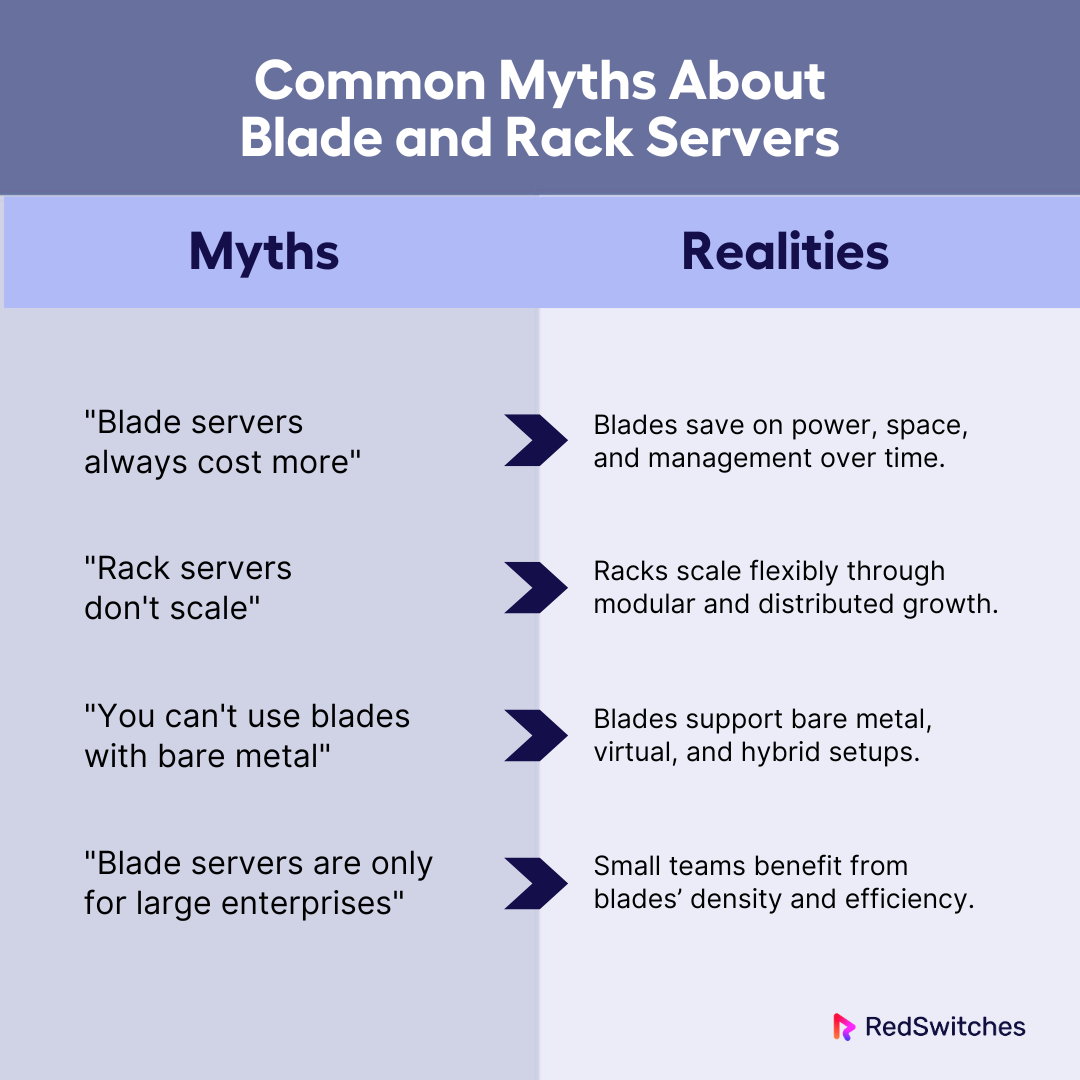
“Blade servers always cost more”
This myth ignores operational expenses. While blade chassis require higher upfront investment, total cost of ownership often favors blades at scale.
Reality: Blade servers cost more initially but save money operationally through:
- 15-20% lower power consumption.
- 30% reduction in management time.
- 50% less physical space requirements.
- Bulk purchasing discounts on standardized blades.
Break-even typically occurs at 20-30 servers over 3-year lifecycle.
“Rack servers don’t scale.”
This myth assumes scaling only means density. Rack servers scale differently than blades.
Reality: Rack servers scale through:
- Linear addition of independent servers.
- Mix of different server types as needs change.
- Distributed scaling across multiple locations.
- Flexible resource allocation per application.
The question isn’t whether they scale, but how they scale.
“You can’t use blades with bare metal.”
This myth confuses form factor with deployment model.
Reality: Blade servers support multiple deployment options:
- Bare metal blade servers for maximum performance.
- Virtualized blades for resource sharing.
- Container orchestration on blade clusters.
- Hybrid bare metal + virtualized configurations.
Form factor and virtualization are independent choices.
“Blade servers are only for large enterprises.”
This myth assumes blade servers require massive scale to be worthwhile.
Reality: Blade servers make sense for smaller deployments when:
- You need high compute density in limited space.
- Standardized workloads benefit from centralized management.
- Growth plans justify the initial chassis investment.
- Operational simplicity outweighs higher upfront costs.
Some organizations find value with just 8-12 blade servers.
Rack and Blade Aren’t Opposites- They’re Tools
Your server choice shouldn’t be an either/or decision. Rack and blade servers are tools designed for different jobs.
The best infrastructure often combines both approaches, using blade servers for standardized, high-density workloads while deploying rack servers for specialized applications and mixed environments. Tower servers continue to serve their purpose at edge locations and in small deployments.
Your workload requirements should drive your decisions, not arbitrary preferences or vendor relationships. Consider your scale and determine the number of servers you need. Think about standardization and whether your workloads are similar or diverse.
Evaluate your budget preferences between upfront versus operational spending. Assess your space constraints and data center footprint limitations. Growth plan and how your needs will evolve over the next 3-5 years.
No single server type wins across all criteria. The right choice depends on your specific situation. Looking to deploy high-performance infrastructure? Consult with RedSwitchesexperts to select the best-fit solution before scaling.
FAQ
Q. What is the difference between a rack server and a server?
A server is the computer itself. A rack server is a server designed to fit in a standardized rack cabinet. Rack servers are thin and stackable in data centers.
Q. What is a blade server used for?
Blade servers handle high-density computing tasks. They’re used for virtualization, web hosting, databases, and cloud services where space efficiency is most crucial.
Q. How do blade servers optimize space compared to rack servers in data centers?
Blade servers share power, cooling, and networking in one chassis. This packs more computing power per rack unit than individual rack servers.
Q. What are the main cost differences between deploying blade and rack servers?
Blade servers cost more upfront but save on power and cooling. Rack servers are initially cheaper but require more infrastructure and space.
Q. How does management complexity differ between blade and rack server setups?
Blade servers utilize centralized management through a single interface. Rack servers require managing each unit separately, making blade setups simpler to maintain.
Fatima J.
Technical Writer
Fatima is a writer who has authored a wide range of technical guides for the RedSwitches blog, covering Linux, servers, and hosting topics, with a focus on making hands-on subjects clear and approachable.

Aloft Dedicated Server Setup Guide 2026
An Aloft world can grow quickly when your crew is building, exploring, and sailing between floating islands together. But when the player hosting the session leaves, everyone may lose access to that shared world until the host returns.
The Front Dedicated Server Setup: Windows, Linux, Ports and Fixes
Your The Front dedicated server can launch successfully while your friends still cannot join. The real test is a world that players can reach, and return to without losing progress.
Subnautica Dedicated Server Setup (2026): Nitrox 1.8.1 Guide
Your group has a base to finish and deeper waters to explore, but the next session depends on someone keeping the server online. Can a Subnautica dedicated server give everyone access without that player staying in the game?
Power Your Next Project With Bare Metal
10 min delivery, zero setup fees, and 24/7/365 human engineers across 20+ global locations.