IaaS vs PaaS: Which Model Fits Your Stack?
Cloud computing offers two core models: IaaS for full control and PaaS for fast deployment. This guide explains their differences, use cases, and how to choose the right fit.
Choosing the wrong cloud model can slow deployments, waste budget, and block scaling. Here’s how to pick the right one and avoid costly mistakes.
The global cloud computing market, valued at USD 753.11 billion in 2024, is expected to soar to about USD 5,150.92 billion by 2034, growing at a CAGR of 21.20%.
This guide highlights the key tradeoffs so you can choose what works best for your stack.
IaaS vs PaaS Explained: Definitions and Why They Matter
| Cloud Model | Definition | Key Benefit |
|---|---|---|
| IaaS (Infrastructure as a Service) | IaaS (Infrastructure as a Service) delivers virtualized and dedicated computing resources like servers and storage over the internet. Users manage apps and OS, while the provider handles the infrastructure. | Full control over your IT setup without owning physical hardware. |
| PaaS (Platform as a Service) | PaaS (Platform as a Service) is a cloud computing model that provides developers with a ready-to-use platform, including infrastructure, runtime environment, and development tools, to build, deploy, and manage applications. It allows developers to focus on coding without worrying about hardware or software maintenance. | Faster development and deployment with less technical overhead. |
IaaS offers raw infrastructure for maximum control, while PaaS provides a pre-built environment to speed up app creation. Your choice depends on how much customization you need.
Before diving into the full breakdown, here’s a quick snapshot of the core differences to set the stage.
Key Takeaways
- IaaS gives full OS-level control for custom or regulated workloads but needs strong DevOps skills.
- PaaS handles infrastructure and scaling, letting teams focus on code.
- IaaS supports any runtime; PaaS limits you to approved stacks.
- IaaS requires manual setup and tuning; PaaS offers automated deployment with less flexibility.
- Many teams combine IaaS for infrastructure with PaaS for faster delivery.
IaaS (Infrastructure as a Service): Architecture Overview
| Component | Managed by You | Managed by Provider | Example Providers |
|---|---|---|---|
| Overview | Virtualized computing resources you configure | Physical hardware, networking, and datacenter infrastructure | RedSwitches, OVHcloud, Hetzner, Leaseweb, Cherry Servers |
| Responsibilities | OS, runtimes, applications, custom security layers | Physical servers, network, virtualization stack (KVM, Xen, VMware), redundancy | |
| Key Advantage | Full software control without managing hardware | Offloads hardware and network maintenance for uptime and scalability |
Provider Highlights
- RedSwitches:Bare metal servers with GPU, streaming, and blockchain readiness
- OVHcloud**:** Bare-metal, public/private cloud with global infrastructure
- Hetzner**:** Affordable, dedicated, and cloud VPS with colocation options
- Leaseweb**:** Dedicated, public/private cloud, CDN, and colocation services
- Cherry Servers**:** Automated bare-metal/virtual servers with GPU options for SMBs
Each offers scalable instances, pricing tiers, and API control. If you need a flexible base layer, these are the tools.
IaaS gives you power, but it expects maturity. If your team isn’t ready to manage infrastructure at scale, you’ll hit delays. If you are, it gives you the freedom to build exactly what you need.
PaaS (Platform as a Service): Architecture & Providers
| Component | Managed by You | Managed by Provider | Example Providers |
|---|---|---|---|
| Overview | Application code, configurations, and databases | Language runtimes, web servers, buildpacks, load balancing, patching, autoscaling | Heroku, Google App Engine, AWS Elastic Beanstalk, Microsoft Azure App Service, Red Hat OpenShift |
| Responsibilities | Writing and managing your app’s code and data | Infrastructure, runtime environments, scaling, and security updates | |
| Key Tradeoff | Lets you focus on building without handling infrastructure | Saves time but limits deep customization |
Provider Highlights
- Heroku: Cloud platform for deploying and scaling apps in multiple languages
- Google App Engine: Fully managed platform with auto-scaling and runtime management
- AWS Elastic Beanstalk: Automates app deployment, scaling, and monitoring
- Microsoft Azure App Service: Builds and hosts web apps and APIs without server management
- Red Hat OpenShift: Kubernetes-based platform for containerized app deployment and scaling
Each offers fast deployment, built-in scaling, and language-specific environments. An example of PaaS in action: deploying a Node.js app on Heroku with a single Git push.
PaaS is great when you need speed, simplicity, and auto-scaling. It’s not ideal for apps that require custom networking, non-standard runtimes, or deep OS access.
If your workload aligns with the model, PaaS enables you to move quickly. If it doesn’t, you’ll run into hard limits.
Key Differences Between IaaS and PaaS
The global IaaS market was valued at $83.6B in 2024 and is expected to hit $900B by 2034 (26.8% CAGR), driven by demand for scalable, customizable infrastructure. This makes it ideal for teams building on high-performance dedicated servers that deliver unmatched control and raw computing power.
The PaaS market stood at $144.9B in 2024 and is projected to reach $505.9B by 2032 (17.1% CAGR), fueled by the need for faster deployments and reduced operational complexity.
With both models growing rapidly, knowing the tradeoffs helps you choose the best fit for your stack.
| Category | IaaS (Infrastructure as a Service) | PaaS (Platform as a Service) |
|---|---|---|
| Definition | Rent virtual servers, storage, and networking you set up and manage yourself | Ready-to-use platform to build and run apps without managing infrastructure |
| Control & Customization | Full access to OS, runtimes, and middleware | Limited to app code, configs, and supported stacks |
| Infrastructure Management | You manage OS, updates, scaling, and monitoring | Provider handles infra, runtime, scaling, and patches |
| DevOps Involvement | High provisioning, patching, and monitoring are required | Low, deploy code without server management |
| Deployment Complexity | Manual setup with CLI/IaC tools | Push-to-deploy or GUI-driven |
| Scaling | Custom auto-scaling rules, VM tuning, vertical & horizontal scaling | Built-in autoscaling, limited control |
| Runtime Flexibility | Any OS, container, or legacy stack supported | Limited to the provider’s approved languages/frameworks |
| Integration | Custom CI/CD, SDKs, APIs, and legacy system support | Works best with cloud-native tools; limited for legacy |
| Security Management | Full IAM, OS hardening, firewall control | Provider manages infra security; you handle app-level |
| Compliance Ownership | You meet all compliance (HIPAA, PCI-DSS) | Provider covers infra-level compliance |
| Performance Tuning | Full control over system resources and tuning | Limited runtime and environment adjustments |
| Cost Model | Pay for allocated resources, even when idle | Pay by app tier or usage; efficient for small/variable loads |
| Best Fit | Custom infra, hybrid cloud, high-performance workloads | Fast app development, APIs, SaaS backends |
Making the Right Choice: Decision Framework
IaaS vs PaaS: How to Decide?
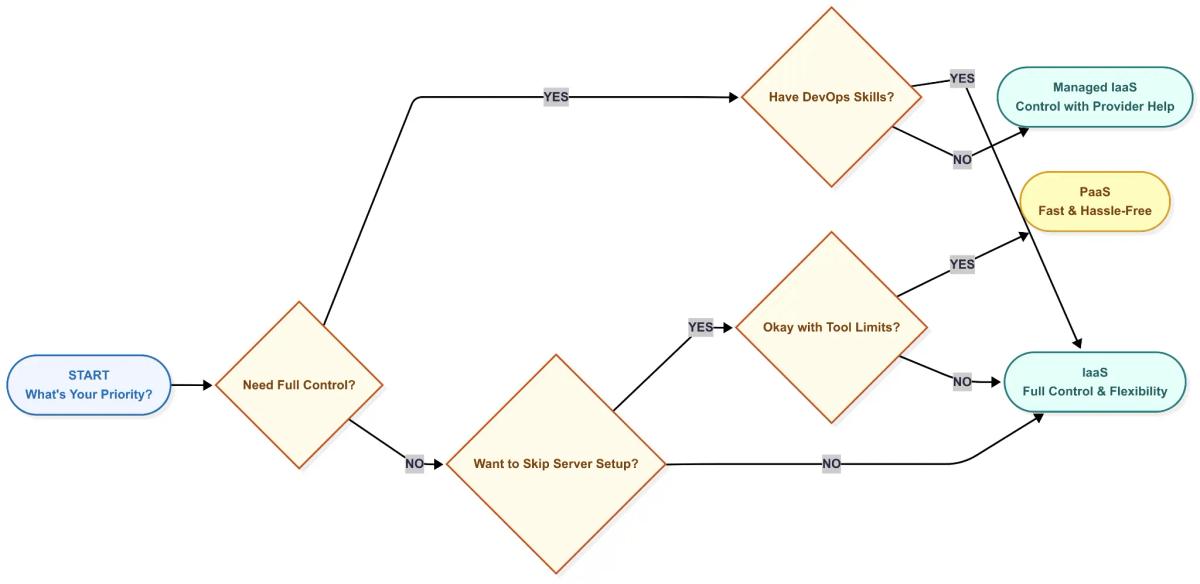
Technical Evaluation
Look at app dependencies. Legacy systems or specific OS-level needs typically rule out PaaS.
Consider your security and compliance requirements. If your stack demands full control over encryption, patching, and IAM, go with IaaS.
Assess your existing CI/CD workflows. PaaS works best with modern GitOps pipelines. IaaS is a better fit if you’re already running custom scripts or IaC.
Organizational Perspective
Teams with in-house DevOps skills should lean toward IaaS. It offers full control and supports complex, scalable architectures.
Agile product teams focused on speed and shorter delivery cycles will benefit more from PaaS. It reduces operational load and speeds up releases.
For industries with strict compliance needs, where hardened OS images, private networking, and detailed audit trails are essential, IaaS is the safer choice.
Financial Considerations
Don’t just compare monthly bills. Review TCO vs ROI over 1, 3, and 5 years.
Account for the cost of scaling, potential lock-in, and what it might take to migrate if your needs change.
Evaluate procurement complexity. PaaS may involve bundled pricing, while IaaS requires closer resource planning and license tracking.
Some businesses also prefer alternative payment options for added privacy or convenience.
Choosing a provider that supports buying dedicated servers with Bitcoin can streamline procurement and offer more flexible billing arrangements.
Bridging the Gap: Combining IaaS and PaaS
You don’t have to pick one or the other. Many engineering teams use both. For example, running Kubernetes clusters on IaaS gives full control over orchestration, while using a PaaS layer for CI/CD speeds up app delivery.
Hybrid setups are now common in cloud-native environments. Teams use IaaS as a foundation for custom networking, databases, or security workloads, then layer PaaS on top to streamline developer workflows and internal platforms.
FAQs
Q. Can you give a few examples of IaaS and PaaS services?
- IaaS examples: RedSwitches, OVHcloud, Hetzner, Leaseweb, Cherry Servers; these provide raw infrastructure, such as bare metal servers and dedicated infrastructure that you fully configure.
- PaaS examples: Heroku, Google App Engine, AWS Elastic Beanstalk, Microsoft Azure App Service, Red Hat OpenShift. These offer ready-to-use platforms where the provider manages infrastructure, runtime, and scaling so you can focus on application code.
Q. Does AWS offer IaaS or PaaS services?
AWS offers both IaaS and PaaS services. EC2 is a classic IaaS product, giving you full control over compute resources. AWS Elastic Beanstalk and AWS App Runner are PaaS options that manage infrastructure so you can focus on code.
Q. Is Google Cloud more focused on IaaS or PaaS?
Google Cloud supports both IaaS and PaaS. Google Compute Engine is an IaaS solution for full control, while Google App Engine is a PaaS platform for simplified app deployment. Many teams mix both based on their needs.
Q. How do I know if IaaS or PaaS fits my project better?
Choose IaaS if you need OS-level control or custom environments; choose PaaS if you want faster deployments without managing servers. IaaS suits legacy support and custom tooling, while PaaS is best for speed and reduced operational overhead.
Q. Which model is better for scaling apps?
IaaS is better for custom scaling control, while PaaS offers automated scaling for speed. IaaS lets you fine-tune performance or run hybrid setups, while PaaS scales automatically based on predefined rules but offers less customization.
Fatima J.
Technical Writer
Fatima is a writer who has authored a wide range of technical guides for the RedSwitches blog, covering Linux, servers, and hosting topics, with a focus on making hands-on subjects clear and approachable.

BeamMP Dedicated Server Setup Guide (2026)
Build and host a reliable BeamMP dedicated server on Windows or Linux with setup, configuration, optimization, security, and troubleshooting guidance.
ASKA Dedicated Server Setup Guide: 2026
Learn how to successfully install, configure, secure, and troubleshoot an ASKA dedicated server for smooth, persistent multiplayer hosting in 2026.
Wreckfest 2 Dedicated Server Setup Guide 2026
Build a reliable Wreckfest 2 dedicated server with clear, practical steps for 2026 covering installation, configuration, ports, optimization, and troubleshooting.
Power Your Next Project With Bare Metal
10 min delivery, zero setup fees, and 24/7/365 human engineers across 20+ global locations.