Dedicated Server vs VPS: Which Hosting Is Right for You in 2026?
When you’re choosing between a Dedicated Server and a VPS, you’re deciding how much power, control, and freedom your hosting setup will give you.
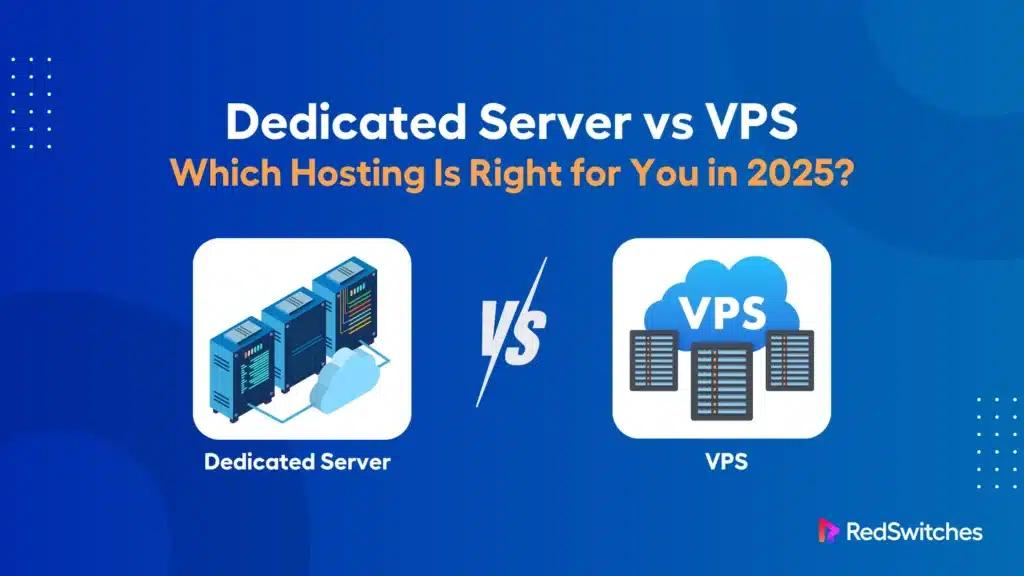
A Dedicated Server gives you full access to an entire physical machine, no shared resources, no neighbors. It’s built for high-demand workloads, full customization, and consistent performance.
A VPS (Virtual Private Server) splits one physical server into multiple virtual environments. You get dedicated resources, but you’re still sharing the hardware with others.
Hosting isn’t one-size-fits-all anymore. What worked for a small blog won’t work for a fast-growing store or a data-heavy app. And picking the cheapest option? That’s a quick way to outgrow your server and run into trouble.
Cost matters, but so do performance, security, and flexibility. The right choice depends on what your site or application really needs.
In this guide, we’ll break down the differences, compare real-world use cases, and help you decide what makes sense for your next move.
What Is a Dedicated Server?
A Dedicated Server is a physical machine reserved exclusively for you. Every component, from CPU cores to RAM, storage, and network ports, is fully assigned to your workload. No hypervisors. No neighbors. No shared resources.
You get full root access to the system. That means you can install any software, run custom configurations, and use every bit of the server’s performance. This setup is built for businesses that can’t afford interruptions, unpredictable performance, or resource limits.
Features
- You control the full hardware stack, CPU, RAM, disk, and bandwidth.
- No virtualization layers. Everything runs directly on bare metal. Your data never shares space with another client.
- You choose the operating system, security tools, and performance tuning.
Pros
- Consistent performance with zero resource contention.
- Full control over the server environment.
- Better physical security and compliance potential.
- Ideal for high-traffic, high-load, or sensitive applications.
Cons
- Higher monthly cost.
- Scaling takes more time, and upgrades need hardware changes.
- Requires more server management experience.
What Is VPS?
A Virtual Private Server (VPS) is one part of a larger physical server. That server is split into multiple virtual machines, each isolated and configured as a standalone environment. You are assigned resources, including CPU, RAM, and disk space, to your VPS.
Unlike shared hosting, a VPS gives you root access and the freedom to customize. But since you’re still sharing physical hardware with others, some limitations apply, especially under heavy load.
Features
- A virtual environment that acts like a full server.
- Dedicated portions of CPU, memory, and storage.
- Root access for custom installs and scripts.
- Managed by a hypervisor (like KVMor VMware) for isolation and resource control.
Pros
- Lower cost than a full dedicated server.
- Easy to scale up as your resource needs grow.
- Great for development, staging, or low to moderate traffic apps.
- Faster setup and deployment.
Cons
- Still shares hardware with other VPS clients.
- Performance can dip during peak usage times.
- Slightly less secure than full hardware isolation.
Dedicated Server vs VPS: Key Technical Differences
Let’s start with a quick snapshot of the main differences between a dedicated server and a VPS.
| Feature | Dedicated Server | VPS Hosting |
|---|---|---|
| Hardware Ownership | A full physical machine reserved for one user | Virtual slice of a shared physical machine |
| Resource Contention | None, no noisy neighbors | Possible, others may affect performance |
| Performance Consistency | High, 100% of resources available anytime | Varies, depends on the host server load |
| Customization | Full root + hardware-level flexibility | Root access, but limited by virtual infrastructure |
| Scalability | Slower, hardware-dependent | Fast and flexible, just upgrade the plan |
| Cost | Higher, pays for all physical capacity | Lower pays for a portion of shared resources |
| Best Use Case | High-traffic sites, sensitive data, custom stacks | SMB sites, test environments, and early-stage apps |
1. Hardware Ownership
Dedicated Server
You own every byte and clock cycle. A dedicated server means you’re not just renting server space; you’re renting the entire machine. The full CPU, memory, storage, I/O, and network interface are allocated to you. There’s no hypervisor layer, no virtualized abstraction, and no neighbors to share with.
This kind of isolation matters. Whether you’re running data-heavy analytics, custom OS configurations, or resource-hungry applications, a dedicated server gives you raw access to everything the hardware has to offer.
VPS Hosting
A VPS runs inside a physical server that’s shared with others. Through a hypervisor, the system is split into multiple virtual servers. Each VPS has its operating system, CPU allocation, RAM, and storage, but all of these resources are carved from a shared machine.
That means your slice can only perform as well as the virtualization layer and the physical host allow it to. If other users start pushing the limits, your performance may suffer. This is the “noisy neighbor” problem: when one VPS hogs the shared CPU or I/O, others feel the slowdown.
Key takeaway
If complete isolation and zero interference are must-haves, a dedicated server is the only option. With VPS hosting, you get convenience and savings, but you don’t get full ownership of the hardware.
2. Performance Consistency
Dedicated Server
You’re in full control of the hardware stack. CPU-intensive apps, large databases, or high-traffic websites run without bottlenecks. There’s no virtualization overhead, and no hypervisor mediating your access to compute resources.
Because you’re not sharing the machine, performance stays predictable. Whether it’s day or night, traffic spike or idle time, you always get full CPU speed, memory bandwidth, and disk I/O. This is essential for workloads such as video processing, AI inference, and heavy backend computing.
VPS Hosting
VPS performs well for most lightweight and mid-range use cases. You’ll get solid speed when traffic is stable. But when the physical server is loaded with active VPS instances, your performance may fluctuate. That’s especially true if multiple users reach CPU or storage limits simultaneously.
The hypervisor splits up access to the hardware. That means scheduled access to CPU cycles, managed memory paging, and virtualized disk I/O. These systems are efficient, but not perfect. There’s always a performance tax compared to bare metal.
Modern VPS platforms (like KVM and VMware) do a great job of minimizing this overhead. Still, they can’t match the raw, uninterrupted compute power of a dedicated machine.
Key takeaway
If performance needs to be consistent, every minute of every day, dedicated hosting is the winner. If you’re fine with occasional performance dips and don’t run mission-critical workloads, VPS hosting gets the job done.
3. Resource Scalability
Dedicated Server
Scaling a dedicated server is a physical process. You either upgrade the server’s hardware, add more RAM, use better CPUs, use faster disks, or deploy more servers in parallel. This takes planning and often involves downtime.
But the upside? You get full control over the growth path. You can build custom clusters, load-balanced environments, or geo-distributed setups. Dedicated servers enable you to architect your scaling strategy with no virtual limits.
You’re not stuck with the constraints of a parent machine. You can go as big as your infrastructure and budget allow. If you run a fast-growing application or expect major traffic spikes, dedicated servers offer the headroom you’ll eventually need.
VPS Hosting
VPS hosting is built for convenience. Most providers allow you to scale your CPU, RAM, or disk with just a few clicks. It’s fast and works well, until you hit the physical limits of the parent server. At that point, the provider either migrates you to a new plan or caps your current plan.
You’re always tied to a shared machine. That means you’re limited by what that host can support. No clustering. No advanced networking. Just vertical scaling within set boundaries.
VPS is great for short-term growth. But long-term? You’ll run into ceilings.
Key takeaway
VPS hosting scales faster, but dedicated servers scale further. If your app is growing rapidly, don’t wait until you outgrow your VPS; start thinking in terms of physical capacity and clustering from the beginning.
4. Security & Compliance
Dedicated Server
Security starts with physical isolation. When you use a dedicated server, you’re not sharing the machine, the CPU, or even the memory controller with anyone else. That eliminates shared vulnerabilities from the start.
You control the entire OS, firewall, and every installed package. You can enable full-disk encryption, utilize hardware firewalls, configure custom DDoS protection, and manage security patches at your own pace.
For industries with strict data handling requirements, like healthcare, finance, and government, dedicated servers are often the only acceptable option. If you’re working with HIPAA, PCI-DSS, or GDPR-sensitive workloads, a shared environment isn’t enough.
VPS Hosting
VPS platforms offer strong virtual isolation. Each virtual machine runs its own operating system (OS) and is isolated by a hypervisor. Most modern systems are designed to be hardened and secure. For general workloads, that’s enough.
However, you don’t have full control over the hypervisor or the host operating system. And that means some risk remains. There’s always a small chance of VM escapes, side-channel attacks, or admin-level access by the provider.
For basic apps, ecommerce, blogs, or SaaS MVPs, VPS is secure enough. But for compliance-heavy environments? It won’t meet the audit requirements.
Key takeaway
Dedicated servers are built for compliance. VPS hosting is secure, but it’s still a shared environment. If you’re handling regulated data orcustomer PII, don’t take shortcuts; use a physically isolated server.
5. Customization & Control
Dedicated Server
You get full control, top to bottom. This includes root access, BIOS settings, custom OS installation, and even hardware-level configurations, such as RAID setups or kernel module tuning.
Need a non-standard Linux distro? No problem. Want to optimize I/O for a specific database engine? You can. You’re not limited by what the host allows or what the hypervisor supports. You control how the server boots, operates, and what is installed on it.
This kind of deep control is essential for custom stacks, legacy systems, or highly specialized apps. It’s also essential if you’re running performance-tuned environments or working on low-level development.
VPS Hosting
VPS gives you root access on the virtual machine. That means you can run your own web server, database, or app stack. But you don’t have access to the host system, kernel modules, BIOS, or physical RAID.
Most providers block functions that impact other tenants, like custom boot loaders or deep networking tweaks. And you won’t be able to load drivers or perform hardware-level tuning.
For most standard setups, VPS works fine. However, if you require full control over both the hardware and software environment, a VPS will limit you.
Key takeaway
Dedicated servers offer full-stack control. VPS provides software freedom, but with hardware limitations. Power users and development teams working on complex or optimized environments always prefer dedicated solutions.
6. Long-Term Cost Efficiency
Dedicated Server
Yes, dedicated servers cost more upfront. But that cost is fixed. You pay for a full machine and get everything it offers, no shared components, no throttled performance, no surprise charges for burst CPU or bandwidth use.
When you’re hosting heavy apps or multiple projects on one box, dedicated becomes cost-effective fast. You avoid the inefficiencies of multiple VPS accounts, and you get predictable billing without worrying about overage limits.
There’s also no virtualization tax. No performance loss from the hypervisor. Every dollar you spend goes toward real computing power.
VPS Hosting
VPS pricing is attractive early on. Plans start at a low cost, and scaling up simply involves clicking a few buttons. However, as your resource needs grow, you begin to encounter limits. Costs rise. You may need to migrate to a larger host or a dedicated server in the future.
That migration takes time, risks downtime, and adds complexity to your stack. You might also end up paying more for performance that still doesn’t match a properly tuned dedicated machine.
Key takeaway
VPS is good for short-term affordability. Dedicated servers win in the long run, especially if you plan to scale, host resource-heavy apps, or avoid future migrations.
Smooth Migration from VPS to Dedicated? We’ve Got You Covered
Starting with VPS hosting makes sense. It’s fast to launch, affordable, and gets the job done for most early workloads. But growth comes fast. And with it, higher traffic, heavier apps, and stricter requirements.
At some point, VPS hits a ceiling. You start noticing slower performance, inconsistent response times, or resource limits that hinder your project’s progress. That’s when it’s time to switch, before it starts hurting your business.
We make that switch easy.
- Workload Assessment We review your current setup, including CPU load, disk usage, memory, and network traffic. Based on real data, we help you choose the right dedicated server configuration.
- End-to-End Migration Our engineers handle everything. We back up your data, transfer files and databases, test them in the new environment, and prepare them for go-live.
- Zero Downtime Cutover We sync your live VPS while it runs. When everything is ready, we switch traffic over, no delays, no service interruptions.
- Post-Migration Monitoring After launch, we closely monitor performance to ensure smooth operation. If something needs tuning, we handle it fast.
You don’t need to plan migrations manually or risk breaking things. We’ve done this hundreds of times. We ensure that your transition is smooth, secure, and stress-free.
Use Cases: Which Workloads Belong Where
Not all workloads are suitable for the same hosting plan. Let’s skip the generic advice and look at real 2026 use cases.
| Workload Type | Best Fit | Why |
|---|---|---|
| Startup SaaS App | VPS | Fast to launch, easy to scale early, and low overhead |
| Dev/Test Environment | VPS | Flexible setups, ideal for short-term use |
| High-Traffic Magentoor WordPressStore | Dedicated | Handles consistent traffic spikes, PCI compliance, and caching flexibility |
| AI/ML Training Pipelines | Dedicated | Needs raw GPU access, high-speed NVMe, full control |
| Game Server Hosting (Minecraft, ARK) | Dedicated | CPU-intensive, latency-sensitive, better user experience |
| Video Streaming Platform | Dedicated | Heavy bandwidth usage, high I/O, must avoid throttling |
| Agency Hosting Multiple Clients | VPS → Dedicated | Start lean with VPS, upgrade to isolated infra as client load grows |
Key point:
VPS isn’t the wrong choice. It’s simply not designed to handle everything in the long term. Dedicated servers step in when performance, consistency, and control are most crucial.
How to Choose (With Confidence, Not Guesswork)
Still unsure whether to go with a dedicated server or stick with VPS hosting? Ask yourself the right questions, and let the answers guide your decision.
How predictable is my workload?
- If you know your usage patterns and can accurately forecast growth, consider a Dedicated plan.
- If your workload is sporadic or your growth is gradual, VPS hosting may be sufficient for now.
Am I building for now, or for what’s next?
- Planning new products, scaling traffic, or adding team members? Don’t wait. Start planning for dedicated early.
- Running a lightweight app with modest needs? VPS hosting provides flexibility without upfront costs.
How much control do I need under the hood?
- Do you require a custom operating system, hardware-level adjustments, or sophisticated security protocols? Dedicated gives you full access, no limits.
- Just running a LAMP stack or a CMS like WordPress? VPS will cover the basics.
Not sure what’s right for your setup? Speak with our engineers, not sales representatives. We’ll review your actual infrastructure, workload, and plans, and then recommend the solution that best fits your needs. No pressure.
FAQs
Q. Is a dedicated server better than VPS hosting?
It depends on what you’re running. If your project needs consistent high performance, custom configurations, or compliance-level security, a dedicated server is a better choice. For smaller workloads or flexible growth, VPS hosting is an ideal starting point. At RedSwitches, we help you choose based on what fits, not just what’s bigger.
Q. What’s the difference between a VPS and a dedicated IP?
A VPS is a virtual server environment that has its operating system and resources. A dedicated IP is just a static IP address assigned exclusively to your server. You can have a dedicated IP on either a VPS or a dedicated server. If you’re unsure about your setup, we can check it for you.
Q. How can I check if I’m using a VPS or a dedicated server?
Check your hosting dashboard or ask your provider directly. If you’re using RedSwitches, our support team can confirm this for you in minutes. Do you need root access, full hardware control, or custom BIOS settings? That’s dedicated. If your server is running in a virtual environment, that’s a VPS.
Q. Do I need a dedicated server for better security?
If you’re handling sensitive data, running compliance-heavy applications (such as HIPAA or PCI-DSS), or need full isolation from other users, then a dedicated server is the safer choice. VPS is secure for general workloads, but it still shares hardware. At RedSwitches, we can assess your risk and help you choose the best option.
Q. Which is more scalable, a VPS or a dedicated server?
VPS is faster to scale in the short term; you can upgrade RAM, CPU, or disk on the fly. But it has limits. Dedicated servers scale further long term. You can build clusters, upgrade hardware, or run custom network setups. If you’re unsure how your workload will grow, we’ll help you plan.
Fatima J.
Technical Writer
Fatima is a writer who has authored a wide range of technical guides for the RedSwitches blog, covering Linux, servers, and hosting topics, with a focus on making hands-on subjects clear and approachable.

Aloft Dedicated Server Setup Guide 2026
An Aloft world can grow quickly when your crew is building, exploring, and sailing between floating islands together. But when the player hosting the session leaves, everyone may lose access to that shared world until the host returns.
The Front Dedicated Server Setup: Windows, Linux, Ports and Fixes
Your The Front dedicated server can launch successfully while your friends still cannot join. The real test is a world that players can reach, and return to without losing progress.
Subnautica Dedicated Server Setup (2026): Nitrox 1.8.1 Guide
Your group has a base to finish and deeper waters to explore, but the next session depends on someone keeping the server online. Can a Subnautica dedicated server give everyone access without that player staying in the game?
Power Your Next Project With Bare Metal
10 min delivery, zero setup fees, and 24/7/365 human engineers across 20+ global locations.