
Support Requests
Support is built into the portal and answered by engineers. Because you are signed in, the team already has your account and server details, so you never start by explaining who you are.
Open a request
Section titled “Open a request”-
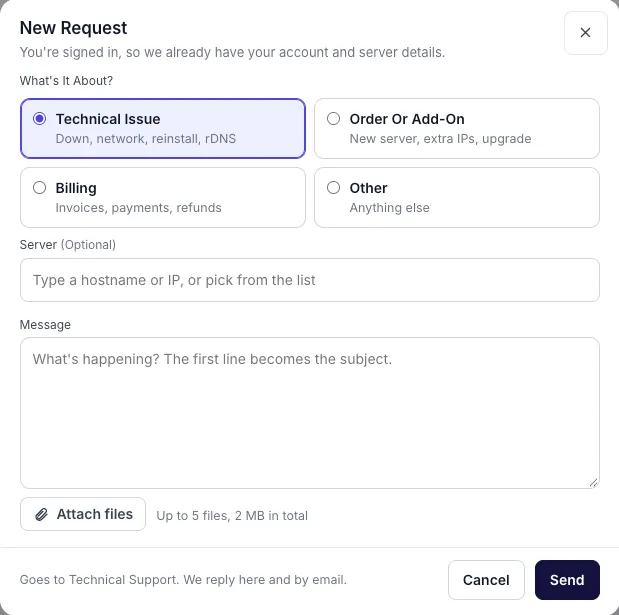
Select Support in the sidebar, then New Request.
-
Choose what it is about:
Category Use it for Technical Issue A server that is down, network problems, reinstalls, reverse DNS Order Or Add-On A new server, extra IPs, an upgrade Billing Invoices, payments, refunds Other Anything else -
Optional: pick the server it concerns by hostname or IP address. If that server is down, tick This server is down.
-
Write your message. The first line becomes the subject.
-
Optional: attach files, up to 5 files and 2 MB in total.
-
Select Send.
Replies arrive in the portal and by email.
Follow a request
Section titled “Follow a request”The Support page lists your requests on the left and the conversation in the middle. The details panel on the right shows the engineer, priority, the server involved and any files.
- Reply in the box at the bottom of the conversation.
- To reopen a resolved request, reply to it or select Reopen.
Live chat
Section titled “Live chat”Select Live Chat at the top of the Support page to talk to the team in real time.
Suggest a feature
Section titled “Suggest a feature”Open the account menu at the bottom of the sidebar and select Request a feature to tell the product team what you would like built. You can also use the feature request form in these docs.