
Team Members
Bring your whole team in without sharing a password. Team members log in with their own credentials and see only what you allow. The account owner always has full access.
Invite someone
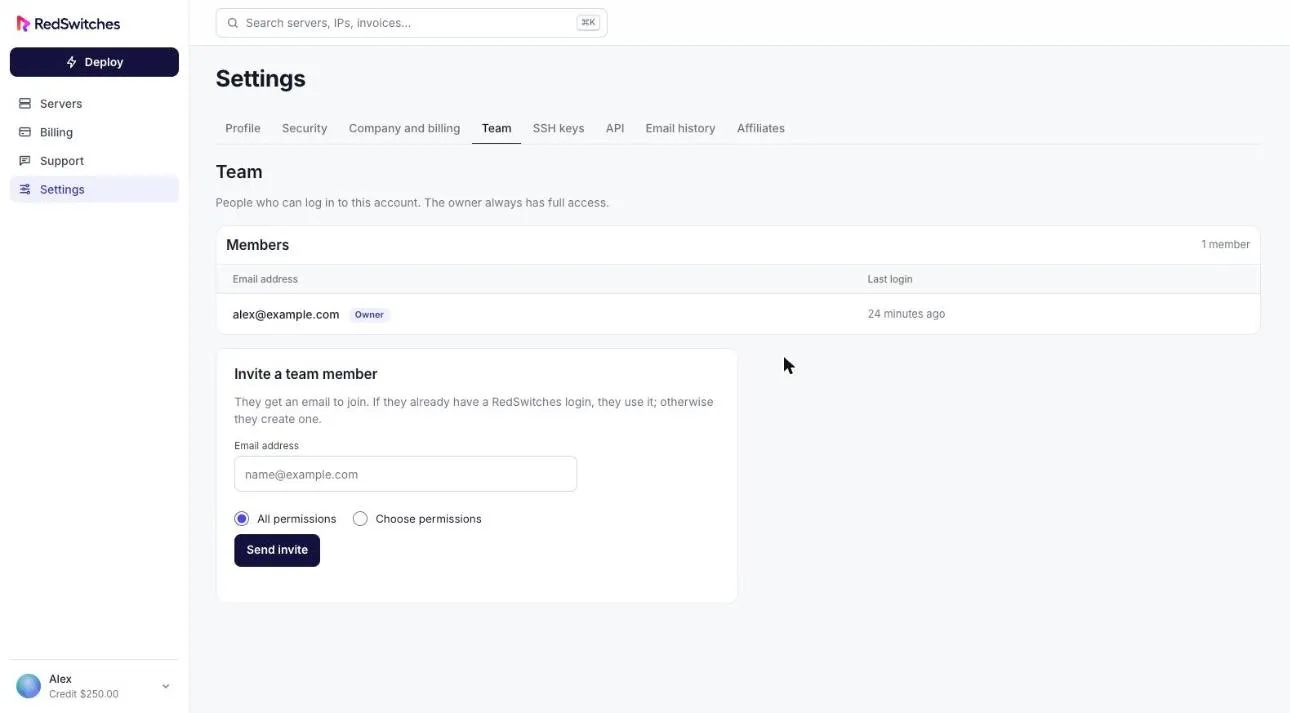
Section titled “Invite someone”- Select Settings, then the Team tab.
- Under Invite a team member, enter their email address.
- Choose All permissions or Choose permissions.
- Select Send invite.
They receive an email to join. If they already have a RedSwitches login they use it; otherwise they create one.
Permissions
Section titled “Permissions”With Choose permissions you can grant any combination of:
| Permission | Allows |
|---|---|
| Modify Master Account Profile | Changing the account’s profile information |
| View & Manage Contacts | Managing contacts |
| View Products & Services | Seeing servers and add-ons |
| View & Modify Product Passwords | Password resets and similar actions |
| Perform Single Sign-On | Signing in to services |
| View & Pay Invoices | Seeing and paying invoices |
| View & Open Support Tickets | Opening and replying to support requests |
| View & Manage Affiliate Account | Seeing affiliate figures and requesting withdrawals |
| View Emails | Seeing the account’s email history |
| Place New Orders/Upgrades/Cancellations | Ordering, upgrading and cancelling |
The invite form lists every permission available.
See who has access
Section titled “See who has access”The Members list shows each person’s email address, role and last login.