
Connect to Your Server
Your server is ready to use the moment the portal says so, usually about 3 minutes after payment. Log in over SSH as root, using either the SSH key you chose at deployment or the root password shown in the portal.
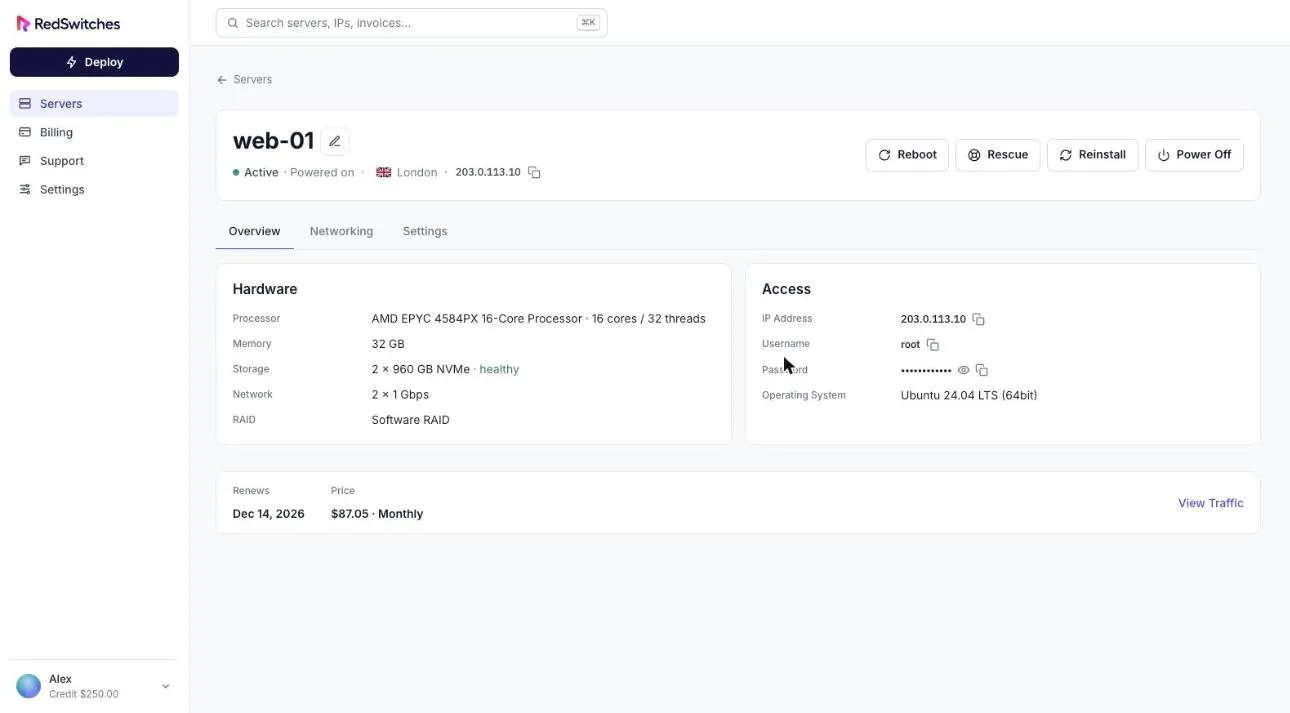
Find your access details
Section titled “Find your access details”- Select Servers in the sidebar and open your server.
- On the Overview tab, the Access card shows the IP address, username, password and operating system.
- Use the copy button beside any value. The password is hidden until you select the eye icon.
Log in with an SSH key
Section titled “Log in with an SSH key”If you chose an SSH key at deployment, it is installed on first boot.
ssh root@YOUR_SERVER_IPIf your private key is not in the default location, point to it:
ssh -i ~/.ssh/id_ed25519 root@YOUR_SERVER_IPLog in with the password
Section titled “Log in with the password”If you deployed without a key, use the root password from the Access card. A root password is created for every server, including those deployed with a key.
ssh root@YOUR_SERVER_IPIf you cannot connect
Section titled “If you cannot connect”- Just deployed? The server may still be completing its first boot. Wait a few minutes and try again.
- Locked out of the operating system? Use the remote console, which works even when the OS is down, or boot into rescue mode.
- Still stuck? Open a support request.