High Availability Clusters Explained: Architecture, Tools, & Real Use Cases
High-availability clusters are critical to keeping your systems online, always. This guide walks you through HA architecture, tools, models, and expert strategies.
A high-availability cluster is a system built to keep your services online even when parts of it fail. It does this by running backup servers that instantly take over if something goes wrong.
Downtime isn’t just annoying. For platforms like Amazon or banking apps, it can cost over $300,000 per hour. Outages like the AWS crash or airline system failures show how fast things break, and how hard they hit.
High availability clustering isn’t disaster recovery. It prevents failure, not just reacts to it. And it’s not just about speed like high-performance clusters.
Think of it like a fire station. If one truck is out, another rolls out. In 2026’s always-on, cloud-heavy world, that level of readiness isn’t optional. It’s required.
What Is a High Availability Cluster?
A high availability cluster is a group of servers, or nodes, that work together to keep your services running even if one of them fails. If one node goes down, another picks up the load immediately. You don’t lose access. Your users don’t notice a thing.
This is not the same as disaster recovery. Disaster recovery is about getting things back online after failure. High availability clustering is about making sure failure doesn’t stop your service in the first place.
It’s also different from a high performance cluster. Those are built for speed, usually to process massive data sets or power-demanding workloads. HA clusters are built for uptime and fault tolerance.
You measure their success using metrics like:
- MTBF: Mean Time Between Failures, how often something breaks
- RTO: Recovery Time Objective, how fast you recover
- RPO: Recovery Point Objective, how much data you can afford to lose
Here’s a real example. A hospital runs its patient records on an HA cluster. If the main server crashes, another one steps in instantly. The system doesn’t go down. Lives aren’t put at risk.
A high availability cluster prevents downtime by removing single points of failure. It doesn’t wait for a crash; it works through it.
Infrastructure providers offering bare-metal environmentswith cluster-grade failover capabilities make it easier to build this level of resiliency out of the box
Core Components and Workflow of HA Clusters
A high availability cluster has one job: keep things running. To do that, it relies on a few key parts, each one playing a role in keeping your system online.
- Cluster Nodes: These are the actual servers. In an active-passive setup, one node handles everything while another waits in standby. In an active-active cluster, multiple nodes share the load. If one fails, the others keep working without a hitch. We will go over this in more detail later in the article.
- Shared Storage: All nodes must access the same data. This can be a SAN (Storage Area Network), NAS (Network-Attached Storage), or replicated block devices. If storage isn’t consistent, the failover won’t work.
- Heartbeat & Monitoring: Each node watches the others through a private network link. If one stops responding, the rest assume it’s failed and begin the failover process. This constant checking is called a heartbeat.
- Load Balancing: Before anything fails, you still need to distribute traffic. Load balancers like HAProxy, NGINX, or cloud-native services (e.g., AWS ELB) make sure no single node gets overwhelmed.
- Cluster Management: Tools like Pacemaker, Corosync, or Kubernetescontrol planes handle the logic, detecting node failures, electing a new primary, and triggering recovery steps. Without this logic, your HA setup falls apart.
How Does It Work In Real-Time?
Here’s how a high availability cluster responds when something goes wrong:
- One node stops working. It could be a hardware crash, network issue, or system error.
- The heartbeat system notices. Nodes in the cluster constantly send health checks to each other. If a node doesn’t respond within a set time, it’s marked as failed.
- Cluster management steps in. Tools like Pacemaker or Kubernetes decide which standby node should take over. This new node becomes the active one.
- Traffic gets rerouted. The load balancer updates its routing to send all incoming requests to the new active node.
- The failed node is isolated. It’s either rebooted, fenced off (using STONITH(Shoot The Other Node In The Head)), or repaired manually, depending on your setup.
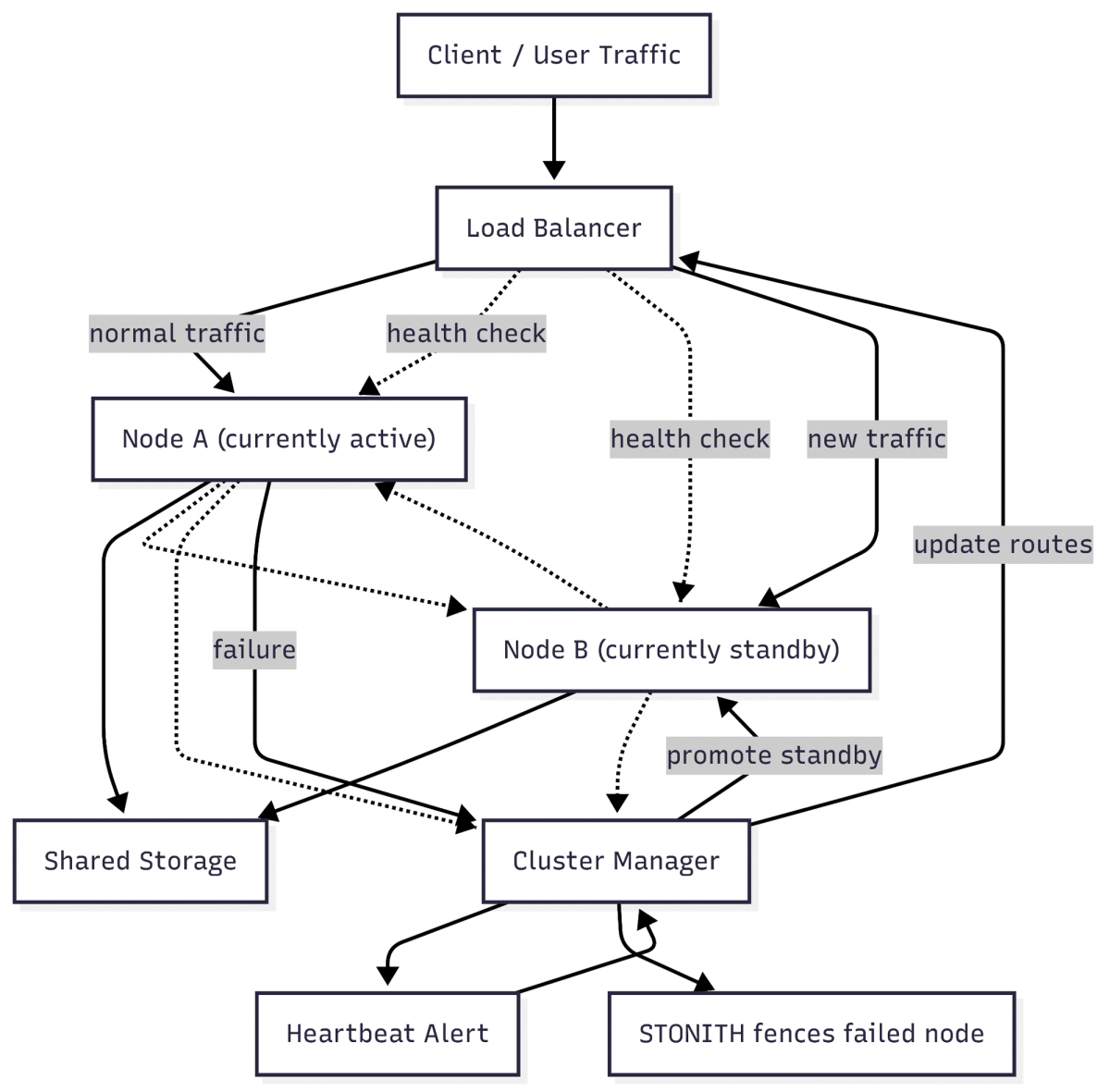
Let’s explain this diagram
Components (the boxes)
| Box | What it is | Why it matters |
|---|---|---|
| Client / User Traffic | Real people or apps sending requests. | They start the whole chain. |
| Load Balancer | A small gateway server. | Decides which worker server handles each request. |
| Node A / Node B | The worker servers (also called “nodes”). | They run your website, database, or app. |
| Shared Storage | Central disk space both nodes can read and write. | Keeps data identical on both servers. |
| Cluster Manager | Software that watches the nodes. | Makes the call when one node fails. |
| Heartbeat Alert | Signal that says “I can’t hear one node.” | Triggers the fail-over process. |
| STONITH fences failed node | Power-off or block command. | Stops a broken node from touching data. |
The solid arrows (normal data flow)
- Users → Load Balancer All requests first reach the Load Balancer.
- Load Balancer → Node A While everything is healthy, Node A handles the work.
- Node A → Shared Storage Node A reads and updates the same data store used by Node B.
The dotted arrows (health checks)
- Load Balancer → Nodes The balancer keeps pinging both nodes to see if they respond.
- Node A ↔ Node B The nodes ping each other directly. If one stops answering, the other knows.
- Nodes → Cluster Manager Each node also reports its own status to the Cluster Manager.
What happens when Node A fails
- Failure detected Health-check signals from Node A stop. The Cluster Manager raises the Heartbeat Alert.
- Promote standby Cluster Manager tells Node B, “You are active now.”
- Update routes Cluster Manager instructs the Load Balancer to send new traffic to Node B.
- Fence failed node Cluster Manager triggers STONITH. Node A is powered off or isolated so it can’t corrupt data.
- Service continues Users now talk to Node B. They experience no downtime.
Recovery
- Admins fix Node A and bring it back online.
- Cluster Manager sets it to “standby,” ready for the next incident.
That’s the entire high-availability cycle: monitor → detect → switch → isolate → recover.
This entire process happens automatically, often in seconds, without you lifting a finger.
Example: During a holiday sale, your e-commerce platform crashes under a traffic spike. Thanks to your HA cluster setup, the standby node takes over immediately. No orders are lost. The checkout flow never stops.
That’s the power of high availability clustering done right.
Cluster Models: How Different High Availability Setups Work
There’s no one-size-fits-all approach to high availability clustering. The right model depends on your workload, risk tolerance, and budget. Let’s break down the most common cluster models: active-active, active-passive, hybrid, and two key storage models: shared-disk and shared-nothing.
Active-Active Clustering
An active active cluster runs multiple nodes simultaneously. Each one actively handles live traffic. There’s no standby machine waiting in the wings; every node contributes to workload processing.
Why it matters
This model gives you the fastest failover. If one node fails, the remaining nodes keep running. No time is wasted switching roles. It also balances the load between nodes, making it suitable for high-traffic systems.
How it works
- All nodes serve client requests at the same time.
- If one node goes down, traffic automatically shifts to the others.
- Cluster management keeps data synchronized across nodes.
Advantages
- No idle hardware, everything is used.
- Great for horizontal scaling.
- Faster failover.
- Ideal for stateless services or distributed databases.
Challenges
- Data consistency can be harder to maintain.
- Requires careful sync strategies and conflict resolution.
- More complex configuration.
Use cases
- MySQL Group Replication allows multi-primary write operations.
- Kubernetes HA uses multiple control plane nodes to maintain uptime.
- Content delivery networks, API gateways, and load-balanced app servers also benefit.
If you want performance without delay, an active-active setup makes sense. But it demands careful planning, especially for apps that manage state or write-heavy databases.
Active-Passive Clustering
An active-passive high-availability setup uses one node to serve all traffic while others remain on standby. These standby nodes don’t do anything until the active one fails.
Why choose this
This model is easier to set up and maintain. You don’t have to deal with traffic balancing or complex sync issues. It’s perfect when availability is important, but performance isn’t the main concern.
How it works
- One active node does the job.
- Standby nodes monitor its health via heartbeat.
- If it fails, a standby node is promoted and takes over.
Advantages
- Simpler to configure.
- Lower resource usage during normal operation.
- Fewer risks with data conflicts.
Challenges
- Failover takes longer than active-active.
- Idle hardware means wasted capacity in some cases.
- Performance may dip during recovery.
Use cases
- Internal enterprise apps.
- Single-tenant database systems.
- File servers or backup systems.
An active-active HA cluster keeps all nodes running simultaneously, ideal for applications needing real-time load distribution.
With unmetered bandwidth and low-latency links between nodes, this setup ensures continuous availability across data centers.
Hybrid Clustering
A hybrid HA cluster mixes both models, some nodes are active, others are passive. You might use this setup if different parts of your system have different needs.
Why go hybrid
Sometimes, one size doesn’t fit all. For example, a frontend web app might use active-active for speed, while its backend database runs active-passive for safety.
How it works
- Some zones or regions run active-active.
- Others have passive failover nodes.
- Your load balancer and cluster manager route traffic accordingly.
Advantages
- Flexible resource allocation.
- Better risk distribution across services.
- Can balance performance and safety.
Challenges
- Configuration gets more complex.
- Needs more monitoring and planning.
- Can introduce uneven performance if not managed well.
Use cases
- Global applications with multiple regions.
- SaaS products with active frontend and passive database tiers.
- Retail apps balancing online store and inventory systems.
A hybrid model works when your services don’t all need the same level of availability or performance. It’s useful but only worth the effort if you know how to manage both styles.
Shared-Disk vs. Shared-Nothing Storage
HA clusters rely on shared data. That’s where storage design matters. There are two main models: shared-disk and shared-nothing.
Shared-Disk
All nodes access the same storage device, usually a SAN or NAS. This setup makes sure that whichever node takes over, it’s looking at the same data.
Advantages
- Simple to configure.
- No need for complex replication.
- Works well for legacy apps that expect a central disk.
Challenges
- Storage is a single point of failure.
- You’ll need redundant paths, controllers, and backups.
- Doesn’t scale well for high-volume writes.
Best for
- File servers
- Older database systems
- Environments with central storage infrastructure already in place
Shared-Nothing
Each node has its own storage. Data is replicated across nodes, so if one fails, the others still have it.
Advantages
- No single point of failure in storage.
- Better performance under load.
- Scales well with distributed systems.
Challenges
- You must manage replication and consistency.
- Split-brain issues can arise if sync isn’t tight.
- Configuration is more complex.
Best for
Recap Table
| Cluster Model | Performance | Complexity | Hardware Use | Best For |
|---|---|---|---|---|
| Active-Active | High | High | Full | Web servers, stateless services |
| Active-Passive | Medium | Low | Partial | Databases, legacy systems |
| Hybrid | Medium-High | High | Mixed | Multi-tier apps, global services |
| Shared-Disk Storage | Medium | Medium | Shared | Traditional setups, file servers |
| Shared-Nothing | High | High | Distributed | Cloud-native and scalable apps |
Choosing the right model depends on what you care about most: speed, simplicity, or flexibility. Each one has trade-offs. The key is matching the cluster design to your workload and goals. The smart move is aligning your cluster design with a dedicated server platform that gives you control over ports, storage, and failover logic.
Active-Active vs. Active-Passive High Availability Clusters
When designing your high availability cluster, the architecture choice matters just as much as the technology behind it. The two dominant models, active-active cluster and active-passive high availability, address different priorities: speed vs. simplicity, full performance vs. ease of failover.
| Attribute | Active-Active Cluster | Active-Passive High Availability |
|---|---|---|
| Utilization | All nodes serve live traffic | Only one node serves traffic |
| Performance | High (scales horizontally) | Moderate (limited by one node) |
| Complexity | Higher (requires synchronization) | Lower (easier configuration) |
| Failover Speed | Instant or seamless | Slight delay during switchover |
| Use Cases | Scalable, real-time workloads | Legacy apps, internal systems |
Now, let’s discuss these in detail. Below is a deep dive into how they compare across key dimensions.
Utilization
Active-Active
In an active-active cluster, all nodes serve live traffic simultaneously. That means every machine is contributing to the overall workload. Whether it’s handling requests, processing database writes, or serving static content, every node is doing real work; no standby hardware goes idle.
This leads to full resource utilization, which is ideal when you’re paying for expensive compute or when workloads need to scale horizontally. Since the nodes are all active, they must be aware of each other and keep their states in sync in real-time.
Active-Passive
An active-passive high-availability setup takes a more conservative approach. One node handles everything. The other nodes sit in standby mode, continuously monitoring the health of the active node. They don’t process live requests, until something breaks.
This setup leads to lower resource utilization during normal operation. You’re reserving hardware purely for emergencies. While it’s more cost-efficient from a management perspective, it means you’re not squeezing every drop out of your hardware unless a failure occurs.
Performance
Active-Active
Performance scales with your cluster. More nodes mean more throughput. Since load is distributed, you avoid bottlenecks under high demand.
However, maintaining consistency across active nodes (especially for databases or write-heavy systems) can add overhead. You’ll need tight synchronization, often through quorum-based mechanisms or consensus protocols like Paxos or Raft.
Active-Passive
Performance is bounded by the single active node. If it gets overloaded, there’s no help unless you manually scale up that node or trigger a failover. While this setup works fine for smaller or predictable workloads, it won’t keep up with rapid spikes in traffic.
The advantage is reduced complexity; there’s no need for real-time data sync between nodes, which makes this model more predictable in behavior.
Complexity
Active-Active
This model is inherently complex. You must manage synchronization, data replication, session state distribution, and collision handling. You also need careful planning for how your application handles simultaneous writes, network partitions, and rolling upgrades.
For web services, active-active is relatively simple (stateless design helps). But for databases or transactional systems, the architecture needs to be deliberate.
Active-Passive
It’s easier to configure and manage. You define a primary node and one or more backup nodes. If the primary fails, a backup takes over. No data replication is needed in real time, only during switch-over or scheduled sync windows.
This lower complexity makes active-passive suitable for legacy applications, internal tools, or infrastructure that isn’t built for concurrent activity.
Failover Speed
Active-Active
Failover is instant or nearly seamless. Since other nodes are already handling traffic, the system simply routes requests away from the failed node. There’s no need to “promote” a standby; it’s already in play.
This makes active-active ideal for zero-downtime environments like ecommerce sites, live streaming platforms, or financial systems where milliseconds matter.
Active-Passive
There’s a slight delay during failover. The system first detects failure via heartbeat, then elects or promotes a standby node to active status. This can take several seconds depending on your configuration.
While acceptable in many enterprise contexts, that delay can be risky for customer-facing platforms or APIs that require real-time availability.
Use Cases
| Use Case | Best Fit |
|---|---|
| High-traffic web servers with load balancers | Active-Active – for horizontal scaling across nodes with session-aware routing. |
| Sharded or replicated databases (e.g., MongoDB, Galera) | Active-Active – enables distributed write/read throughput and real-time sync. |
| Finance or HR systems with strict uptime but low concurrency | Active-Passive – ensures business continuity with minimal resource overhead. |
| Legacy ERP or line-of-business apps | Active-Passive – supports failover without re-architecting monolithic systems. |
| API clusters serving global users | Active-Active – paired with geo-distributed load balancing for low-latency response. |
| Cold-standby disaster recovery environments | Active-Passive – maintain ready-to-failover infrastructure with cost efficiency. |
| Web3validator or indexer nodes | Active-Active – supports redundancy and transaction consistency across chains. |
| Blockchain-based apps or smart contract runners | Active-Passive – keeps fallback nodes live for contract execution or sync errors. |
Both active-active clusters and active-passive high availability setups aim to keep your systems online, but they do it differently.
If uptime, scalability, and instant response are critical, active-active is your best bet. If simplicity, cost control, and predictable behavior matter more, active-passive fits better.
Choose based on what matters most to your application: performance or predictability. And if your workloads vary, you can even design hybrid clusters that combine the strengths of both models.
Types of HA Cluster Architectures and Deployment Patterns
When setting up a high availability cluster, the architecture you choose will depend on your environment, on-premise, cloud-native, or hybrid, and your infrastructure goals.
Below are the main deployment types and the tools that make them work.
On-Premise vs Cloud-Native Clusters
- On-PremiseHA Clusters run in your data center. You control the hardware, networking, and software stack. These are common in industries with strict data sovereignty or latency requirements.
- Cloud-Native Clusters run on public cloud platforms like AWSor Azure. They use managed services for failover, scaling, and storage replication. Ideal for fast deployment and flexible growth.
Hybrid clusters combine both, e.g., a local system backed by cloud standby instances.
Shared-Disk vs Shared-Nothing Architectures
- Shared-Disk Clusters use centralized storage (SAN or NAS). All nodes access the same disk pool. Easier to manage, but a single storage failure can impact the whole cluster unless storage is HA itself.
- Shared-Nothing Clusters replicate data across nodes. Tools like DRBD, GlusterFS, or Cephhandle sync. Better fault isolation, but adds replication overhead.
Load Balancing Strategies
To route traffic during failover:
- DNS-Based Load Balancing: Simple and global, but has TTL(Time to Live) delays.
- Reverse Proxy (e.g., HAProxy, NGINX): Offers fine-grained control and fast switching.
- Anycast/BGP: Routes requests to the nearest healthy node at the network level. Great for global clusters.
Cluster Orchestration Tools
- Pacemaker + Corosync: Standard for Linux HA. Pacemaker handles resource failover; Corosync does messaging and quorum.
- Kubernetes HA: Supports both stacked (control plane on each node) and external etcdsetups. Built for containerized, microservice-based environments.
- Cloud-Native Orchestration: AWS Multi-AZ deployments, Azure Availability Sets, and Google Cloud Load Balancing all offer baked-in HA.
Storage Synchronization Tools
- DRBD: Block-level replication across nodes.
- GlusterFS: Distributed file system for scalable, shared-nothing clusters.
- Ceph: Highly fault-tolerant object, block, and file storage.
HA Tooling Landscape: Open Source, Cloud, and Vendor Ecosystems
Choosing the right tools is critical for building a reliable high availability cluster. Below is a breakdown of the most effective options, categorized for clarity and real-world fit.
Open Source Tools
These are widely used, battle-tested solutions that offer full control:
- Pacemaker– Handles resource failover in Linux environments.
- Corosync– Manages messaging and cluster quorum.
- STONITH– Fences failed nodes to prevent data corruption.
- Patroni– Leader election and failover automation for PostgreSQL clusters.
- Galera Cluster– Multi-master sync for MySQL/MariaDB; ideal for active-active setups.
- DRBD– Block-level replication between nodes, used in shared-nothing models.
Cloud-Native Tools
Cloud providers bundle high availability features into their services:
- Kubernetes HA– Spreads control plane components across zones or nodes.
- AWS ELB + Auto Scaling– Distributes traffic and launches replacements on failure.
- Azure Load Balancer + Availability Zones– Zone-aware HA for Azure deployments.
- NetApp Cloud Volumes ONTAP– Adds HA to cloud storage on AWS and Azure.
Specialized/Niche Tools
Built for unique needs like edge locations or regulated industries:
- StorMagic SvSAN– Virtual SAN for edge or remote sites with limited infrastructure.
- JSCAPE MFT Server– High availability file transfer protocol server for secure data flows.
Tool Comparison Table
| Tool | Use Case | Complexity | SLA-Ready? |
|---|---|---|---|
| Pacemaker + Corosync | Linux HA clusters | Medium | Yes |
| Patroni | PostgreSQL clusters | Medium | Yes |
| Galera Cluster | MySQL/MariaDB multi-master | High | Yes |
| Kubernetes HA | Container orchestration | High | Yes |
| AWS ELB + Auto Scaling | Web/app workloads in AWS | Low | Yes |
| StorMagic SvSAN | Edge/ROBO deployments | Medium | Yes |
| NetApp ONTAP | Cloud storage HA | Medium | Yes |
These tools support different layers of a high availability architecture, compute, storage, and networking, making it easier to build a full-stack high availability cluster example.
Implementation Best Practices and Setup Considerations
Building an HA system isn’t just about the right tools. It’s about setting them up correctly. Miss one detail, and you risk downtime when it matters most.
Redundancy First
Never rely on a single point:
- Dual power supplies
- Dual NICs with bonded failover
- Redundant network paths
- Spare compute nodes on standby
Quorum and Voting
Odd-numbered clusters help avoid split-brain. Add a witness node (or tie-breaker VM) when needed.
Fencing and Isolation
Use STONITH to shut down failed nodes safely. This avoids split-brain and protects data integrity.
Time Sync Matters
All nodes must run on synced clocks. Use NTP services to keep system logs and replication consistent.
Simulate Failure
Test your cluster. Use chaos tools to simulate:
- Node failures
- Network loss
- Resource starvation
This helps you fix issues before they break in production.
Monitoring and Alerting
- Use Prometheusand Grafanato visualize system metrics.
- Use Nagiosfor alerting and threshold breaches.
- Track disk I/O, CPU, memory, and service availability.
CI/CD and GitOps for HA
Automate cluster provisioning with tools like Ansible, Terraform, or ArgoCD.
- Store config files in Git.
- Roll back changes safely.
- Run pre-deployment health checks.
RedSwitches High Availability Hosting- Bare-Metal Control, Cloud-Grade Uptime
RedSwitches offers specialized high availability (HA) hosting services, leveraging bare-metal infrastructure and global data centers to support demanding workloads like AI, streaming, and Web3.
Our HA platform brings bare-metal power and clustered resilience together. We provision multi-node sets in minutes. You keep root control. We guard uptime with a 99.99 % pledge. Everything runs on our private, low-latency backbone.
Infrastructure for HA
- Bare-Metal Servers: Equipped with AMDand Intelprocessors, their servers are optimized for high-performance HA configurations, such as active/active clusters for compute-intensive tasks.
- Global Data Centers: Operating 20+ locations across the UK, the USA, Asia, and Australia, RedSwitches ensures low-latency and multi-zone HA deployments.
- Network: Unmetered bandwidth options, 1Gbps, 10Gbps, 25Gbps, 40Gbps, and 100Gbps, run on a redundant network with heartbeat monitoring and seamless failover, ensuring high availability at all times.
Architecture at a Glance
- Active-Active, Active-Passive, and Hybrid templates
- Shared-nothing or replicated NVMe storage
- Private VLANs for east-west traffic
Core Features That Matter
- Dual power, dual NICs, bonded ports
- IPMI control plus automatic fencing
- Inline DDoS shield up to 3 Tbps
Deployment Templates
- Web/API nodes behind HAProx
- Sharded MySQL or MongoDB sets
- Blockchain validators and indexers
- Streaming stacks with GPU edge nodes
Managed vs Unmanaged Tiers
| Control Layer | Unmanaged | Managed |
|---|---|---|
| OS Patching | You | We do |
| Monitoring | Optional | 24/7 NOC |
| Migration Help | Self-serve | Included |
| SLA | 99.99 % | 99.99 % |
With the hosting layer sorted, we now turn to security hardening, so a small glitch never becomes a breach.
Security in HA Clusters: Preventing a Breach from Becoming a Disaster
Most guides talk about uptime. Few talk about what happens when uptime becomes a security risk.
High availability clustering isn’t just about keeping services online. It’s about keeping them safe when something goes wrong. A weak link in your HA setup can let a breach spread across nodes, fast.
Secure Every Layer of the Cluster
- TLS Encryption– All communication, including health checks and replication traffic, should be encrypted. Use TLS to secure private networks and node syncs.
- IAM & RBAC– Cloud-native clusters must lock down user access. On AWS, use IAM roles to limit what each service or user can access. In Kubernetes, use RBAC to restrict cluster actions to only what’s necessary.
- Firewall Segmentation– Separate control plane traffic (API calls, election logic) from data plane traffic (app flows). Use VPC firewalls or iptables rules to isolate zones.
- STONITH for Containment– Secure fencing tools like STONITH don’t just reboot failed nodes. They cut off compromised systems from interacting with storage or peers. If a node is hijacked, fencing stops it from spreading damage.
Real Example: Breach Blocked by Fencing
A cloud-native finance company experienced a privilege escalation vulnerability in a node’s management API. Before attackers could exploit it further, heartbeat checks triggered fencing. STONITH cut power to the node and isolated it from shared storage. The rest of the HA cluster stayed untouched.
That’s the power of proper isolation: a flaw didn’t become a catastrophe.
Cost Optimization in HA Deployments
High availability sounds complex and often expensive. But with the right infrastructure design, you can get resilience without overspending.
Tier Your HA Strategy
Not every service needs the same level of redundancy.
- Mission-critical systems run best on full active-active clusters with real-time replication and load balancing.
- Lower-priority workloads can stay cost-efficient with active-passive setups, delayed sync, or manual promotion.
With RedSwitches, you can mix both tiers across bare-metal and managed instances. That means you don’t overpay for high SLA coverage where it’s not needed.
Storage That Doesn’t Break the Budget
You don’t need costly SANs to build resilient storage. Our high availability hosting supports shared-nothing architectures using tools like DRBD, GlusterFS, or replicated NVMe volumes, letting you keep fault tolerance without enterprise storage overhead.
Go Hybrid for Smarter Redundancy
Many teams today deploy hybrid HA clusters using our global infrastructure:
- Primary nodes in low-latency regions for performance and compliance
- Passive or backup nodes in cost-optimized zones or cloud-connected facilities
This reduces the need for duplicate data centers while still giving you automated failover, fencing, and isolation across zones.
We’ve seen fintech clients run real-time apps in Frankfurtwhile keeping failover nodes in Amsterdam, balancing uptime with budget.
With RedSwitches, you’re not forced into overengineering. You choose where to invest, across nodes, storage, or SLAs, based on what your workload needs.
We accept Bitcoin and crypto payments across all HA plans- giving teams greater control over billing, especially in fast-moving or decentralized environments.
Industry Use Cases and Real-World Examples
A high availability cluster isn’t a niche solution. It’s now core infrastructure across nearly every major industry. Here’s how different sectors implement it, based on workload type, uptime needs, and cost structure.
Databases
- PostgreSQL– Patroni manages HA with etcd for leader election. If a primary fails, a replica takes over in seconds.
- MySQL– Group Replication forms a multi-primary active active cluster, ideal for systems with write distribution needs.
- MongoDB– Replica Sets with automatic elections allow seamless recovery from node failure.
These setups keep transactional systems consistent and available, even under stress.
Web Hosting
Using Nginx or Apache with Keepalivedensures frontend traffic isn’t interrupted. If a load balancer or web node fails, traffic reroutes in real time.
Best fit for hosting control panels, SaaS dashboards, and high-traffic CMS platforms.
Finance
Banks often combine HAProxy with a backend cluster (e.g., Oracle RAC) to meet internal SLA targets. Data replication is synchronous. Downtime is unacceptable.
Example: A fintech provider mirrors database writes across zones, paired with fencing and isolated failover routines.
Healthcare
Critical patient systems (EHRs, HL7 brokers) often run on Kubernetes HA clusters. Multiple master nodes, external etcd, and aggressive probes keep services stable, even during maintenance.
Edge and ROBO
Retail and branch locations use StorMagic SvSAN. This shared-nothing HA setup runs on two nodes with no external storage.
Perfect for local failover with no cloud dependency.
Blockchain
Validator nodes for Ethereum or Solana often run in active active high availability. One node signs blocks while the other verifies and syncs. If the primary fails, the second signs without delay.
File Transfer
JSCAPE MFT clustering enables government or healthcare orgs to run secure file exchanges with zero interruption.
AI and Self-Healing: The Future of HA Clustering
Manual failovers are slow. Predictive and automated failovers are the next frontier.
Predictive Failure Analysis
Modern clusters now use logs, telemetry, and ML models to detect early warning signs.
- Fan speed changes
- Memory leaks
- Disk I/O slowdowns
Systems learn from past failures to flag future risks before they strike.
Auto-Remediation
Kubernetes clusters with Prometheus + ArgoCD can now:
- Detect a fault
- Redeploy a container
- Reconfigure services
- Recover, without human intervention
This turns high availability into self-healing availability.
Reinforcement Learning for Tuning
Some platforms now use reinforcement learning to:
- Reallocate workloads
- Tune cluster resources
- Reduce failure rates over time
Limitations and Trade-offs of HA Clusters
High availability clustering comes with real benefits, but also real complexity. Don’t go in blind. Know where things can break or bite.
1. Configuration Complexity
Setting up an HA cluster isn’t a one-click job. You’ll deal with:
- Quorum settings
- Fencing mechanisms
- Storage syncing
- Node role definitions
- Health-check intervals
Each config has to be precise. One slip, and you risk false failovers or downtime loops.
2. Application Compatibility
Not every app plays nice in a clustered environment. Stateful applications, especially older ones, don’t always support:
- Shared storage
- Session replication
- Stateless operation
For example, a legacy ERP may crash when traffic shifts mid-process. Test compatibility early in your deployment phase.
3. Cost vs ROI
Redundancy costs money:
- Extra nodes
- Extra storage
- More bandwidth
- Skilled engineers to manage it all
Ask yourself: Is this workload mission-critical? If not, consider active-passive high availability with preemptible or spot instances to cut costs.
4. Split-Brain Risk
If your quorum or fencing isn’t tight, you may get split-brain: two nodes think they’re both primary. That leads to:
- Data corruption
- Conflicting writes
- Potential rollback disasters
STONITH, witness nodes, and reliable private links are your first defense.
5. Troubleshooting Failovers in Distributed Setups
Multi-region or hybrid clusters add network latency. During failover, even 3–5 seconds of delay can:
- Trigger false alarms
- Confuse monitoring tools
- Lead to multiple election loops
Simulate outages regularly. Observe how your stack responds under pressure.
Final Thoughts: Building Resilient, Always-On Infrastructure
High availability clustering isn’t just for cloud giants anymore. It’s now a must for any team that values uptime, user trust, or compliance. Whether you’re running databases, healthcare tools, or SaaS apps, resilience is the expectation, not the bonus.
Start with a small pilot. Document your plan. Test for real-world failure. Secure the weak links. Monitor aggressively. Then tune for performance.
High availability is not a luxury, it’s the backbone of operational excellence.
Your next move? Get your pilot cluster online, simulate real failures, and iterate until failovers feel boring. That’s when you know it’s working.
Need expert support? Get in touch with our team to architect a high-quality HA setup tailored to your workloads.
FAQs
Q. What is the difference between HA and cluster?
A cluster is a group of connected servers working together. High availability (HA) means that the cluster is built to avoid downtime. Not all clusters are HA. Some handle big workloads (high performance), others ensure uptime (HA). HA clustering focuses on staying online, even if parts fail.
Q. What is a high availability group?
A high availability group is a set of nodes designed to take over if one fails. They share traffic, storage, or roles. When one node goes down, another steps in automatically. It’s the core of how high availability clustering works.
Q. What is a cluster availability?
Cluster availability refers to how often your cluster is online and serving traffic without interruption. It’s usually measured in uptime SLAs, like 99.99%. The goal is to avoid single points of failure and keep services running around the clock.
Q. What are the key components needed to set up a high availability cluster?
You need five key pieces:
- Multiple nodes (servers)
- Shared or replicated storage
- Health check (heartbeat) system
- Load balancer
- Cluster manager (e.g., Pacemaker or Kubernetes control plane)
Without these, your HA cluster can’t detect failures, reroute traffic, or recover fast.
Q. How does failover work in a high-availability cluster and what triggers it?
Failover kicks in when one node goes silent or fails a health check. The system:
- Detects failure via heartbeat
- Elects a new active node
- Reroutes traffic via the load balancer
- Isolates or reboots the failed node
This happens in seconds, with no human input.
Q. What are the advantages and limitations of high availability clusters in critical systems?
Advantages:
- Near-zero downtime
- Business continuity
- Compliance support
Limitations:
- Complex setup
- Cost of extra hardware
- Requires tight monitoring and config
Still, for systems that can’t go down, HA is the only real option.
Q. How do different architectures (active/passive vs. active/active) impact cluster performance?
Active-active clusters share the workload. All nodes serve traffic. This gives you faster failovers and better performance.
Active-passive high availability keeps some nodes in standby. It’s simpler and cheaper, but recovery takes slightly longer.
Choose based on your workload type, budget, and uptime goals.
Fatima J.
Technical Writer
Fatima is a writer who has authored a wide range of technical guides for the RedSwitches blog, covering Linux, servers, and hosting topics, with a focus on making hands-on subjects clear and approachable.

BeamMP Dedicated Server Setup Guide (2026)
Build and host a reliable BeamMP dedicated server on Windows or Linux with setup, configuration, optimization, security, and troubleshooting guidance.

ASKA Dedicated Server Setup Guide: 2026
Learn how to successfully install, configure, secure, and troubleshoot an ASKA dedicated server for smooth, persistent multiplayer hosting in 2026.

Wreckfest 2 Dedicated Server Setup Guide 2026
Build a reliable Wreckfest 2 dedicated server with clear, practical steps for 2026 covering installation, configuration, ports, optimization, and troubleshooting.
Power Your Next Project With Bare Metal
10 min delivery, zero setup fees, and 24/7/365 human engineers across 20+ global locations.