Best Windows Dedicated Server Providers
Get a short list of Windows dedicated hosts that actually deliver fast hardware, clear licensing, and real SLAs. See who’s best for your workload before you lock into a long-term contract.
Windows dedicated servers give you complete control, security, and consistency for Microsoft workloads that can’t afford downtime.
From ASP.NET web apps to MSSQL databases and remote desktop environments, every millisecond of performance depends on the hardware and network behind your setup.
The right server doesn’t just run your software; it defines your reliability, user experience, and long-term cost.
In this guide, we’ll show you which ones stand out in 2026, and why. By the end, you’ll know exactly where to host your next Windows project for faster performance, predictable costs, and true peace of mind.
Key Takeaways
- Windows dedicated servers give full control, performance, and isolation for Microsoft workloads.
- The best providers balance hardware power, global reach, and clear licensing.
- RedSwitches leads with instant Windows setup and a license included in every plan.
- Liquid Web is ideal for managed environments with strict uptime needs.
- OVHcloud offers flexible BYOL options, while Leaseweb focuses on strong global reach and enterprise networking.
- IONOS suits budget-conscious teams with 1 Gbps unmetered traffic.
- Cherry Servers, Hostwinds, and InterServer provide agile or predictable pricing options.
- Always check license terms, data center region, and support scope before committing.
- A reliable Windows host means stable RDP sessions, faster SQL performance, and predictable monthly costs.
7 Top Windows Dedicated Server Hosting Providers (2026)
You want clear choices with real-world gains: faster apps, stable RDP, and clean licensing. Below are the providers that cover the most ground right now.
| Provider | Strengths | Network & Performance | Licensing | Support & Management | Best For |
|---|---|---|---|---|---|
| RedSwitches | 20+ global DCs (Amsterdam, Singapore, LA), instant 10-min deployment, bundled Windows Server 2019-2026 | 1Gbps, 10 Gbps & 25Gbps uplinks, NVMe storage, AMD EPYC / Intel Xeon | Included in all plans | 24/7 NOC, dedicated manager, managed/ unmanaged options | Global teams & enterprises needing turnkey Windows servers |
| Liquid Web | Fully managed hosting with Server Secure Plus, Acronis backups, 100% SLA | Tier III U.S./EU DCs, strong redundancy | Add-on via managed tiers | Hands-on support, proactive patching | Mission-critical managed workloads |
| OVHcloud | 44 DCs, BYOL flexibility, anti-DDoS always on | Up to 10 Gbps, unlimited traffic (non-Asia) | BYOL or add-on | Self-service / ticketed | Developers with existing Windows licenses |
| Leaseweb | ISO 27001 DCs, floating IPs, private networking | 99.99% core-network uptime, APAC (Singapore) ready | Add-on license required | Global NOC + enterprise portal | Enterprises & hybrid architectures needing APAC reach |
| IONOS | Budget-friendly dedicated servers, API control, unlimited 1 Gbps traffic | Stable 1 Gbps uplink | Optional license | SIEM + firewall included by default | SMBs and developers need an affordable entry |
| Cherry Servers | 30-min Windows setup, hourly/monthly billing, DevOps-ready API | 3 Gbps uplinks, 100 TB traffic, DDoS included | Add-on / BYOL | Chat support + automation tools | Agile projects & CI/CD teams |
| InterServer | Transparent plans with price-lock guarantee | 1 Gbps unmetered bandwidth | Add-on license | Basic support with clear billing | Long-term projects needing stable costs |
Note: The features and details in this table are based on each provider’s public information at the time of writing and may change as providers update their offerings.
Your Fastest Path To Windows Bare Metal
Spin up fully licensed Windows servers in minutes with NVMe storage, unmetered bandwidth, and 24/7 support from RedSwitches.
1. RedSwitches
RedSwitchesships Windows-ready bare metal with the license bundled. No hidden OS fees. No ticket. You get a server that boots into Windows in minutes and stays online.
Core strengths
- We deploy the latest Windows Server editions on bare-metal servers.
- We give you full admin access over RDP plus IPMI or KVM.
- Our Windows servers run on modern Intelor AMDCPUs with ECC RAM.
- We use fast NVMe or SSD storage for your Windows workloads.
- We let you choose cores, RAM, storage, and unmetered bandwidth for each server.
- Our global network offers dedicated 1Gbps, 10Gbps, or 25 Gbps ports with low latency.
- We include always-on DDoSprotection and help you secure RDP and the Windows firewall.
- We optimize our Windows servers for IIS, ASP.NET, SQL Server, and Remote Desktop.
- We offer unmanagedand fully managedWindows dedicated servers with 24/7 support.
- We provide flexible monthly and long-term billing with card, bank, or crypto payments.
Best for
Global teams, developers, and enterprises that need Windows servers ready to deploy with predictable costs and high throughput.
2. Liquid Web
Liquid Web focuses on managed Windows at scale. If your team wants platform care and strict SLAs, this is the safe pick.
Core strengths
- They offer managed and custom Windows dedicated servers on bare metal.
- They give you root or admin access on Windows servers.
- They provide 24/7/365 support from Windows server specialists.
- They guarantee 99.9992% network and power uptime with SLA credits.
- They include proactive monitoring plus OS and software updates on managed Windows plans.
- They bundle 500GB Acronis Cyber Backup for Windows server backups.
- They include DDoS protection and a dedicated IP with each dedicated server.
- They support Plesk on Windows for GUI management of sites and apps.
- They promise 30-minute hardware replacement if a component fails.
Best for
Mission-critical managed workloads that need strict SLAs, hands-on support, and clean backup and restore workflows.
3. OVHcloud
OVHcloud remains a strong contender when you need scale, built-in protections, and flexible licensing. Here’s what you should know.
Core Strengths
- They let you run the latest Windows Server versions on all dedicated servers.
- They provide ready-to-use Windows images for business applications.
- They deliver unmanaged Windows bare metal with full control over OS and stack.
- They include unmetered traffic as standard on most bare metal offers.
- They bundle always-on anti-DDoS protection with every server.
- They add 500GB of free external backup storage per dedicated server.
- They provide IPv4 and IPv6 addresses, with options for extra IP ranges.
- They offer Intel Xeon and AMD CPUs with SSD RAID and large HDD storage for Windows workloads.
- They run a large global data-center network for low-latency Windows hosting.
Best for
Developers or organizations who already own Windows licenses, want global reach, and are comfortable with handling OS-level management.
4. Leaseweb
Leaseweb brings enterprise infrastructure, a strong compliance posture, and regional reach that serves Asia-focused projects well.
Core Strengths
- They support Windows Server as an operating system on their dedicated servers.
- They use single-tenant hardware with high-performance Intel Scalable processors.
- They let you customize RAM, storage type, and bandwidth for each Windows server.
- They offer a control panel and API to manage IPs, traffic, and server actions.
- They provide bandwidth billing as metered, 95th percentile, or unmetered.
- They include 24/7 technical support and advanced security measures.
- They allow reinstalling or changing the Windows OS from the customer portal.
- They publish Windows-specific guides for RDP access and security hardening.
- They operate data centers across North America, Europe, and Asia-Pacific for global Windows deployments.
Best for
Global enterprises, hybrid cloud setups, and organizations needing high throughput + regulatory compliance with strong Asia-region performance.
5. IONOS
IONOS positions itself as a cost-conscious but enterprise-capable Windows hosting provider, blending affordability and features.
Core Strengths
- They offer Windows dedicated and root servers with full administrator/root access.
- They let you choose Windows Server as the OS on bare-metal hardware.
- They include unlimited traffic with up to 1 Gbit/s bandwidth on many Windows plans.
- They bundle advanced anti-DDoS protection with firewall filtering for Windows servers.
- They host Windows machines in ISO-certified data centers with 99.99% uptime targets.
- They provide 24/7 support and dedicated server help for Windows customers.
- They give each customer a personal consultant for server and infrastructure advice.
- They support ASP.NET and modern .NET stacks on their Windows hosting platform.
Best for
Small to medium businesses, development teams, or test environments where you need Windows dedicated capabilities without breaking the budget.
6. Cherry Servers
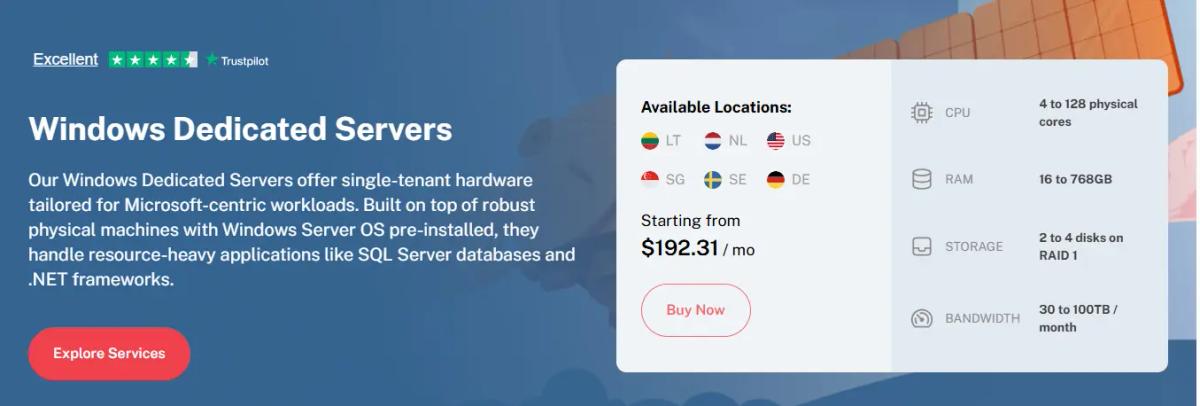
Cherry Servers designs offerings for automation, agility, and cost efficiency under bare-metal architecture. Their setup leans heavily into developer workflows.
Core Features & Capabilities
- They sell single-tenant Windows dedicated servers with Windows Server pre-installed.
- They give full administrator access and hardware-level control on Windows bare metal.
- They let you scale from 4 to 128 physical CPU cores and up to 768 GB RAM for Windows workloads.
- They provision Windows dedicated servers in roughly 15–30 minutes with automated setup.
- They include up to 100 TB free outbound traffic and unmetered inbound traffic.
- They provide built-in DDoS protection with optional premium filtering.
- They offer private VLAN subnets so Windows servers can communicate over isolated internal networks.
- They support GPU add-ons, NVMe storage, and RAID for heavy Windows database or .NET apps.
- They let you choose hourly, monthly, or longer-term billing for Windows dedicated servers.
- They back Windows servers with 24/7 technical support and a 15-day money-back guarantee (provided the customer has not breached the terms of service).
Best For
Agile projects, test/staging environments, automation workflows, or dev teams that want to spin up and tear down Windows bare-metal instances quickly without long-term lock-ins.
7. InterServer
If you hate surprise price hikes, InterServer offers one of the most predictable models in the market.
Core Features & Capabilities
- They offer Windows dedicated hosting with no setup fees and transparent renewals.
- They provide full root access on dedicated servers so you control the Windows stack.
- They include unmetered bandwidth on many dedicated server plans.
- They bundle free DDoS protection on cheap and 24-core dedicated servers.
- They give you 1 Gbps or 10 Gbps ports for high-throughput Windows workloads.
- They include remote reboot and IPMI access for low-level Windows server control.
- They let you customize hardware configurations for Windows, including CPU, RAM, and storage.
- They provide 24/7 expert support and managed assistance for dedicated servers.
Best For
Projects needing long-term cost stability, simpler throughput demands, or budget-constrained enterprises that fear hidden price hikes.
***Disclaimer:***All features and specifications discussed above reflect providers’ information available at the time of writing. Please refer to each provider’s website for the most current details.
Windows Server Licensing and Costs (2026 Update)
Licensing remains one of the most overlooked costs in dedicated Windows hosting. The Windows Server ecosystem uses a per-core SPLA model (Service Provider License Agreement), meaning providers pay Microsoft per physical core assigned to your server.
Editions and Pricing
| Edition | Cores | VM Rights | Typical Add-On |
|---|---|---|---|
| Standard | 16 cores | 2 virtual machines | $15 – $50 / month |
| Datacenter | 16 cores | Unlimited virtual machines | $80 – $100 / month |
The Standard edition fits smaller workloads that need up to two virtual machines. The Datacenter edition targets larger or virtualized environments where you plan to run multiple Windows VMs under one host.
Licenses are typically billed monthly under SPLA, but some hosts let you bring your own license (BYOL) if you already own retail or volume keys.
SPLA and Per-Core Licensing Explained
Under SPLA, the provider tracks the number of CPU cores assigned to your machine and reports usage monthly to Microsoft. You pay only for the cores you use.
This model scales predictably but adds up fast on high-core CPUs like AMD EPYC or Intel Xeon Platinum. Always confirm whether your host includes licensing in the base plan or adds it as a monthly charge.
Additional Microsoft Licenses
If your workload needs more than just the OS:
- RDS CALs (Remote Desktop Services Client Access Licenses) are required for multiple concurrent remote users.
- SQL Server licenses are sold separately and often cost more than the base Windows license. Many hosts offer SPLA SQL options billed per core or per instance.
Some providers include RDS or SQL licensing as optional add-ons. Others expect you to manage them through Microsoft Volume Licensing or your own agreement.
Why Included Licensing Matters
Many hosts advertise low monthly pricing but add the Windows license later, creating unexpected costs. Providers like RedSwitches simplify this by bundling Windows Server 2019–2026 licensing directly into the monthly fee, removing guesswork and ensuring compliance.
When comparing providers, always check:
- Is the license included or billed separately?
- Which Windows Server editions are supported?
- Are RDS or SQL options available on the same invoice?
These details affect your total monthly spend and compliance standing more than raw hardware specs.
Managed vs Unmanaged Windows Dedicated Hosting
Choosing between managed and unmanaged hosting decides how much control and responsibility you’ll carry. Each model fits a different type of user and workload.
| Feature | Managed | Unmanaged |
|---|---|---|
| Patching & Monitoring | Automatic updates, 24/7 monitoring | Manual setup and maintenance |
| Security Hardening | Managed firewall, malware scans, OS hardening | Handled by user |
| Control | Partial , provider manages system-level changes | Full root or admin control |
| Cost | Higher monthly price | Lower, infrastructure-only pricing |
| Best For | Non-technical teams, agencies, or companies without in-house IT | Sysadmins, developers, and experienced administrators |
Managed Hosting
Managed Windows dedicated servers come with a support team that handles:
- OS installation, patching, and upgrades
- Firewall setup and DDoS mitigation
- Monitoring and alerting for uptime or resource spikes
- Backup scheduling and restore operations
- Performance tuning and security audits
They’re ideal for businesses that want guaranteed uptime and compliance without daily maintenance. Most managed providers (like Liquid Web or RedSwitches’ managed tier) include a Service Level Agreement (SLA) covering response times and system recovery.
Unmanaged Hosting
Unmanaged servers deliver full freedom at a lower cost. You handle everything from setup to security. Common tasks include:
- Installing and licensing Windows Server
- Managing patches and RDP configurations
- Setting up antivirus, backup, and firewall policies
- Monitoring performance and logs
It’s perfect for developers, DevOps engineers, or enterprises with internal IT staff. You gain total control, but mistakes or missed updates can lead to downtime or vulnerabilities.
Pro tip: If you’re confident managing Windows and want maximum flexibility, go unmanaged. If uptime and compliance matter more than control, go managed.
How to Choose the Right Windows Dedicated Server
Picking the best Windows server isn’t about brand names; it’s about aligning resources and licensing with your workload. Use this actionable checklist to make the right decision the first time.
Define Your Workload
Start by identifying what your server will do:
- Web hosting: Choose mid-range CPUs with fast NVMe SSDs.
- Remote Desktop (RDP): Prioritize high RAM and bandwidth.
- Database hosting (SQL Server): Go for Datacenter edition and NVMe drives.
- Virtualization: Select multi-core EPYC/Xeon CPUs with large memory pools.
Pick the Windows Version
- Windows Server 2019 – proven stability for legacy apps.
- Windows Server 2022 – balanced performance and modern features.
- Windows Server 2025 – newest release with security and kernel upgrades. Confirm whether the provider includes or charges extra for the license.
Choose Hardware
Match specs to workload:
- CPU: AMD EPYC, Ryzen or Intel Xeon with enough cores for concurrent users.
- RAM: Start at 32 GB for production workloads; 64 GB+ for databases or RDP.
- Storage: Always use NVMe SSDs; consider RAID for redundancy.
- Network: Aim for 1 Gbps minimum, 10 Gbps if global access is critical.
Check SLA and Data Center Region
- Verify uptime SLA (target 99.99%+).
- Pick data centers closest to your audience (Singapore for Asia, Frankfurtfor EU, LAfor U.S.).
- Ask about redundancy and failover paths for mission-critical systems.
Confirm License Model and Panel Costs
- Determine if the Windows license is included or billed separately.
- If using Plesk or cPanel, check for monthly panel fees.
- Validate RDS CALs or SQL Server license requirements upfront.
Compare Support Scope and Response Times
Look beyond uptime guarantees. Ask:
- What’s the average ticket response time?
- Does support include OS-level fixes or just hardware?
- Is live chat staffed 24/7 or during business hours only?
Review Hardware Replacement SLA
Hardware failures happen; what matters is response speed. Look for guarantees like:
- Spare parts inventory in each data center.
- Proactive monitoring for early fault detection.
Choose your Windows dedicated server as if it’s your production team’s foundation. Balance control, compliance, and cost. The right host will deliver not just uptime, but predictability, security, and peace of mind every time you log in.
FAQs
Q. Which Windows Server version is best in 2025/2026?
Windows Server 2022 remains the most stable and widely supported choice in 2025 and 2026. It balances security, performance, and compatibility with most business applications. Windows Server 2025 is ideal for newer deployments, offering faster kernel performance, SMB over QUIC, and advanced virtualization. At RedSwitches, both versions are available and fully licensed, so you can choose based on stability or cutting-edge features.
Q. Does the license cost come with a dedicated Windows server or separately?
It depends on the provider. Many hosts list low base prices and charge for the Windows license later. At RedSwitches, every Windows dedicated server includes the Windows Server license in the monthly price, no hidden SPLA or per-core surprises. Always verify this before ordering, as licensing can add $15–$100 per month, depending on edition.
Q. Do I need RDS CALs or SQL Server licenses on top of Windows Server?
Yes. If multiple users access the server via Remote Desktop, you’ll need RDS CALs (Client Access Licenses). If you run Microsoft SQL databases, you’ll also need a SQL Server license, billed per core or instance. RedSwitches can provide both under Microsoft SPLA, so you stay compliant and billed monthly.
Q. Can I bring my own Windows Server license (BYOL)?
Yes, if you have valid retail or volume licenses, you can bring them under Microsoft’s License Mobility terms. At RedSwitches, you can deploy your own ISO and apply your existing key during setup. This helps enterprises using Software Assurance or internal keys reduce long-term costs.
Q. How much bandwidth and network speed do I need for Windows workloads?
For remote desktop or web hosting, 1 Gbps uplinks handle typical daily use. For global apps, media streaming, or large SQL queries, 10 Gbps uplinks deliver smoother performance and lower latency. RedSwitches offers both, with private LANs and Anycast routing for stable global connectivity.
Q. What uptime SLA should I expect from a Windows dedicated server?
Look for a 99.99% uptime guarantee or better, backed by hardware replacement SLAs under 60 minutes. RedSwitches maintains a 99.99% SLA across all Windows bare-metal servers, with 24/7 NOC monitoring and instant failover support. Anything lower risks interruptions in RDP, database, or production workloads.
Fatima J.
Technical Writer
Fatima is a writer who has authored a wide range of technical guides for the RedSwitches blog, covering Linux, servers, and hosting topics, with a focus on making hands-on subjects clear and approachable.

BeamMP Dedicated Server Setup Guide (2026)
Build and host a reliable BeamMP dedicated server on Windows or Linux with setup, configuration, optimization, security, and troubleshooting guidance.

ASKA Dedicated Server Setup Guide: 2026
Learn how to successfully install, configure, secure, and troubleshoot an ASKA dedicated server for smooth, persistent multiplayer hosting in 2026.

Wreckfest 2 Dedicated Server Setup Guide 2026
Build a reliable Wreckfest 2 dedicated server with clear, practical steps for 2026 covering installation, configuration, ports, optimization, and troubleshooting.
Power Your Next Project With Bare Metal
10 min delivery, zero setup fees, and 24/7/365 human engineers across 20+ global locations.