Bare Metal Hypervisors – A Technical Deep Dive
Bare metal hypervisors run directly on hardware, delivering superior performance, isolation, and scalability. Learn how they power enterprise IT, cloud platforms, and high-performance computing.
Bare metal hypervisors solve the problem of running multiple virtual servers on a single physical machine. This is a crucial requirement for businesses that need to scale operations quickly and seamlessly.
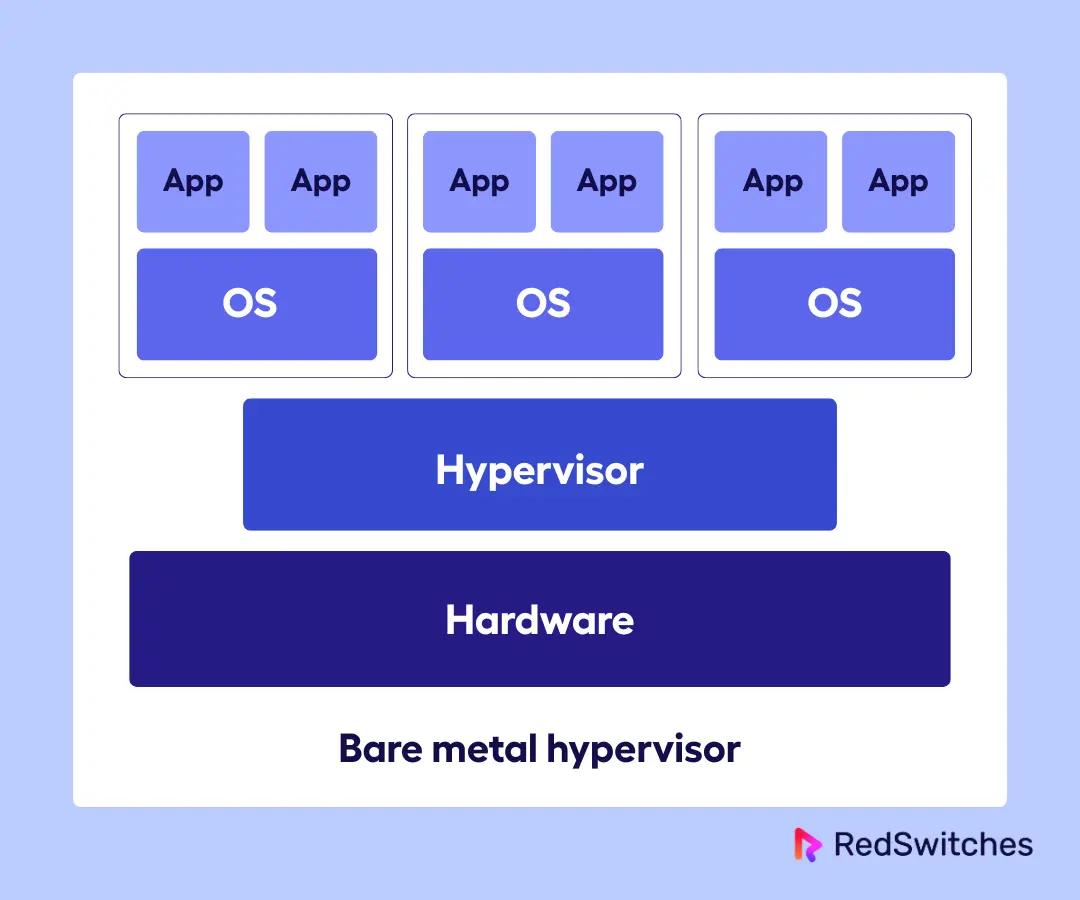
In practical terms, a bare metal hypervisor (also known as a Type 1 hypervisor) is a virtualization solution that is installed directly on the operating system of the physical hardware.
Since it is directly installed above the hardware layer, the hosted servers can run a wide range of applications without worrying about the OS and hardware of the physical server. Similarly, the virtual servers can run different guest operating systems, independent of the underlying OS layer.
Bare metal hypervisors have transformed how businesses can optimize the use of their server infrastructure through better resource utilization. At the same time, this technology is invaluable in implementing scalability by quickly provisioning virtual machines on demand. This allows the business to handle traffic spikes and unexpected increases in user requests.
Core Components of a Bare Metal Hypervisor
A bare metal hypervisor directly manages CPU, RAM, storage, and networking and allocated resources to virtual machines. This is accomplished by the following components.
Hardware Abstraction Layer (HAL)
The Hardware Abstraction Layer serves as the critical intermediary between the physical server hardware and the virtual machines running on top of it. In modern Type 1 hypervisors, HAL is present as a functionality delivered by the software, rather than a distinct module.
By abstracting the underlying hardware, the HAL enables consistent and efficient access to physical resources across different virtual machines, regardless of hardware-specific differences.The HAL allows for better portability, scalability, and hardware independence in virtualized environments by decoupling virtual machines from hardware dependencies.
Key responsibilities of the HAL include:
- CPU Scheduling: Ensures that virtual CPUs (vCPUs) are mapped effectively to physical CPU cores, optimizing performance and fairness across workloads.
- Memory Management: Allocates and isolates memory resources for each VM, preventing cross-VM interference and supporting features like memory ballooning or overcommitment.
- I/O Coordination: Manages access to storage, network, and peripheral devices, translating virtual requests into physical I/O operations with minimal overhead.
Virtual Machine Manager (VMM)
The Virtual Machine Manager (VMM), also referred to as the hypervisor core or virtual machine monitor, is responsible for orchestrating the lifecycle and execution of virtual machines.
The VMM operates in conjunction with the HAL to provide an efficient, secure, and transparent virtualization layer. It ensures strict isolation between VMs and controls how they interact with system resources and hardware interfaces.
Core functions of the VMM include:
- VM Lifecycle Management: Handles starting, stopping, suspending, and migrating VMs across hosts.
- Resource Scheduling: Allocates compute, memory, and I/O bandwidth to virtual machines based on configured policies and current system load.
- Isolation and Security: Enforces strict separation between VMs to prevent unauthorized access or data leakage between tenants.
- Hardware Interface Virtualization: Provides virtualized hardware devices and services to guest operating systems, allowing them to run unmodified as if they were on physical hardware.
Management Console
The management console provides system administrators with a centralized interface to interact with the hypervisor and manage virtual infrastructure. Depending upon the utility/tool, it can be a command-line utility, desktop application, or more commonly, a web-based interface accessible remotely.
Regardless of the implementation, the management console is essential for maintaining operational visibility and control over a virtualized environment.
Key capabilities of the management console include:
- VM Deployment and Configuration: Create, modify, and delete virtual machines, configure virtual hardware, and assign resources.
- Monitoring and Alerts: Track performance metrics, resource usage, and system health across hosts and virtual machines.
- Automation and Orchestration: Integrate with scripting tools, APIs, and infrastructure-as-code platforms to automate tasks such as provisioning, scaling, and failover.
- User and Role Management: Define access controls and permissions for administrators and users to ensure secure operations.
Bare Metal vs Hosted Hypervisors: What’s the Difference?
Hypervisors play a central role in virtualization by allowing multiple virtual machines to run on a single physical machine. They come in two primary forms: bare metal (Type 1) and hosted (Type 2), each suited to different use cases depending on performance, security, and operational needs.
Performance and Resource Utilization
For mission-critical systems, bare metal hypervisors provide superior throughput and responsiveness. Hosted hypervisors offer greater flexibility but are better suited for less demanding workloads. The architectural difference between the two hypervisor types leads to substantial variation in how they handle system resources.
| Type 1 (Bare Metal) | Type 2 (Hosted) | |
|---|---|---|
| Installation Layer | Direct on hardware | Inside host OS |
| Performance | High with low latency | Lower because the OS introduces overhead |
| Resource Efficiency | Optimized and predictable | Dependent on host OS behavior |
| Graphics Acceleration | Supports hardware passthrough | Often limited or emulated |
Security and Isolation
Bare metal hypervisors offer tighter control and fewer vulnerabilities simply because they minimize the number of software layers involved. By contrast, hosted hypervisors inherit the security profile of their host operating system. So, if the OS is compromised, all VMs it manages are affected.
| Type 1 | Type 2 | |
|---|---|---|
| Attack Surface | Minimal (no general-purpose OS) | Larger (due to host OS exposure) |
| Isolation | Strong and hardware-enforced | OS-dependent |
| Patch Management | Focused on hypervisor only | Requires host OS patching too |
Benefits of Bare Metal Hypervisors
Direct Hardware Access With No OS Layer Overhead
Bare metal hypervisors install directly onto the physical server hardware, bypassing the need for a general-purpose host operating system. This architecture removes the intermediary software layer typically found in hosted environments, streamlining the connection between the hypervisor and hardware. This direct path ensures a leaner, more efficient virtualization stack with better predictability and control.
As a result:
- Virtual machines (VMs) interact with hardware via the hypervisor with minimal translation or abstraction.
- Hardware features like virtualization extensions (Intel VT-x, AMD-V), IOMMU, and SR-IOV can be fully leveraged without OS interference.
- There’s no need to allocate resources for a host OS, which frees up CPU cycles and memory for actual workloads.
Efficient Resource Utilization For Better CPU/Memory Scheduling
Type 1 hypervisors are purpose-built to optimize resource scheduling at the hardware level. Without a host OS consuming resources or running background processes, bare metal hypervisors can:
- Assign CPU time slices and memory more intelligently across VMs using kernel-level schedulers.
- Implement advanced features like CPU pinning, NUMA-aware memory placement, and memory overcommitment with tighter controls.
- Ensure that resources are dynamically allocated or throttled based on real-time demand, quality-of-service policies, or workload prioritization.
Low Latency and High Throughput
Type 1 hypervisors are well-suited for latency-sensitive workloads, including real-time analytics, VoIP, gaming servers, and high-frequency trading platforms. This is made possible because they offer:
- Low latency I/O: Direct access to network and storage devices reduces round-trip times for disk and network operations.
- Reduced context switching: Hypervisors manage VMs without needing to switch control through an OS process scheduler, which helps maintain consistent performance across workloads.
- High throughput: Bare metal hypervisors can move data more efficiently between VMs and physical interfaces, especially when using passthrough or virtualized device drivers (e.g., paravirtualized network and storage adapters).
Tight Security With Minimal Attack Surface
Security is a major advantage of bare metal hypervisors due to their minimalistic and hardened design:
- The hypervisor typically includes only essential services, reducing the number of exploitable components.
- Unlike a full OS, there are no user-space applications or unnecessary services running in the background.
- Many vendors (e.g., VMware ESXi, Microsoft Hyper-V Core) provide features like secure boot, cryptographic VM isolation, and patch verification at the hypervisor level.
- There’s no need to worry about vulnerabilities in third-party OS-level software that might be present in hosted hypervisors.
- Bare metal hypervisors get regular updates and patches, reducing the operational burden and complexity of managing multi-layered systems.
Smooth Scalability that Supports Dense VM Environments
Bare metal hypervisors are designed for enterprise-grade workloads and can scale efficiently across large physical infrastructures:
- They support high VM densities per host, thanks to superior scheduling and resource isolation.
- Integration with clustering technologies enables workload balancing, live migration (vMotion), and high availability (HA) features.
- Hypervisors like VMware ESXi, KVM, and Hyper-V are commonly deployed in hyperscale data centers, supporting thousands of VMs across hundreds of hosts with centralized orchestration.
- Features such as distributed resource scheduling (DRS), storage tiering, and dynamic VM provisioning further enhance scalability in dynamic environments.
Hassle-Free Management
Modern bare metal hypervisors come with robust management ecosystems to streamline operations:
- Centralized dashboards allow administrators to monitor host performance, VM health, resource usage, and event logs.
- CLI tools and RESTful APIs support scripting, automation, and integration with third-party infrastructure tools like Ansible, Terraform, and vRealize.
- Role-based access control (RBAC) and audit logging are typically built-in, enabling compliance and governance in multi-tenant environments.
- Cluster and policy management features simplify updates, maintenance, and workload optimization at scale.
Drawbacks of Bare Metal Hypervisors
Costs
Deploying bare metal hypervisors often involves significant upfront and ongoing expenses, particularly in enterprise environments.
Key cost drivers include:
- Licensing fees: Many Type 1 hypervisors (e.g., VMware vSphere/ESXi, Microsoft Hyper-V Datacenter Edition) require paid licenses, especially when advanced features like high availability, live migration, and centralized management tools are needed.
- Hardware requirements: Bare metal hypervisors often require certified, enterprise-grade server hardware listed in vendor Hardware Compatibility Lists (HCLs), which are typically more expensive than consumer-grade components.
- Support contracts: Organizations may also need to purchase technical support and software update subscriptions to maintain compliance and receive critical security patches.
Mitigation Tips:
- Evaluate open-source alternatives such as KVM (Kernel-based Virtual Machine) or Xen, which provide bare metal virtualization without licensing costs.
- Use hardware consolidation planning to reduce the number of physical hosts by maximizing VM density per server.
- Consider subscription-based models (e.g., VMware Tanzu, Red Hat Virtualization) to better align cost with usage.
Complexity
Bare metal hypervisors demand a higher level of operational expertise compared to Type 2 setups. Installing and maintaining them involves informed decision-making and careful planning.
Complexity challenges include:
- Initial deployment: Installation may involve configuring RAID, BIOS/UEFI settings, networking (e.g., VLAN tagging, NIC bonding), and storage fabric integration.
- Resource planning: Administrators must understand VM sizing, overcommitment ratios, storage tiering, and high availability strategies.
- Ongoing maintenance: Regular updates, patch management, hardware firmware alignment, and log monitoring require skilled oversight.
Mitigation Tips:
- Use vendor-provided installation wizards, templates, and lifecycle tools (e.g., VMware Auto Deploy, Hyper-V SCVMM templates) to streamline initial setup.
- Invest in training and certifications (e.g., VCP, RHCSA/RHCE for KVM-based environments) to upskill internal teams.
- Leverage management platforms like vCenter or OpenStack to reduce operational complexity through automation and orchestration.
Driver Support Limitations
Because bare metal hypervisors are purpose-built for stability and performance, they support fewer drivers than general-purpose operating systems.
Issues that can arise:
- Hardware compatibility gaps: Certain network adapters, RAID controllers, or GPU models may not be supported out of the box.
- Limited peripheral support: Consumer-grade devices (e.g., USB dongles, sound cards, printers) are often not usable or unsupported.
- Slower update cycles: Driver support updates are usually tied to hypervisor releases, which may lag behind Linux or Windows driver updates.
Mitigation Tips:
- Consult the Hardware Compatibility List (HCL) or Certified Hardware Catalog from the hypervisor vendor before procurement to avoid incompatibility issues.
- Use enterprise-class components that are more likely to have reliable support and vendor-maintained drivers.
- For advanced hardware passthrough needs (e.g., GPU virtualization), validate that the hypervisor supports technologies like SR-IOV, vDGA, or vGPU and that drivers are certified.
When Should an Organization Use a Bare Metal Hypervisor?
Bare metal hypervisors excel in environments where performance, isolation, manageability, and scalability are top priorities. Consider the following key scenarios where a Type 1 hypervisor proves to be highly advantageous.
High-Performance Workloads
Workloads such as real-time data processing, high-frequency trading (HFT), 3D rendering, and low-latency application services demand predictable performance and minimal overhead. By avoiding OS-induced latency and offering direct hardware control, Type 1 hypervisors deliver the precision and efficiency these workloads require.
Common applications:
- Algorithmic trading platforms requiring sub-millisecond response times.
- In-memory data analytics engines like Apache Ignite or SAP HANA.
- High-performance computing (HPC) clusters running simulations or big data workloads.
- Media encoding/decoding, CAD, and 3D graphics pipelines.
Why a bare metal hypervisor is ideal:
- Direct hardware access eliminates the latency introduced by a general-purpose host OS.
- Advanced scheduling enables precise CPU pinning and memory allocation.
- Hardware passthrough (e.g., SR-IOV, vDGA) allows near-native access to GPUs, NICs, or NVMe storage.
- Consistent I/O performance benefits latency-sensitive and compute-intensive workloads.
Environments Requiring Strong Isolation
Industries like healthcare, banking, and government require strict security controls, data separation, and compliance with regulatory standards (e.g., HIPAA, PCI DSS, GDPR).
Common applications:
- Electronic health records (EHR) systems and clinical applications.
- Core banking platforms and payment gateways.
- Multi-tenant SaaS applications handling sensitive user data.
Why a bare metal hypervisor is ideal:
- Minimal attack surface: With no underlying host OS, Type 1 hypervisors reduce exposure to vulnerabilities and malware. While Bare Metal hypervisors have a smaller software footprint, they still require regular patching to address firmware-level and CPU-level vulnerabilities such as Spectre and Meltdown
- Hardware-enforced isolation: Strong VM separation mitigates the risk of cross-VM data leakage or lateral movement by attackers.
- Compliance-friendly design: Enterprise hypervisors often include features like secure boot, VM encryption, audit logging, and RBAC out of the box.
- Support for air-gapped deployments: In regulated environments, Type 1 hypervisors can run in isolated networks without requiring constant OS updates or external internet access.
Centralized, Managed Infrastructure
Organizations building centralized IT infrastructure for internal use or to offer services to users, require high levels of control, visibility, and automation.
Common applications:
- Virtual Desktop Infrastructure (VDI): Delivering Windows/Linux desktops from a central server farm to end-users.
- Private or hybrid clouds: Hosting business-critical applications in a self-managed cloud environment.
- Lab and staging environments: Shared development and QA platforms requiring repeatable provisioning and teardown of VMs.
Why a bare metal hypervisor is ideal:
- Centralized orchestration platforms: Integration with tools like VMware vCenter, Microsoft SCVMM, or OpenStack allows unified control of hundreds of hosts and thousands of VMs.
- Policy-driven management: Administrators can automate provisioning, backup, access control, and load balancing based on workload profiles or business rules.
- High availability and live migration: Bare metal hypervisors support vMotion/live migration, DRS (Distributed Resource Scheduler), and automatic failover.
- Better resource consolidation: Type 1 hypervisors allow dense VM packing without significant overhead, maximizing return on infrastructure investment.
Environments with Scalability and Reliability Demands
Organizations operating at scale (for instance, telecom providers and SaaS vendors) need infrastructure that can grow seamlessly and recover gracefully.
Common applications:
- Large-scale application hosting and SaaS delivery.
- Multi-region infrastructure supporting global user bases.
- Edge computing platforms with distributed deployment needs.
Why a bare metal hypervisor is ideal:
- Clustered deployments and horizontal scaling: Type 1 hypervisors support node clustering, allowing VMs to move seamlessly between hosts for load balancing and maintenance.
- Automated provisioning and lifecycle management: Through APIs and infrastructure-as-code tools (e.g., Terraform, Ansible), teams can quickly replicate and manage VM instances across data centers.
- Built-in fault tolerance: Features like VM replication, host failover, and disaster recovery workflows ensure business continuity.
- Consistent performance across scale: Type 1 hypervisors eliminate variability introduced by general-purpose OS processes, allowing reliable scaling under heavy load.
| Scenario | Typical Use Cases | Key Benefits of Type 1 Hypervisor |
|---|---|---|
| High-Performance Workloads | – Real-time analytics- High-frequency trading- 3D rendering and simulations | – Direct hardware access with minimal latency- Predictable performance for CPU and I/O- Full use of hardware acceleration (e.g., vGPU, SR-IOV) |
| Strong Isolation Requirements | – Healthcare systems (EHR)- Financial services- Government workloads | – Hardened security with minimal attack surface- Hardware-enforced VM isolation- Compliance-ready features (encryption, audit logging) |
| Centralized, Managed Infrastructure | – Virtual Desktop Infrastructure (VDI)- Private or hybrid cloud- Development/test environments | – Centralized orchestration via vCenter/OpenStack- Live migration, HA, resource pooling- High VM density per host with efficient resource allocation |
| Scalability and Reliability Demands | – SaaS platforms- Large enterprise IT- Edge or multi-region deployments | – Cluster-aware scalability and failover- API-driven automation and provisioning- Consistent performance under scale |
Top Bare Metal Hypervisors
VMware ESXi
VMware ESXi is one of the most mature and widely deployed bare-metal hypervisors in enterprise environments. It’s a core part of the VMware vSphere suite and is designed for maximum stability, security, and performance.
ESXi runs directly on hardware with minimal footprint and is managed via vCenter Server, offering advanced features such as vMotion, DRS, and HA. VMware maintains a detailed Hardware Compatibility List (HCL) and provides strong vendor support.
KVM (Kernel-based Virtual Machine)
KVM is an open-source Type-1 hypervisor integrated into the Linux kernel since version 2.6.20. It transforms the Linux kernel into a native hypervisor by leveraging hardware virtualization extensions such as Intel VT-x and AMD-V.
KVM supports a wide range of management tools, including libvirt, virt-manager, and enterprise wrappers like Red Hat Virtualization or oVirt. It is the default hypervisor for many cloud platforms and distributions like Ubuntu, CentOS, and RHEL.
Microsoft Hyper-V (Server Core)
Hyper-V is Microsoft’s Type-1 hypervisor built into Windows Server editions. When installed on Server Core, it operates as a minimal, headless environment offering a secure, lightweight footprint. Hyper-V integrates tightly with Active Directory, Windows Admin Center, and System Center Virtual Machine Manager (SCVMM), making it ideal for Windows-centric infrastructure. It’s a great fit for Windows-centric infrastructure and supports Linux guests as well.
Citrix Hypervisor (XenServer) / Xen Project
Citrix Hypervisor is a commercial virtualization platform built on the open-source Xen Project hypervisor. Known for its lightweight architecture and strong security posture, it’s widely used in cloud and VDI environments. Citrix adds management tools, live migration, and GPU virtualization support on top of Xen. The open-source Xen Project is also used in large-scale cloud platforms like AWS.
Nutanix AHV
AHV (Acropolis Hypervisor) is a Type-1 hypervisor tightly integrated into Nutanix’s hyperconverged infrastructure (HCI) stack. It is based on KVM and is designed for simplicity, resilience, and automation. AHV is fully managed via Prism, Nutanix’s centralized management component. The product is tailored for workloads that need high availability, replication, and performance at scale.
Oracle VM Server for x86 / Red Hat Virtualization
Oracle VM Server is based on Xen and optimized for Oracle workloads. It supports enterprise deployment and includes Oracle VM Manager for orchestration. Red Hat Virtualization (RHV), built on KVM, provides a full management stack and is suitable for RHEL-centric environments with enterprise SLAs.
Proxmox VE
Proxmox Virtual Environment is a popular open-source platform that combines KVM, LXC containers, and ZFS under one UI. It’s highly favored by SMBs and home labs due to its web-based management, built-in backup tools, clustering, and no licensing cost. It also supports GPU passthrough and software-defined storage.
Virtualizor
Virtualizor is a commercial virtualization control panel that supports multiple hypervisors including KVM, Xen, OpenVZ, and LXC. Though not a hypervisor itself, it is often installed on bare-metal systems to simplify VM creation, billing, and management in hosting environments.
| Hypervisor | Type | Licensing | Platform Focus | Management Tools | Notable Features |
|---|---|---|---|---|---|
| VMware ESXi | Type-1 | Proprietary | Enterprise, Datacenters | vCenter, ESXi CLI | DRS, vMotion, HA, large HCL support |
| KVM | Type-1 | Open Source | Cloud, Linux, General Use | libvirt, Cockpit, oVirt | Kernel integrated, high flexibility |
| Hyper-V (Core) | Type-1 | Free/Commercial | Windows Server Environments | SCVMM, WAC, PowerShell | Windows-native, live migration, shielded VMs |
| Citrix Hypervisor | Type-1 | Free & Paid | Cloud, VDI | Citrix Studio/XenCenter | GPU virtualization, secure by design |
| Nutanix AHV | Type-1 (KVM) | Included w/ HCI | Hyperconverged Infrastructure | Prism Central | Integrated HCI, replication, self-healing |
| Oracle VM Server | Type-1 | Free | Oracle Workloads | Oracle VM Manager | Xen-based, optimized for Oracle stack |
| Red Hat Virtualization | Type-1 | Subscription | Enterprise Linux Environments | RHV-M | KVM-based, enterprise-grade with SLAs |
| Proxmox VE | Type-1 | Open Source | SMBs, Labs, DevOps | Web GUI, CLI | KVM + LXC + ZFS, snapshots, clustering |
| Virtualizor | Control Panel | Commercial | Hosting Providers | Web UI | Multi-hypervisor support, billing integration |
Use Cases for Bare Metal Hypervisors
Bare metal hypervisors are critical components of modern enterprise and cloud infrastructure. Their direct hardware access, efficient resource handling, and robust isolation make them ideal for environments that demand high performance, scalability, and security.
Enterprise Data Centers
Enterprise data centers rely on highly stable and secure infrastructure to run business-critical applications such as ERP systems, CRM platforms, and internal services like email and file sharing. Type 1 hypervisors are a cornerstone of enterprise virtualization strategies, ensuring uptime, performance, and manageability.
Role of Type 1 Hypervisors:
- High availability (HA) and fault tolerance features minimize downtime and protect against hardware failures.
- Live migration allows VMs to be moved between hosts with no interruption to services.
- Resource pooling and automation help optimize infrastructure usage across large clusters.
- Centralized management platforms (e.g., VMware vCenter, Red Hat Virtualization Manager) provide visibility and control across the entire virtual environment.
Cloud Platforms (IaaS)
Organizations building private or hybrid cloud environments (Infrastructure-as-a-Service) require a flexible, multi-tenant, and self-service platform to provision VMs on-demand. By running directly on hardware, bare metal hypervisors eliminate OS overhead, which improves performance consistency across cloud tenants.
Role of Type 1 Hypervisors:
- API-driven provisioning enables cloud automation tools and platforms like OpenStack, vCloud, and Azure Stack to create and manage VM instances.
- Strong isolation supports multi-tenancy by securely segmenting user workloads.
- Elastic scalability allows dynamic allocation of compute, storage, and network resources.
- Integration with orchestration and billing systems enables cloud-native workflows, metering, and quota enforcement.
High-Performance Computing (HPC)
HPC environments in academia, life sciences, and engineering demand ultra-fast compute performance and large-scale parallel processing. Bare metal hypervisors make it possible to run mixed HPC and general-purpose workloads on the same infrastructure, improving hardware utilization.
Role of Type 1 Hypervisors:
- Low-overhead virtualization ensures CPU and memory are used efficiently with minimal latency.
- Hardware passthrough and direct device access (e.g., to GPUs, RDMA NICs) allows workloads to run near-native. with Active Directory
- Support for CPU affinity and NUMA-aware scheduling improves performance for tightly coupled, compute-heavy applications.
- Cluster management capabilities allow large compute grids to be virtualized with controlled resource scheduling.
Virtual Desktop Infrastructure (VDI)
VDI solutions provide end-users with secure, remote-accessible desktops hosted in a data center or cloud environment. Type 1 hypervisors offer the reliability and scalability required for production-grade VDI implementations.
Role of Type 1 Hypervisors:
- High VM density per host enables cost-effective delivery of hundreds or thousands of virtual desktops.
- Consistent performance ensures responsive user experience even under high concurrent usage.
- Secure endpoint isolation is crucial in enterprise, education, and healthcare deployments.
- Integration with GPU virtualization supports graphically demanding applications for design, engineering, or media workloads.
Regulated Industries
Organizations in regulated sectors must meet strict security, privacy, and compliance requirements while maintaining service reliability. By reducing complexity and increasing control, Type 1 hypervisors help meet the compliance and data integrity demands of regulated environments.
Role of Type 1 Hypervisors:
- Minimal attack surface makes the system inherently more secure compared to hosted hypervisors.
- Built-in compliance features, such as audit trails, role-based access control (RBAC), encryption, and secure boot.
- VM isolation prevents data leakage and supports strict segmentation between departments or tenants.
- Certifications (e.g., Common Criteria, FIPS 140-2) ensure hypervisors meet regulatory standards.
Hybrid Cloud
Organizations adopting hybrid strategies need a virtualization layer that can unify on-premises resources with cloud platforms. Bare metal hypervisors form the backbone of hybrid cloud infrastructure, offering the performance and compatibility needed for consistent operations across environments.
Role of Type 1 Hypervisors:
- Workload mobility enables VMs to be replicated or migrated between on-prem and public clouds (e.g., via VMware HCX or Azure Arc).
- Consistent resource abstraction simplifies operations across heterogeneous environments.
- Integrated identity and policy management allows centralized control even across hybrid boundaries.
- Support for hybrid orchestration tools (e.g., Kubernetes, Terraform, Ansible) ensures seamless deployment pipelines.
Conclusion
Bare metal hypervisors offer unmatched performance, security, and scalability by running directly on hardware. Ideal for HPC, secure environments, and enterprise-scale workloads.
Ready to deploy?
RedSwitches offers enterprise-grade bare metal servers and expert support to help you confidently launch and manage your Type 1 hypervisor infrastructure.
FAQ
What is the main difference between Type-1 and Type-2 hypervisors?
Type-1 (bare metal) hypervisors run directly on the physical hardware, managing virtual machines without a host OS.
Type-2 (hosted) hypervisors run as applications on top of a general-purpose operating system, adding extra latency and overhead.
Are bare metal hypervisors suitable for small businesses?
Yes, but with caveats. Bare metal hypervisors offer superior performance and security but may require higher upfront investment, skilled management, and enterprise-grade hardware. Lightweight or open-source options like Proxmox VE or KVM can make adoption feasible for small businesses.
Can bare metal hypervisors run any operating system?
Generally yes. Most Type-1 hypervisors support a wide range of guest OSes (e.g., Windows, Linux, BSD), provided VM tools or drivers are available. However, niche or outdated OSes may face compatibility limitations.
Do bare metal hypervisors require special hardware?
They don’t require exotic hardware, but enterprise-grade components are recommended. Hardware must support virtualization extensions (e.g., Intel VT-x, AMD-V) and appear on the hypervisor’s Hardware Compatibility List (HCL) for optimal stability and support.
Zafar Iqbal
Technical Editor
Zafar Iqbal is a technical writer and editor specializing in server management, automation, and SaaS. He combines hands-on technical knowledge with AI-assisted workflow optimization to produce clear, practical guides for the RedSwitches blog.

BeamMP Dedicated Server Setup Guide (2026)
Build and host a reliable BeamMP dedicated server on Windows or Linux with setup, configuration, optimization, security, and troubleshooting guidance.

ASKA Dedicated Server Setup Guide: 2026
Learn how to successfully install, configure, secure, and troubleshoot an ASKA dedicated server for smooth, persistent multiplayer hosting in 2026.

Wreckfest 2 Dedicated Server Setup Guide 2026
Build a reliable Wreckfest 2 dedicated server with clear, practical steps for 2026 covering installation, configuration, ports, optimization, and troubleshooting.
Power Your Next Project With Bare Metal
10 min delivery, zero setup fees, and 24/7/365 human engineers across 20+ global locations.